How To Make Smartprix Your Go-To Source in Google Search for Trending News, Comparisons & In-Depth Reviews

Main Image
  • Like
  • Comment
  • Share
TL; DR
  • Thanks to the new Preferred Sources feature for Google Search, you can ensure seeing Smartprix’s coverage in the Top Stories section that appears below the search box when you type a topic.
  • All you’ve to do is set Smartprix as your preferred source of news, telling Google that you want to see our take on a development.

For years, Smartprix has been the source of timely and credible news for readers. Whether it is exclusive smartphone leaks, detailed gadget reviews, in-depth comparisons, or trending tech news, we’ve been at it for over a decade, becoming the most-trusted source of daily tech developments for our readers.

Also Read: I Used Google AI Mode: What It Is, How It Works, And Comparison With Perplexity AI

What’s The New Preferred Sources Feature For Google Search?

Preferred Sources Google

Now, thanks to the new Preferred Sources feature for Google Search, you can ensure seeing Smartprix’s coverage of a topic in the Top Stories section that appears below the search box when you type a topic. The feature, as the name suggests, aims to cater to users’ personal preferences, which might get lost due to the cruel tricks that the algorithm plays.

All you’ve to do is set Smartprix as your preferred source of news, telling Google that you want to see our take on a development. The search engine will show you our latest editorial on the query or topic, along with the other top results that contain relevant information.

Also Read: Google’s Latest AI Principles Rewrite Is A Bit Concerning: Here’s Why

How to Make Smartprix Your Go-To Tech Source on Google Search?

  • Search for a tech-related topic in Google Search. You can also do this for other beats, but since we’re primarily into tech, we’ll stick to it throughout the steps. For instance, you can search for the “Pixel 10 launch event.”
  • Google will fetch the best news stories in response and list them under the “Top Stories” section. All you’ve to do is press the star button to the right of it, as marked in the screenshot below.
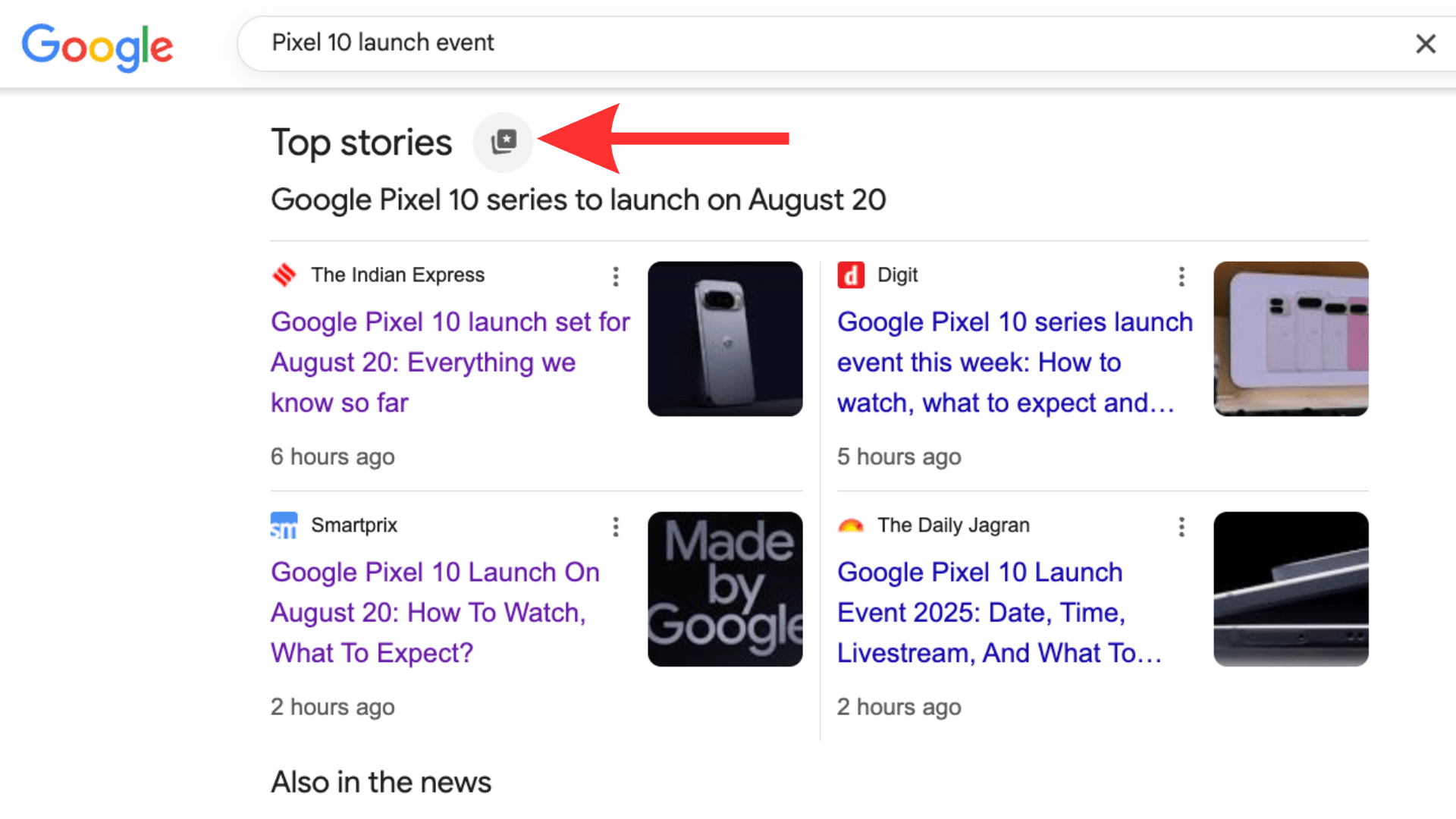
Google Search Preferred Sources
  • You’ll see the Preferred Sources dialogue box open on the screen.
Google Search Preferred Sources steps
  • In the text field, type “Smartprix,” and when you see our website (with the ‘sm’ logo), check the box right next to it.
  • Finally, tap on the “Reload results” button in the bottom right corner of the dialogue box.
Google Search Preferred Sources steps
  • Now, you’ll see that Google has moved our Pixel 10 launch event coverage to the top.
How to set Smartprix as the preferred source of information on Google Search

From now on, whenever you search for something, the search engine will look for any relevant articles published by SmartPrix and recommend them at the top of the Top Stories section. It’s worth mentioning here that you can select as many sources as you want.

Also Read: Meta’s ‘Hypernova’ AR Glasses Tipped for September Launch at a Lower-Than-Expected Price

In its official blog post about the feature, Google also mentions how your selected sources can also appear in a “From your sources” section on the search result page.

You can follow Smartprix on TwitterFacebookInstagram, and Google News. Visit smartprix.com for the latest tech and auto newsreviews, and guides.

Shikhar MehrotraShikhar Mehrotra
Shikhar Mehrotra is a seasoned technology writer and reviewer with over five years of experience covering consumer tech across India and global markets. At Smartprix, he has authored more than 1,700 articles, including news stories, features, comparisons, and product reviews spanning automobiles, smartphones, chipsets, wearables, laptops, home appliances, and operating systems. Shikhar has reviewed flagship devices such as the iPhone 16, Galaxy S25+, and Sennheiser HD 505 Open-Ear headphones. He also contributes regularly to Smartprix’s growing automotive section.

With a deep understanding of both iOS and Android ecosystems, Shikhar specializes in daily tech news, how-to explainers, product comparisons, and in-depth reviews. His DSLR photography in product reviews is recognized as among the best on the team.

Before joining Smartprix, Shikhar wrote for leading publications including Forbes Advisor India, Republic World, and ScreenRant. He holds a Bachelor of Arts in Journalism and Mass Communication from Amity University, Lucknow.

Related Articles

ImageOPPO Reno16 Series Design Officially Revealed Ahead of Launch

OPPO has officially revealed the design of the upcoming Reno16 series ahead of its launch in China and global markets. The new lineup brings a flatter and cleaner design language this time, with slim flat sides, a premium metal frame, and a camera layout that looks quite similar to the previous generation. The Reno16 series …

ImageGoogle Health App Launches With Gemini AI Coach and Full Redesign

Google has officially renamed the Fitbit app to Google Health, marking a major shift in how the company wants to handle fitness, sleep, and wellness tracking going forward. The new app combines Fitbit’s tracking system with Google services and Gemini AI features. Google Health Coach The biggest addition is Google Health Coach, an AI-powered coaching …

ImageOPPO F33 Pro Review: The Selfie Camera Makes This Phone Special

The OPPO F-series usually targets buyers who care about design, cameras, battery life, and a polished everyday experience more than benchmark numbers. The OPPO F33 Pro follows that same formula closely. At first glance, it checks a lot of boxes people usually like. It looks premium, is pretty slim, charges quickly, has a bright AMOLED …

ImageI Used Google AI Mode: What Is It, How It Works, And Comparison With Perplexity AI

After testing it in the United States, Alphabet-owned search giant Google released its Perplexity AI rival in India on Tuesday: AI Mode. Called Google’s “most powerful AI search experience yet,” the AI Mode essentially combines Google Search’s vast directory of information with Gemini’s ability to process and organize it in an easy-to-understand and efficient manner. …

ImageFrom Grocery Lists to Custom Widgets: Google Gemini Intelligence Is Redefining What Android Can Do

At the Android Show 2026, Google announced something that goes well beyond another Gemini update. The company introduced “Gemini Intelligence,” its most ambitious attempt at making its operating system genuinely proactive. Android already had contextual suggestions in place, but this one takes it on a whole new level.  Gemini Intelligence is designed to anticipate the …

Discuss

Be the first to leave a comment.