Exploring Samsung’s Smart Glow Notification Light

Main Image
  • Like
  • Comment
  • Share

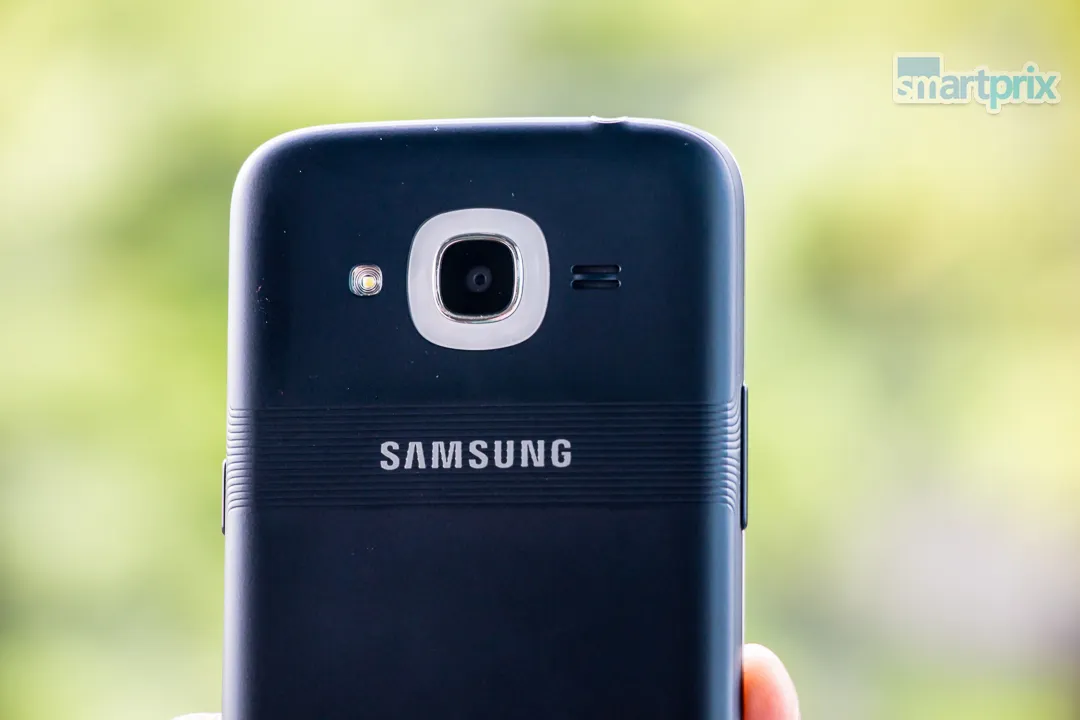
Samsung recently unwrapped its Galaxy J2 2016 which primarily targets Indian youth and budget conscious buyers. The Korean giant in its 2016 variant of Galaxy J2 tried to play around with its design and ditched the conventional front panel notification light for the new Smart Glow. This unconventional notification alert encircles the rear camera and can be programmed to lavishly glow for notification alerts from pre-defined apps and contacts. Let’s see if it’s any useful.

What’s Unique About Smart Glow?

It’s bigger, it’s brighter, glows imposingly in different colors and it’s customizable. That explains it.

Samsung Galaxy J2 2016 Smart Glow

So here is how this works.

You can access Smart Glow like any other app or from the quick settings. Once you open the app, you will notice three cards, named as…

Priority Alerts: This is the only part where you get some freedom to customize. You can choose up a total of 4 apps and contacts (yup, just 4) for which you want the Smart Glow to work, and you can assign a different color to each selected contact/ App by adjusting an R G B slider. 

This slideshow requires JavaScript.

Usage Alerts: Under Usage Alert tab, you can enable or disable Smart Glow Notifications for low battery (any value between 1% and 60%), Data consumption going beyond its limits and for Low Storage (any value between 0 to 100 percent). Use sliders to choose exact trigger points. For all of these alerts, Smart Glow goes Red. 

This slideshow requires JavaScript.

Selfie Assistant: The selfie assist helps you capture selfies from the rear camera. Turn on the selfie assist, go to the camera app and switch to rear selfie mode, move the box where you wish your face to be in the selfie shot. Now the camera will detect your face and when it’s at the right place, the LED will glow Blue. If not, a portion of it will glow to guide you in the right direction. As you would have guessed, all this is easier said than done. 

IMG_2695

Limitations of Smart Glow

  • Odd placement: To start with, it is situated on the rear side, which makes very little sense since most of us habitually place our phone on a table with the screen facing upwards. Due to this very reason, we almost never see it glow in day-to-day usage.
  • Works for 4 Apps or contacts only: You can only assign a total of 4 entities (apps or contacts to Smart Glow. That’s barely enough.
  • Inaccurate colors: When you set the R G B scale, you will have to glow the light each time to check what color combination you have chosen. The UI doesn’t show the cumulative effect at the time of settings. Once you manage to set a color, you will notice that the LED doesn’t reproduce it accurately. All light colors glow more or less like white light.

Screenshot_20160708-193059

Smart Glow: More of a Design Element than Utility

Because of above-mentioned limitations, the only time we see it actually glow is when an assigned contact gives us a call (that is when it blinks continuously). We are not saying that this is a useless gimmick. It is just not handy enough as a notification light and strikes as more of a design element. That is precisely why people will be drawn to it.

Deepak RajawatDeepak Rajawat
Deepak Rajawat is a technology journalist and editor with over 12 years of experience in both print and digital media. Before transitioning to online journalism, he contributed to renowned publications including Hindustan Times and The Statesman.

At Smartprix, Deepak reviews smartphones, laptops, TVs, and soundbars, with a focus on answering the real-world questions that matter most to consumers. Over the past decade, he has reviewed more than 1,000 devices, combining hands-on expertise with a user-first approach.

A graduate in Journalism and Mass Communication from Calcutta University, Deepak also follows emerging technologies closely—including Virtual Reality (VR), Augmented Reality (AR), and Mixed Reality (MR). Earlier in his career, he covered sports with the same passion he now brings to tech.

He is based in Noida and joined Smartprix in September 2015.

Related Articles

ImageTata Motors Could Launch Its First Flex-Fuel Car by the End of 2026: Punch Is the Likely Candidate

India’s push to reduce the import of crude oil just got a significant nudge from one of the largest automakers in the country. Speaking during the Q4 FY2026 earnings call, Passenger Vehicles MD and CEO Shailesh Chandra confirmed that the company is on track to ready its first flex-fuel passenger car before the year ends, …

ImageSamsung Galaxy J2 Core 2020 Unveiled: Specs and details

Samsung has silently unveiled an entry-level smartphone Galaxy J2 Core 2020 in India on April 28. The phone is an upgraded version of Samsung Galaxy J2 Core which was launched back in 2018. Major specifications are similar to the previous version with a few differences. The company has listed the device on the Indian official …

ImageGalaxy Fit e review – Better than Xiaomi’s Mi Band 3?

Masses expect wearables and fitness trackers to be cheap, which perhaps explains why Xiaomi’s Mi Bands have consistently been topping sales charts in India. These affordable fitness trackers are not perfect, but they are mostly deemed reliable, and good enough for basic activity tracking. (Galaxy Fit e Review हिंदी में पढ़िए) This year, for the …

ImageGoogle Is Borrowing Nothing’s Playbook With A Glowing Light Feature Planned For Future Pixel Devices

The Android 17 Beta 4 just gave away two of Google’s big plans. An APK teardown by 9To5Google has uncovered code that points to a brand-new feature that we haven’t heard about before: Pixel Glow.The name doesn’t really suggest anything, but as per the report, it is a hardware lighting system for the back …

ImageSamsung Galaxy Book6 Pro Review: A Screen That Dazzles, a Package That Mostly Delivers

The 14-inch laptop is the hardest category to get right. It has to be genuinely compact and light enough to carry everywhere, yet powerful enough to justify its price over a 13-inch budget option. For years, Apple’s MacBook Air owned this space without serious Windows competition. The Samsung Galaxy Book6 Pro 14-inch (NP940XJG-KG6IN) is the …

Discuss

7 Comments
User
Javed
Anonymous
8 years ago

When my is on charging abd mobiles light is not auto off any solution plz tell

Reply
User
Suvakant
Anonymous
8 years ago

Hi, I want to disable/remove this Smart Glow apps from my mobile . Please suggest how to do this. Thanks

Reply
User
jraju
Anonymous
9 years ago

Hi, Would you say, what apps means in priority settings. Up to 4 apps , means the applications like clock , etc or any other apps downloaded from playgoogle apps

Reply
User
jraju
Anonymous
9 years ago

Hi, So, it will , by default will flash light appropriately at the end of full charge. So, i could leave it as it is when it shows 100%. in the home screen, but could wait still more to get the filash light. Why there is no mention of this in user manual is not clear.

Reply
User
jraju
Anonymous
9 years ago

I am posting but could not find my post. Thanks for jet reply. Then how it alerts when it reaches 100%. On display? i do not find any settings for that in my phone. pl

Reply
Show Replies (1)
User
jraju
Anonymous
9 years ago

Hi, Nice. I did not know about smart glow use before i come to this page. I immediately made alert for low battery if it reaches 20%. Is there a settings to get the smart glow when the battery reaches 100% or is it already in the device to alert when it reaches? I plug out when i notice that it reaches 100, but i have not heard any sound. Will the device produce sound to alert. I do not want any third party apps

Reply
Show Replies (1)
User
jraju
Anonymous
9 years ago

Hi, Thank you for jet reply. Then how i get the alert? Will it not alert when phone reaches 100%?Enabled smart glow for low battery? Is there any sound settings for low battery apart from this glow? I value your advice

Reply