Quick Verdict:
- Buy the Oakter Mini UPS Basic if you have a standard ISP-provided modem or ONT, your power cuts rarely exceed 3 hours, and you want the simplest possible solution to keep your internet connection alive. This covers the majority of Indian broadband homes.
- Buy the Oakter Mini UPS Pro if you are running a separate high-end router, a mesh node, a CCTV camera, or any 12V device drawing up to 3A, and you need longer backup time with zero switchover lag. This is the right device for power users and home office setups.
- Buy both if: You have a separate modem and a separate router, as I do. Protecting only one device without the other leaves your network half-alive during an outage and defeats the purpose entirely.
Power cuts in Indian homes are not dramatic events. They are just quiet, reliable inconveniences. The lights go, the fans slow down, and the last thing you hear before the silence is the click of the router dying. Then comes the waiting: the blinking lights, the slow modem restart, the moment your laptop decides to reconnect just as the power dips again. The whole cycle can eat five to ten minutes out of your day, and if you work from home or are mid-call, it can eat considerably more.
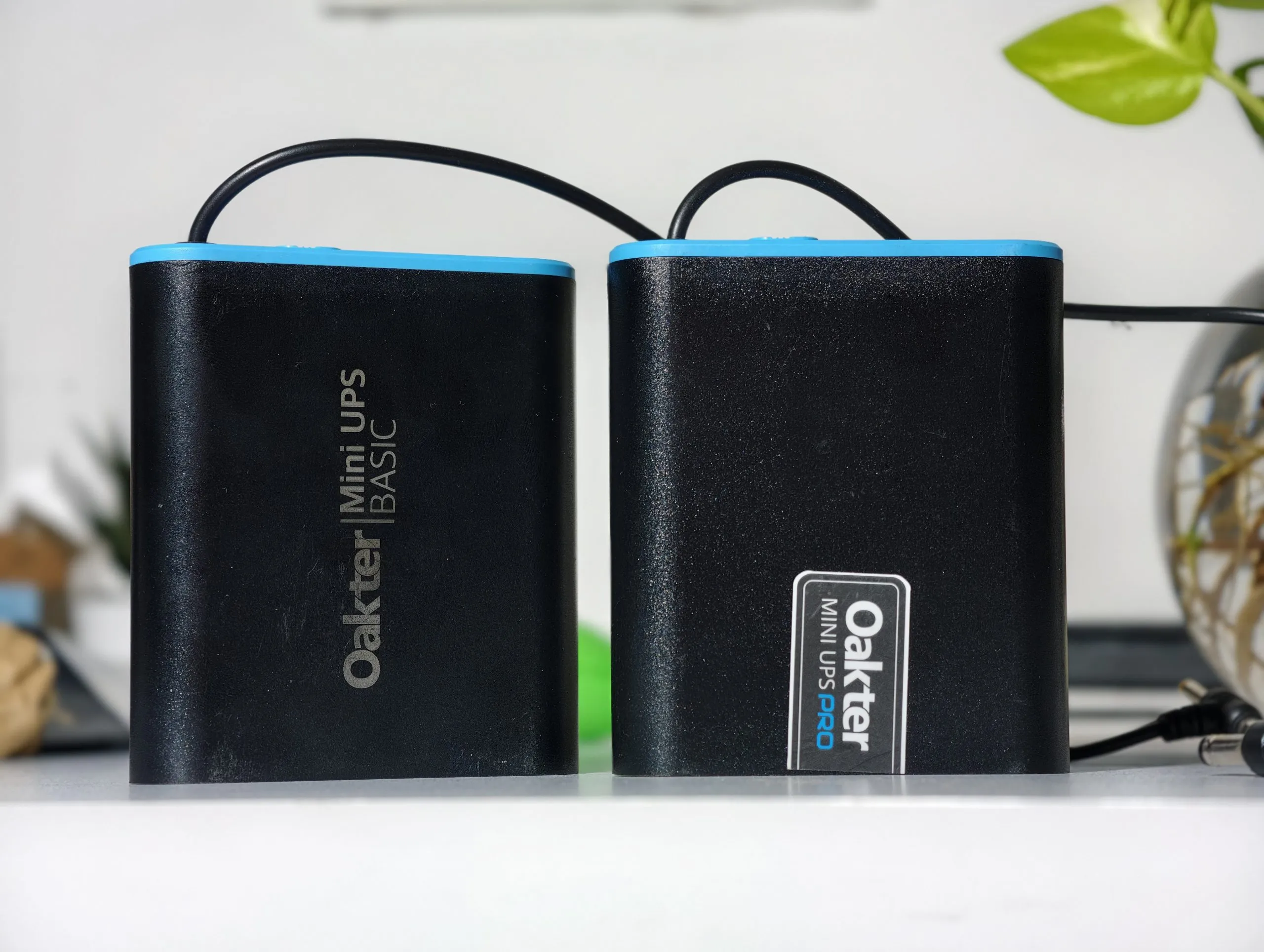
I wanted a permanent fix, not another workaround. So I bought both the Oakter Mini UPS Pro and the Oakter Mini UPS Basic and hooked them up to my home network. The Pro powers my Synology RT6600ax, a Wi-Fi 6 router that draws more current than a standard modem. The Basic runs my Airtel fiber modem. After testing both during actual power cuts, here’s a straightforward breakdown and a clear answer on which one fits your setup.
Oakter Mini UPS Pro vs Mini UPS Basic
| Spec | Oakter Mini UPS Pro | Oakter Mini UPS Basic |
| Battery | 4000mAh | 2000mAh |
| Output Power | 36VA | 24VA |
| Voltage | 12V | 12V |
| Max Current | 3A | Varies by model |
| Backup | Up to 8 hours | Up to 3 hours |
| UPS Type | Online | Offline |
| Weight | 240g | 215g |
| MRP | Rs 1,890 | ₹949 |
| Warranty | 1 year | 1 year |
| Battery Indicator | No | No |
| Best For | Mesh routers, high-end setups | Standard ISP modem/ONT |
How Many Devices Does Your Home Network Have?
This is the question that decides what you should buy. For most Indian homes, the answer is simpler than you think.

Most Indian broadband setups — Airtel Xstream Fiber, Jio Fiber, BSNL Fiber, ACT Fibernet — provide subscribers with a single ISP-supplied Optical Network Terminal or modem. This one device converts the fiber signal, distributes Wi-Fi, and handles routing. You have one box. You need one UPS. In that case, the Oakter Mini UPS Basic is all you need, and spending more on the Pro is unnecessary.
The two-device scenario applies to a smaller, more specific group: people running a separate high-performance router alongside their ISP modem, households with mesh network nodes spread across multiple rooms, users managing multiple ISP connections for redundancy, or anyone with CCTV cameras, smart home hubs, or NAS units they want to keep alive during outages. My own setup falls into this category, which is why I tested both. But if you are reading this from a standard single-modem broadband home connection, the Basic section applies to you.
Setup: Two Minutes Each, No Instructions Required
You can set up both units faster than you can explain them.
For the Pro, I unplugged the Synology RT6600ax’s DC power adapter from the wall, plugged it into the input port on the Mini UPS Pro, and connected the Pro’s output port to the router. Under two minutes. For the Basic, same process: Airtel modem adapter into the UPS input, UPS output into the modem. Done.
For the typical single-modem home, the setup is even simpler. Unplug your ISP modem’s adapter, plug it into the Basic’s input, connect the Basic’s output to your modem, flip the switch. The UPS begins charging its internal battery while simultaneously powering the modem: no app, no pairing, no firmware, no account creation.
The one thing to verify before purchasing is your modem’s power adapter specifications, which are printed on the adapter label. Both devices require 12V input. If your modem runs at 9V, Oakter makes a 9V version of the Basic, so check before buying.
Performance: What Actually Happened During Power Cuts
The Synology RT6600ax on the Pro kept running continuously for over 6 hours when I cut mains power during testing. The router never rebooted, never dropped the Wi-Fi network, and connected devices maintained their sessions without interruption.

The critical technical detail that makes the Pro worth its price for power users is its online UPS architecture. A standard offline UPS switches from mains to battery when power fails, and that switchover — even if it takes only a fraction of a second — is enough to reset most routers. The Pro avoids this entirely by always running output through the battery, with mains power continuously recharging it during normal operation. When mains power fails, the router’s power source remains unchanged from its perspective. There is no switchover event. There is no reset. Your session continues without interruption.
The Airtel modem on the Basic performed exactly as rated. During a 2.5-hour continuous outage test, the modem stayed online without interruption. For the vast majority of Indian homes where this is the only device needing protection, that 3-hour ceiling is adequate for almost every real-world outage scenario.
The Basic’s biggest drawback is the lack of a battery level indicator. You have no way to check whether the battery is full, half empty, or almost dead. For a device meant for emergencies, this matters. Adding a simple LED with a few charge states would cost little and make the product more reassuring. The sliding power switch works, but it feels like a cost-cutting measure rather than a real design choice.

Verdict
The Oakter Mini UPS Pro and Basic each do one job, and they do it without hassle. You do not need to learn anything new, maintain them, or deal with a companion app. You set them up once and forget about them. When the power goes out and your internet keeps working, you will be glad you have them.
The Basic is the right answer for most Indian broadband homes. One modem, one UPS, problem solved. The Pro earns its higher price specifically for users with more demanding, home network setups where online UPS architecture and extended backup time genuinely matter.
A significant downside for both units is the lack of a battery level indicator. This is a noticeable design oversight that Oakter should address in future iterations, as users currently have no way to gauge the remaining charge or health of the battery.
You can follow Smartprix on Twitter, Facebook, Instagram, and Google News. Visit smartprix.com for the latest tech and auto news, reviews, and guides.