iOS 17 Adds Undo Passcode & Reduce Eye Strain Feature

Main Image
  • Like
  • Comment
  • Share

As the iOS 17 made its debut at the WWDC 2023, Apple is upping its game with new features and more onboard. The latest to add to the lineup is the ability to undo passcode changes and Screen Distance to reduce eye strain.

iOS 17 Gives You 72 Hours to Undo Passcode Change
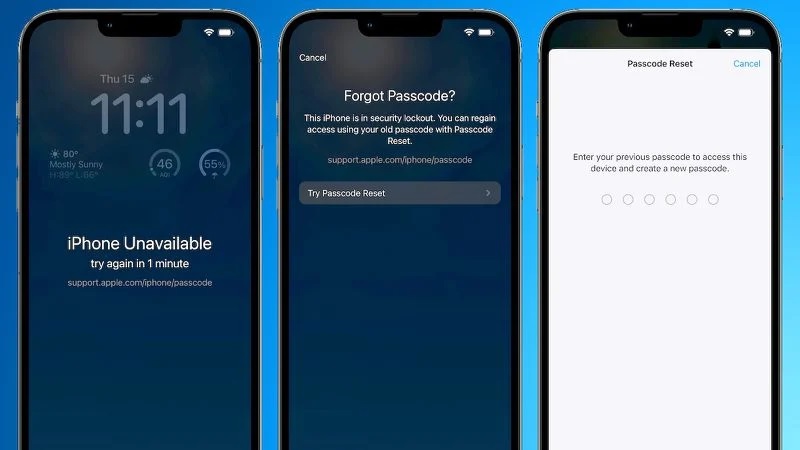
iOS 17 Undo Passcode

With onset of iOS 17, you can reset your passcode change in case you forget it within 72 hours of setting it up. Consider a situation where you forget or enter a wrong passcode, you will see a ‘Forgot Password?’ option on the bottom. Tap on it and you should get ‘Try Passcode Reset’. The feature lets you enter previously remembered passcodes and set up a new one.

It further lets you change the ability to add previous passcode where you set it up to expire immediately after using it. This is a safeguard in case someone else gets hold of your iPhone and tries resetting the password.

iOS 17 For Eye Strain

As we often forget to limit our exposure to the screen, overexposure leads to eye strain and in extreme cases, nearsightedness. With the iOS 17 and iPadOS 17, Apple has worked on a new feature called ‘Screen Distance’. It will help reduce strain on the eyes and diminish the risk of nearsightedness as well.

iOS 17 Protect Your Eye Strain

It uses iPhone’s TruDepth camera to measure the distance between the screen and your eyes. In case the phone is too near for a prolonged time, you will get a notification “iPhone is Too Close”. You will get a warning if the phone is closer than 12 inches and for more than 20 minutes. It is aimed towards reducing strain on the eyes due to overexposure to the screens as it may cause an inability to focus.

iOS 17 is set to arrive across iPhones later this year with the iPhone 15 series arriving this October. It will arrive across iPhone XS and newer with the Beta already available for Apple Developers. The last year’s iOS 16 is currently available across 81% of all supported iPhones to date.

Related Articles

ImageOPPO Bubble launched in India, a tiny display on the back of your phone for selfies

Alongside the Reno16 series and the Enco Air5 today, OPPO has also introduced the Bubble in India. It is essentially a small magnetic display that attaches to the back of your phone and lets you use the rear cameras for selfies, vlogs, and group shots. The Bubble weighs just 27.5g and packs a 1.73-inch AMOLED display …

ImageHow to active a Passcode Lock an App on iPhones

Since Apple offers a host of distinctive and unique features with its iPhone devices, there are some features which iPhones are yet to offer. Among others, iPhones don’t directly allow locking apps with passcode individually. But three’s a working trick to lock sensitive apps like Photos, WhatsApp, Facebook, etc., saving your day. This is a …

ImageHow to change your Apple ID password

Your Apple ID gets you to access the multitude of apps and features in the Apple ecosystem be it Apple Music, iCloud, App Store, or iMessage and that’s just the tip of the iceberg. You can pair your new Apple device with Apple ID to enjoy seamless services. It is recommended to have a strong …

ImageAndroid 17 Is Here: 9 New Features Worth Your Attention

Google just launched Android 17. Pixel phones get it first, and other eligible devices will follow through 2026. The main upgrade, Gemini Intelligence, arrives on select advanced devices later this summer. Still, Android 17 already brings several practical changes that improve multitasking, gaming, and security. Here are the features that matter. Also Read: Android 17: …

ImageThis Hidden iPhone Feature Protects Your Eyes From Strain

With iOS 17, Apple introduced a lesser-known feature called Screen Distance. Since viewing a screen too closely can increase eyestrain (and increase the risk of short-sightedness or myopia), the Screen Distance feature reminds users to move their phone away from their eyes. If an iPhone is part of a Family Sharing Group, Screen Distance is …

Discuss

Be the first to leave a comment.