How to access the Custom Sticker maker feature for WhatsApp Web

Main Image
  • Like
  • Comment
  • Share

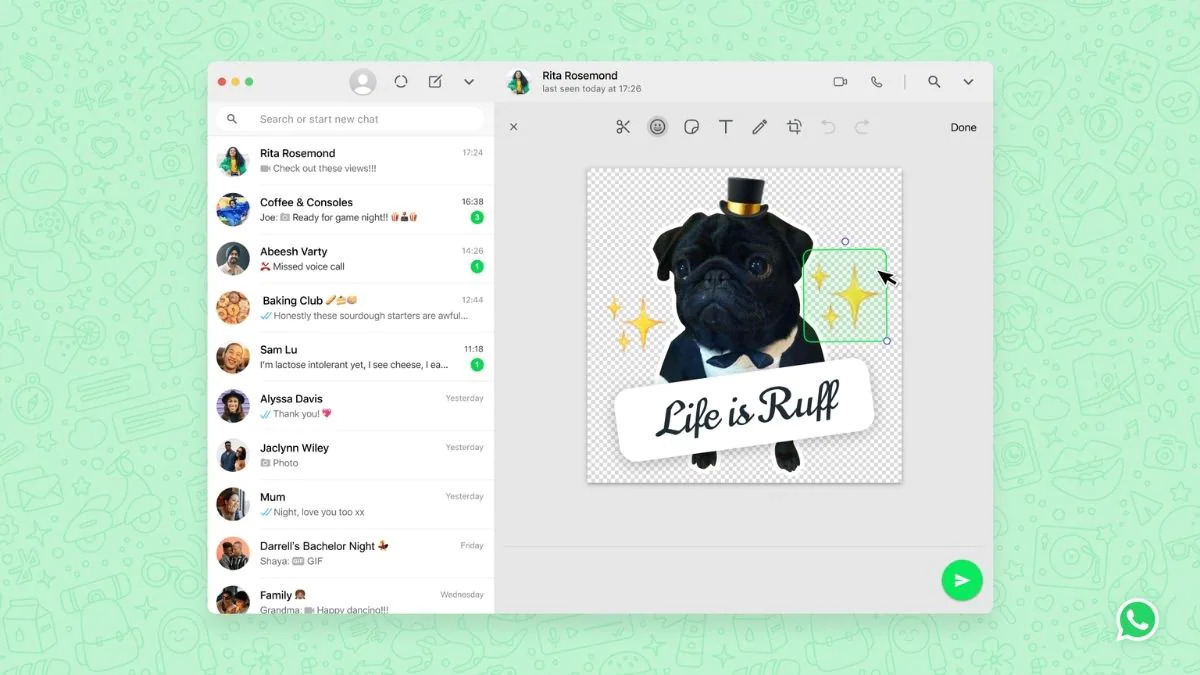
WhatsApp has rolled out a new tool for WhatsApp Web in which users will be able to make their custom stickers using this tool. Users no longer need to use third-party apps to create customized stickers as the feature is now in-built within the platform itself.

The social media giant plans to release the Custom Sticker Maker feature for the desktop version too and the company has confirmed that the rollout will take place soon.
Sticker Maker on WhatsApp

ALSO READ: PUBG: New State Anti-Cheating Update released on Android

“Starting today, we are excited to introduce a new tool on WhatsApp for Web and Desktop that allows users to make their custom stickers,” the company said.

How to access this Custom Sticker Maker

The feature is easily accessible and one can find it in the sticker section of the platform.

  1. Open any WhatsApp chat, click on the paperclip icon.
  2. Click again on the ‘sticker’.
  3. Upload a photo to create your custom sticker.
  4. You can also add an outline, crop the photo into a sticker, and add emojis, stickers, or text to it.

Alternatively,

  1. You can click on the emoji icon on any WhatsApp chat and go to the sticker section.
  2. Here you will see a “Create” option, using which you will be able to create customized stickers.

ALSO READ: OnePlus News: OnePlus10 Pro specs leaked, OnePlus RT, OnePlus Buds Z2 to launch in India on December 16

As of now, this feature is not available for the mobile version and the messaging service has also not given information on whether it will be made available for mobile users or not. 

In a piece of related news, WhatsApp is planning to extend the time limit of the Delete Message for everyone feature. Instead of one hour, users will be able to delete their messages one week after sending the message. The feature is currently under development and WhatsApp is yet to make an official announcement about the same. The time limit may be changed when WhatsApp officially rolls out the feature.


Shivangi AgarwalShivangi Agarwal
Shivangi is a tech writer at Smartprix, where she covers consumer technology news with a focus on smartphones, wearables, laptops, and the evolving world of OTT streaming. Since joining the team in August 2021, she has written over 120 in-depth reviews, comparisons, and buying guides aimed at helping readers navigate the ever-changing tech landscape.

With a strong foundation in English literature and education, Shivangi brings clarity, insight, and a reader-first approach to every story. Her expertise lies in breaking down complex features into accessible, practical insights—whether she’s reviewing the latest smartphone or exploring trends in infotainment.

Shivangi holds a B.A. (Hons.) and M.A. in English, along with a B.Ed in English and Social Studies. She is based in Faridabad, India. You can follow her work on Smartprix or connect with her for tech-related queries.

Related Articles

ImageGTA VI FAQs: 50 Most Asked Questions And Their Answers Every Indian Gamer Must Know About

Pop-culture fans have been looking forward to two major events in 2026: GTA VI’s arrival and Doomsday’s theatrical release. While we’re still about a month away from the latter, the former happens tonight. That’s right! GTA VI is finally here. As the clock strikes midnight and we step into November 19, 2026, gamers and enthusiasts …

ImageWhatsApp brings new web features: Animated stickers, QR codes, dark mode and more

WhatsApp has rolled out some more features that are popular on other similar platforms. The new features include animated stickers, QR codes, dark mode for WhatsApp web, status updates to KaiOS, and group video call improvements. WhatsApp has seen a humungous upsurge in its use since people got locked into their homes due to coronavirus …

ImageBest upcoming Whatsapp features you must know

Whatsapp is one of the most used apps in our daily lives. From the days of its barebone infancy, the app has come a long way in terms of features and user experience. Although many other instant messengers are there in the market, Whatsapp is still the undisputed king. Ever since its acquisition of Whatsapp, …

ImageHow to Turn Any GIF Into an Animated WhatsApp Sticker in 10 Seconds on Android and iPhone

WhatsApp lets you turn GIFs into animated stickers and share them directly in your chats. You can use your phone’s keyboard, WhatsApp’s built-in sticker editor, or a third-party tool to create stickers from GIFs you already have. The process takes only a few seconds once you know where to look. Here’s how to do it …

ImageWhere Did Your X Likes Go? How to Find Liked Posts on iPhone, Android and the Web

X has been rolling out interface changes frequently, with users seeing new layouts and features almost every week. The latest change moves the Likes tab into a History section on iPhone, making it harder to find for users accustomed to accessing liked posts directly from their profile. How to find liked posts on X for …

Discuss

Be the first to leave a comment.