


Epson EcoTank L3250 Multi Function Ink Tank Pri… vs Epson L3150 Multi Function Wireless Printer
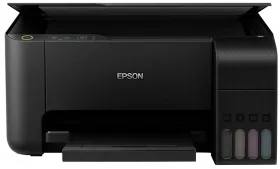
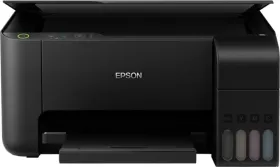
- Like
- Comment
- Share
General
| Country of Origin | Philippines | |
| Brand | Epson | Epson |
| Model | L3250 | C11CG86504 |
| Model Name | EcoTank | L3150 |
| Model Series | EcoTank | |
| Type | Inkjet | Multi-function |
| Printer Type | Inkjet | Inkjet |
| Scan Type | Flatbed | Flatbed |
| Suitable For | Home, office | Home & Small Office |
| Printer Languages | ESC/P-R, ESC/P Raster |
Design and Body
| Dimensions | 375 x 179 x 347 mm | 375 x 179 x 347 mm |
| Weight | 3900 g | 3900 g |
| Active Noise | 39 dB |
Printer Features (Color)
| Resolution | 4800 x 1200 dpi | 5760 x 1440 dpi |
| First Print Time | 16 seconds | |
| Cost per Page | 24 | 18 |
| Print Speed | 8 ppm | |
| Bit Depth | 24 bits | |
| Copy Resolution | 600 x 600 dpi | |
| Copy Speed | 3.8 cpm |
Printer Features (Mono)
| First Print Time | 10 seconds | |
| Cost per Page | 9 | 7 |
| Print Speed | 15 ppm | |
| Bit Depth | 8 bits | |
| Copy Resolution | 600 x 600 dpi | |
| Copy Speed | 7.7 cpm |
Scanner Features
| Optical Scanning Resolution | 2400 x 1200 dpi | 1200 x 2400 dpi |
| Scan Area | 216 x 297 mm | 216 x 297 mm |
| Scanning Speed (Color) | 28 seconds | |
| Scanning Speed (Mono) | 11 seconds | |
| Scan Method | CIS | CIS |
FAX Features
| Auto Dial | No |
Features
| Functions | Print, Copy, Scan | Print, Copy, Scan |
| Duty Cycle | 30000 pages | |
| Print Speed (Photo) | 1.5 min | |
| Duplex Print | Automatic | Automatic |
| Auto Document Feeder | Friction Feed | |
| Borderless Printing | Yes | Yes |
| Max Copies | 20 cpm | |
| Output Tray Capacity | 30 sheets | 30 sheets |
| Input Tray Capacity | 100 sheets | 100 sheets |
| Additional Features | Epson Connect Features: Epson iPrint, Epson Email Print, Remote Print Driver, Other Mobile Solutions: Apple Airprint, Google Cloud Print, Mopria Print Service, PC Printing/ Premium Glossy Photo Paper |
Extra
| Sales Package | 1 U Printer, Ink Bottles-T00V (Black) | T00V (Cyan) | T00V (Magenta) | T00V (Yellow)Ink Bottle - T00V (Black) | T00V (Cyan) | T00V (Magenta) | T00V (Yellow), User Manual | |
| Compatible Cartridge (Color) | Cyan Ink Bottle: 7,500 (Composite Yield) Magenta Ink Bottle: 7,500 (Composite Yield) Yellow Ink Bottle: 7,500 (Composite Yield) | |
| Compatible Cartridge (Black) | Black Ink Bottle: 4,500 pages | |
| Media Size Supported | Legal, Indian-Legal (215 x 345 mm), 8.5 x 13", Letter, A4, 16K (195 x 270 mm), B5, A5, B6, A6, Hagaki (100 x 148 mm), 5 x 7", 4 x 6", Envelopes: #10, DL, C6 | |
| OS | Windows XP / XP Professional / Vista / 7 / 8 / 8.1 / 10 Mac OS X 10.6.8 or later | Windows XP/Vista/7/8/8.1/10, Windows Server 2003/2008/2012/2016 (Only Printing and Scanning Functions are Supported for Windows Server OS) Mac OS X 10.6.8 or Later |
| USB Support | USB 2.0 | USB 2.0 |
| Wireless Support | Yes | Yes |
| Ethernet Support | No |
Power Features
| Power Requirements | AC 220 – 240 V | AC 220 - 240 V |
| Power Consumption | 12 W | 12 W |
| Power Consumption Manual Off | 4.5 W | 0.3 W |
| Power Consumption Stand by | 0.2 W | 4.3 W |
Warranty
| Warranty | 1 year | 1 year, Onsite Warranty |
| Warranty Type | Manufacturer | Manufacturer |
| Covered in Warranty | Manufacturing Defect | |
| Not Covered in Warranty | Physical Damage |
Discuss
Related News
 Sonos Just Launched the Amp Multi to Kill the ‘Stacking’ Era of Home Audio
Sonos is tired of seeing its standard Amps stacked like pancakes in dusty server closets. Today, the company quietly unveiled the Sonos Amp Multi, a high-density, multi-zone streaming amplifier that serves as…
 Xiaomi 17 Ultra Leica Edition Teased with Functional Physical Zoom Ring
On Christmas Day 2025, Xiaomi is unveiling the Xiaomi 17 Ultra in China, but it is the Leica Edition stealing the pre-launch attention. Official teasers shared on Weibo confirm a functional zoom ring built in…
 Tesla Model Y Review: Minimalist By Design, Complex By Functionality
Tesla came to India after a lot of anticipation last year, and despite India not being the “ideal market” for Tesla, the brand has been in the limelight ever since its launch. The Tesla Model Y is the first c…
 macOS 27 Golden Gate Hands-On: My First 48 Hours on a MacBook Air M4
I installed the macOS 27 developer beta on my MacBook Air M4 (16GB/256GB) almost as soon as it dropped after WWDC. It’s been roughly 48 hours now, and I’ve been using it as my main machine for work, browsing,…
Related Printers
Related Searches
Related Comparisons

 Canon Pixma G3000 Multi Function Wireless Printer vs Brother DCP-T436W Multi Function Ink Tank Printer
 Epson EcoTank L3250 Multi Function Ink Tank Printer vs Epson EcoTank L3260 Multi Function Inkjet Printer
 Epson EcoTank M2050 Multi Function Laser Printer vs Epson Workforce Pro WF-C5890 Multi Function Inkjet Printer
 HP DeskJet 2820 Multi Function Inkjet Printer vs Canon Pixma MG3070S Multi Function Printer
 Epson EcoTank L3250 Multi Function Ink Tank Printer vs Epson EcoTank L3252 All-in-One Ink Tank Printer
 Epson EcoTank L3250 Multi Function Ink Tank Printer vs Canon PIXMA G3730 Multi Function Ink Tank Printer