



Canon MAXIFY GX4070 Multi Function Ink Tank Pri… vs Epson EcoTank L6490 Multi Function Ink Tank Pri…
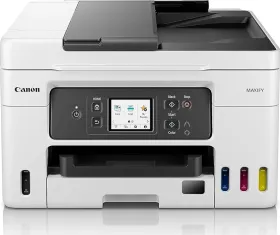
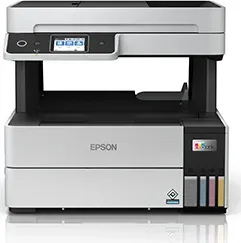
- Like
- Comment
- Share
General
| Country of Origin | Japan | Philippines |
| Brand | Canon | Epson |
| Model | GX4070 | L6490 |
| Model Name | MAXIFY | EcoTank |
| Type | Multi Function | |
| Printer Type | Inkjet | Ink Tank |
| Scan Type | Flatbed, ADF | Flatbed |
| Suitable For | Small Business | Home |
| Printer Languages | ESC/P-R, ESC/P Raster | |
| Display | 6.7cm (2.7in) LCD (Touch Screen, Color) | 6.09cm (2.4") Colour LCD Touch Screen |
Design and Body
| Dimensions | 399 x 251 x 417 mm | 375 x 346 x 347 mm |
| Weight | 9500 g | 7300 g |
| Active Noise | 49 dB | 55 dB |
Printer Features (Color)
| Resolution | 600 x 1200 dpi | 4800 x 1200 dpi |
| First Print Time | 9 seconds | 11 seconds |
| Print Speed | 13 ipm | 9.5 ipm |
| Copy Resolution | 600 x 600 dpi | |
| Copy Speed | 11.1 ipm | Flatbed: Up to 6.0 ipm, ADF: Up to 4.5 ipm |
Printer Features (Mono)
| First Print Time | 8 seconds | 7 seconds |
| Cost per Page | 12 Paise | |
| Print Speed | 18 ipm | 17 ipm |
| Copy Speed | Flatbed: Up to 12.0 ipm, ADF: Up to 10.0 ipm |
Scanner Features
| Optical Scanning Resolution | 1200 x 2400 dpi | 1200 x 2400 dpi |
| Scan Area | 216 x 297 mm | |
| Scanning Speed (Color) | 3.5 ms/line (300 dpi) | Flatbed: 27 sec, ADF: 5.0 ipm |
| Scanning Speed (Mono) | 1.5 ms/line (300 dpi) | Flatbed: 12 sec, ADF: 6.0 ipm |
| Scan Method | CIS | CIS |
FAX Features
| Fax Delayed Sending | Yes | |
| Fax Broadcasting Locations | Mono | |
| Fax Memory Capacity | 250 pages | 180 pages |
| Fax Resolution | 300 x 300 dpi | 200 x 200 dpi |
| Modem Speed | 33.6 Kbps | 33.6 Kbps |
| Auto Dial | Yes | |
| Group Dials | Yes | Yes |
| Speed Dials Memory | 100 numbers | 100 numbers |
Features
| Functions | Print, Copy, Scan, Fax | Print, Copy, Scan, Fax |
| Duty Cycle | 33000 pages | 100000 pages |
| Duplex Print | Automatic | Auto |
| Auto Document Feeder | 35 Sheets | |
| Borderless Printing | Yes | No |
| Copier Resize | 25 - 400% | |
| Max Copies | 999 cpm | |
| Max Multicopy | 99 pages | |
| Output Tray Capacity | 30 sheets | |
| Input Tray Capacity | 250 sheets | Cassette 1: Up to 250 sheets , Rear Slot: 1 sheet |
| Input Tray Type | Cassette |
Extra
| Sales Package | Printer, Power Cord, USB Cable, Instruction Manual, 1 set of GI 76 CYM Ink Bottles and 3 GI 76 Black Ink Bottles | Printer, CD DVD Tray, Power Cable and USB Cable, Ink Bottles |
| Operating Temperature | 15 - 30°C | |
| Compatible Cartridge (Color) | GI-76 Cyan, Magenta, Yellow | Pigment Ink Bottle - Cyan: C13T06G298, Magenta: C13T06G398, Yellow: C13T06G498 |
| Compatible Cartridge (Black) | GI-76 Black | Pigment Ink Bottle - Black: C13T06G198 |
| Media Types Supported | Plain Paper, High Resolution Paper, Photo Paper Plus Glossy II, Semi-Gloss, Glossy Photo Paper, Pro Luster, Matte Photo, Double-Sided Matte Photo Paper, Envelope | Phot paper, Glossy paper, Envelope |
| Media Size Supported | A4, A5, B5, Letter, Legal, Oficio, B-Oficio*, M-Oficio, Foolscap, Legal (India), Executive, 10.16x15.24cm (4 x 6in), 12.7x17.78cm (5 x 7in), 20.32x25.4cm (8 x 10in), Envelopes | Legal, Indian Legal, Letter, A4, 16K (195 x 270 mm), B5, A5, B6, A6, Hagaki (100 x 148 mm), 8.5 x 13", 5 x 7", 4 x 6", Legal (8.5 x 14") Envelopes: #10, DL, C6 |
| OS | Windows 11 / 10 / 8.1 / 7 SP1, macOS 10.14.16 ~ 12 or later, Chrome OS | Windows XP/ Vista / 7 / 8 / 8.1 / 10, Windows Server 2003 / 2008 / 2012 / 2016, Mac OS X 10.6.8 |
| USB Support | USB 2.0 | USB 2.0 |
| Wireless Support | Yes | Yes |
| Ethernet Support | No | Yes |
| Operating Humidity Range | 10 - 80% RH |
Power Features
| Power Requirements | AC 100 - 240 V | AC 220-240 V |
| Power Consumption | 20 W | 12 W |
| Power Consumption Manual Off | 0.1 W | 0.2 W |
| Power Consumption Stand by | 0.9 W | 5.5 W |
Warranty
| Warranty | 1 year | 1 year |
| Warranty Type | Manufacturer | Manufacturer |
Discuss
Related News
 Top 5 cost-effective black and white printers for office use to buy in 2026
Buying an office printer sounds simple until you start looking. If you work from home, you probably print a document now and then, and that’s it. Run a small business, and you’re suddenly dealing with invoice…
 Canon EOS R6V Review: The Gateway Into Going Pro
The Canon EOS R6V is Canon’s latest and most advanced camera in the EOS V-range of cameras that are focused on content creators. Now, the new Canon EOS R6 V sits between the Canon EOS R50 and the EOS R6 Mk II…
 Bambu Lab A2L 3D Printer Review: The A1 Finally Grows Up, and I Stopped Making Excuses
3D printing in India has moved beyond the hobbyist stage, and the Bambu Lab A2L proves it. Earlier budget printers made you handle manual bed leveling, PID tuning, and slicer settings before you got anything …
 Apple Brought Back the Glowing Logo on the New MacBook Pro: Here’s How It Works
The glowing Apple logo is back on the MacBook Pro with PROLED XDR, a decade after Apple dropped it in 2016 in favor of a thinner design. The logo is illuminated again, but the technology behind it has changed…
Related Printers
Related Searches
Related Comparisons

 Epson EcoTank L6490 Multi Function Ink Tank Printer vs HP Smart Tank 790 Multi Function Inkjet Printer
 Epson EcoTank L3211 All-in-One Ink Tank Printer vs Epson EcoTank L3252 All-in-One Ink Tank Printer
 Canon MAXIFY GX4070 Multi Function Ink Tank Printer vs Epson EcoTank L6490 Multi Function Ink Tank Printer
 Canon MAXIFY GX4070 Multi Function Ink Tank Printer vs Canon MAXIFY GX3070 Multi Function Ink Tank PrinterCanon MAXIFY GX4070 Multi Function Ink Tank Printer vs HP Smart Tank 790 Multi Function Inkjet Printer
 Canon MAXIFY GX4070 Multi Function Ink Tank Printer vs Brother DCP-T830DW Multi Function Ink Tank Printer