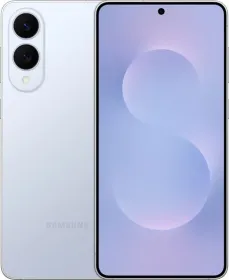
Quick Verdict
The Galaxy S26+ sticks to Samsung’s usual approach without any major changes. It comes with a slimmer body, faster wireless charging, a slightly wider selfie camera, strong software support, a QHD+ display, and a clean overall experience.
At the same time, the camera hardware is still due for an update, battery life is good but not leading, and some display features are still limited to the Ultra model. It ends up being a familiar option that focuses on small improvements rather than big upgrades.
Buy it if:
- You want a big Samsung flagship that is slim and comfortable to use without going to the Ultra size
- You like One UI, Samsung apps, and long software support for years of use
- You want a good multimedia experience, and a stable everyday experience
- You use the front camera a lot and want consistent selfies and video
Skip it if:
- You want better cameras, especially zoom and ultra-wide performance
- You want great gaming performance and better thermals
- You expect longer battery life and faster charging
- You are looking for better value at this price, since other options offer more overall hardware
Samsung’s Plus model has usually sat in a slightly awkward spot. The Ultra gets most of the attention, the base model gets picked for its size and price, and the Plus ends up in between. This year, it still sits in that same position.
The Galaxy S26+ keeps things straightforward. You get a large high-resolution display, premium build, strong performance, good cameras, refined software, and enough battery to get through a full day. It also avoids the size and price jump that comes with the Ultra. But is it worth it? Let’s find out in this review.
HOW I TESTED
| Reviewed By: Mehtab Ansari, Expert in Smartphones, Laptops, Audio Gear, AI and more (5 years experience, 100+ reviews). Test Unit: Review unit of the Samsung Galaxy S26+, without any editorial input from Samsung in this review. Duration and Environment: I used the Galaxy S26+ for two weeks on the Jio network in India. The device was tested indoors, outdoors, during travel, and in warmer conditions. Tests: My daily use included calls, camera use, social media, messaging, navigation, streaming, hotspot use, gaming, photo editing, and long scrolling sessions at night. I also tested charging speeds, sustained performance, display visibility, and standby drain. Competitors: Google Pixel 10 Pro XL (review), vivo X300 Pro (review), OPPO Find X9 Pro (review), OnePlus 15 (review) |
Samsung Galaxy S26+ Price & Availability
The Samsung Galaxy S26+ sits in the premium flagship category and comes in two configurations:
- 12 GB + 256 GB: ₹1,19,999
- 12 GB + 512 GB: ₹1,29,999
The phone is available via Samsung’s official store, Amazon, Flipkart, major offline retailers, and carrier channels in select markets.
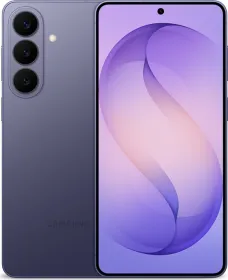
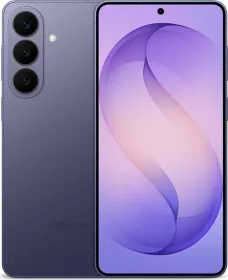
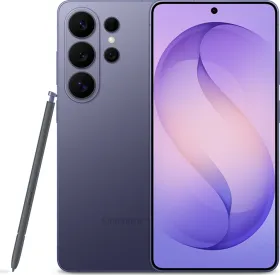
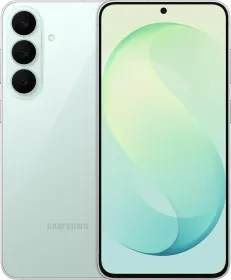
Color options include Cobalt Violet, Sky Blue, Black, White, Silver Shadow, and Pink Gold.
Launch offers, exchange bonuses, and bank discounts can lower the effective price. Even then, this remains an expensive phone, so the long-term experience matters a lot.
Pros
- Slim and premium design
- Excellent QHD+ LTPO display
- Reliable flagship performance
- One UI 8.5 feels polished and feature-rich
- Seven years of Android updates
- Strong main camera consistency
- Great speakers
- Fast ultrasonic fingerprint scanner
- Useful Samsung ecosystem features
Cons
- Same camera hardware again
- Battery life is decent, not class-leading
- Charging speed could’ve been faster
- No anti-reflective coating
- No privacy display layer
- Telephoto sensor feels dated
- Expensive for an iterative upgrade
Samsung S26+ Specifications
- Display: 6.7-inch Dynamic LTPO AMOLED 2X, 1 – 120 Hz, HDR10+, 2600 Nits, 1440 x 3120, 516 PPI, Gorilla Glass Victus 2
- SoC: Exynos 2600 (1x 3.80 GHz + 3x 3.25 GHz + 6x 2.75 GHz, Xclipse 960, 2 nm)
- RAM: 12 GB LPDDR5X
- Storage: 256 / 512 GB UFS 4.0
- Main Camera: 50 MP, 1/1.56-inch, f/1.8, OIS, Dual Pixel PDAF, 24mm, 4K60 / 8K30
- Ultra-wide Camera: 12 MP, 1/2.55-inch, f/2.2, 120°, 13mm, fixed focus, 4K60
- Telephoto Camera: 10 MP, 1/3.94-inch, f/2.4, OIS, PDAF, 3X optical, 67mm, 4K60
- Front Camera: 12 MP, 1/3.2-inch, f/2.2, AF, 23mm, 4K60
- Speakers: Stereo speakers
- Battery and Charging: 4,900 mAh, 45W wired, PD3.0, 20W wireless (Qi2.2), 4.5W reverse wireless
- IP Rating: IP68 (1.5m for 30m)
- Connectivity: 5G, Wi-Fi 7, Bluetooth 6.0, NFC, UWB, eSIM
- Biometrics: Under-display ultrasonic fingerprint, 2D face unlock
- Dimensions and Weight: 158.4 x 75.8 x 7.3 mm, 190g
- Build: Glass front, glass back, Armor Aluminum 2 frame
Samsung Galaxy S26+ Review: Unboxing
Inside the box, you get the Samsung Galaxy S26+, a USB-C to USB-C cable, SIM ejector tool, and documentation.
There is no charger included in the box, so you will need to use your own USB-C adapter or buy Samsung’s 45W charger separately.
Samsung Galaxy S26+ Review: Design and Build

The Galaxy S26+ does not reinvent Samsung’s design language, though it refines it in ways that are easy to appreciate once you start using it daily. This is one of those phones that looks familiar in renders, then feels noticeably better in hand.
The first thing you notice is the slimness. At just 7.3 mm, the S26+ feels incredibly sleek and modern. Samsung has also kept the weight at 190 grams, which is impressive for a large flagship with a 6.7-inch display and a 4,900 mAh battery.
The dimensions are well judged. The phone is tall, as expected for this screen size, but the weight distribution is balanced and it sits comfortably in the hand.

Samsung continues with its flat frame approach, using Armor Aluminum 2 around the sides with Gorilla Glass Victus 2 on the front and back. As expected, there is no flex, no creaking, and no loose button movement.
Button placement is excellent. The volume keys and power button sit high enough to avoid accidental presses, though still within reach. The ultrasonic fingerprint scanner under the display remains the primary unlock method, so you rarely need to think about the power button anyway.

The rear camera layout is slightly different this time. Three separate camera rings sit vertically on the back, and yes, they still collect dust around the edges over time.
At the bottom, you’ll find the USB 3 Type-C port, dual nano SIM card slot, primary microphone, and the speaker. The camera bump is manageable, though the phone does wobble on a table when tapped. A case could solve this quickly.


IP68 water and dust resistance remains part of the package, but it does not come with multiple IP ratings like some of the competitors.
Overall, the Galaxy S26+ is a polished flagship design. It may not surprise anyone visually, though it gets the fundamentals right. Slim body, premium materials, excellent build quality, and daily comfort all come together nicely here.
Samsung Galaxy S26+ Review: Display

Samsung has a strong reputation with displays, and the Galaxy S26+ continues that. The phone features a 6.7-inch Dynamic LTPO AMOLED 2X panel with a sharp 1440 x 3120 resolution, adaptive 1 to 120 Hz refresh rate, and HDR10+ support. In daily use, it is exactly the kind of screen you expect from a premium Galaxy device.
Color reproduction is excellent. Samsung gives you vivid colors by default, with the option to switch to a more natural profile in settings. Most users will enjoy the default tuning, while those who prefer a calmer look still have control.
The 120 Hz refresh rate keeps the entire phone feeling fluid. However, certain apps and games are limited to just 60 Hz or 90 Hz and that’s a bit disappointing. One UI animations are not the best, and hence the smoothness here is no match to ColorOS.

LTPO support also should help efficiency but I don’t think it does much, especially when you’re just scrolling and doing basic tasks on your phone. Yes, you do get support for the full screen AOD, thanks to the LTPO screen allowing the phone to refresh at 1 Hz.
Samsung hasn’t changed the display brightness this year. It’s still rated at 2600 nits peak, and outdoor visibility is generally very good. If you stay in direct sunlight for more than a few minutes though, the display starts dimming on its own to manage heat, and that does affect visibility. It gets even worse when using the camera app outdoors. It’s very hard to see anything.
Bezels are slim and symmetrical, which helps the front look modern. However, they are bit thicker than what you would find on the Find X9 and OnePlus 15. The punch-hole selfie camera remains small and unobtrusive.

There are two omissions some buyers may care about. First, there is no anti-reflective coating like Samsung’s Ultra models. Reflections are more noticeable outdoors and under bright indoor lights. Second, there is no privacy display layer or special viewing-angle privacy feature. What you see is a standard flagship panel experience.
Samsung has continued with the same 480 Hz PWM dimming this year instead of switching to a higher-frequency solution. This can be an issue if you are sensitive to flicker, as it may cause discomfort during longer usage, especially at lower brightness levels.
For most people, it won’t be a problem in daily use. If you are sensitive to PWM flicker though, it’s better to try the display in person before deciding. Personally, I’ve experienced discomfort with this display.
Samsung Galaxy S26+ Review: Speakers and Haptics

The stereo speakers on the Galaxy S26+ get loud, stay clear, and have enough fullness for videos, games, and podcasts. Dialogue is easy to hear, bass has some presence, and stereo separation is good for both media and gaming. Call quality is also solid with clear voices and good loudness.
Haptics are set to a lower intensity by default, so you may want to increase it in settings. The vibration motor is tight and clean, and typing or UI feedback is precise, though it is still not on the same level as OnePlus or ColorOS devices when it comes to tuning and overall integration. Samsung’s implementation is good, but it’s definitely not the best in the segment.
Samsung Galaxy S26+ Review: Software

The Galaxy S26+ ships with Android 16 and One UI 8.5, and this remains one of the biggest reasons to buy a Samsung flagship. Hardware gets attention in stores. Software is what you live with every day. Samsung also promises seven years of Android updates and security patches.
One UI 8.5 doesn’t feel like a big redesign. It’s more of a continuation of what Samsung already does. Animations are a bit smoother, things look more consistent, and the interface looks a bit cleaner overall.
The quick settings panel is still one of the better parts. You now get a lot of control over layout, toggles, spacing, and how the panel background looks. You also still have several customization options with Home Up and Lockstar.

The new floating tab bar style elements and multitasking-friendly UI touches also help larger phones like this one feel easier to use. The animations are still a bit “stiff,” and that’s something Samsung needs to work on.

If you’ve read my previous Samsung software reviews, you already know how much I like their first-party apps. Gallery, Files, Calendar, Notes, Calculator, Recorder, Wallet, Health, and Reminders. They pack in a lot of useful features, to the point where you don’t really feel the need to go looking for third-party apps.


Good Lock continues to be one of Samsung’s secret strengths. If you enjoy customization, modules like Home Up, MultiStar, LockStar, and Camera Assistant give you insane amounts of flexibility and freedom over your phone.
Galaxy AI

Samsung’s AI features are mostly the same set you’ve seen before, just a bit more refined this time instead of adding a lot of new things. Circle to Search is still here. You just hold and circle anything on screen, and it pulls results instantly.

You get writing tools inside the Samsung Keyboard, so you can rewrite text, fix grammar, or change tone directly while typing. There’s also the emoji generator, where you type something and it turns that into stickers in different styles. The AI Eraser is still here, and it’s better now. It removes people or objects more cleanly than before.
For browsing, Samsung Internet can summarize pages, translate them, and even read them out loud. This only works inside Samsung Internet, not Google Chrome, which is something to keep in mind. There’s also system-wide search where you can type normal sentences like “my Wi-Fi is not working” in Settings or search photos with simple phrases. It works most of the time, though it’s not perfect.

Now Brief has been updated quite a bit. It gives you a daily overview, and now it can also read it out like an audio version. It includes things like health and wellness updates, travel info, smart home status, YouTube suggestions, and even wearable battery alerts. You can connect it with Gemini as well, so it gives more personalized travel insights and suggestions. If you use your phone a lot, it can be useful. Otherwise, it’s just there.

There’s also the Now Bar, which shows live activities on the lock screen. It works, though app support is still limited right now. Apps like Uber and Blinkit are not fully supported yet, so it’s not as useful as it could be.
On the media side, Instant Audio Eraser lets you remove background noise from videos directly on the phone. It actually separates things like voices, wind, or crowd noise and lets you adjust them. Plus, it can even remove the noise in Instagram reels and YouTube videos now.

Gemini is integrated across the system, so you can ask it to plan things, send messages, or add events. Gemini Live works like a real-time conversation, and Samsung also gives a free trial of Gemini Advanced with extra features.

So overall, there aren’t many new AI features. Most of it is just improved versions of what was already there.
Samsung DeX remains a valuable extra. Connect the phone to a monitor and you get a desktop-style interface that is still useful for presentations, light office work, or emergency laptop moments.
There are still a few annoyances. The preloaded apps can be unnecessary, and Samsung’s own store notifications can still be overenthusiastic until you turn them off. It takes a few minutes to clean up, then the experience improves quickly.
Overall, One UI 8.5 on the Galaxy S26+ is excellent. It is rich in features, polished in daily use, and backed by long support. For many buyers, this software alone will be a major reason to choose the phone.
Samsung Galaxy S26+ Review: Biometrics

The ultrasonic fingerprint scanner is fast, consistent, and placed well, so unlocking the phone is easy and reliable. Face unlock is there too, though it’s a bit slow and mostly useful in good lighting only.
Samsung Galaxy S26+ Review: Performance

The Galaxy S26+ comes with the Exynos 2600 in some regions and Snapdragon 8 Elite Gen 5 in others. I tested the Exynos version, paired with 12GB LPDDR5X RAM and 256GB UFS 4.0 storage. In day-to-day use, performance is fine. Apps open quickly, multitasking is handled well, and benchmarks are where you’d expect for this class, though it doesn’t really stand out.
| Benchmark | Galaxy S26+ (Exynos 2600) | OPPO Find X9 Pro (Dimensity 9500) | OnePlus 15 (Snapdragon 8 Elite Gen 5) |
| AnTuTu v11 | 2867524 | 3435464 | 3747971 |
| Storage (Score, Sequential Read Speed, Write Speed) | Score: 174121; Sequential Read: 4256 MB/s; Sequential Write: 3281 MB/s | Score: 142,205; Sequential Read: 3737 MB/s; Sequential Write: 3293 MB/s | Score: 156,134; Sequential Read: 3903 MB/s; Sequential Write: 3536 MB/s |
| Geekbench 6 CPU (Single-Core, Multi-Core) | Single-Core: 2876; Multi-Core: 9540 | Single-Core: 3270; Multi-Core: 9644 | Single-Core: 3536; Multi-Core: 10,595 |
| Geekbench 6 GPU (OpenCL, Vulkan) | OpenCL: 24116; Vulkan: 27353 | OpenCL: 22057; Vulkan: 28559 | OpenCL: 24978; Vulkan: 28025 |
| 3DMark Wildlife Extreme (Score, Avg FPS) | Score: 5853; Avg FPS: 35.05 | Score: 6529; Average FPS: 39.10 | Score: 6,683; Average FPS: 40.02 |
| 3DMark Wildlife Extreme Stress Test (Best Loop, Lowest Loop, Stability) | Best Loop: 6126; Lowest Loop: 3286; Stability: 53.6% | Best Loop: 6603; Lowest Loop: 4555; Stability: 69% | Best Loop: 6164; Lowest Loop: 5562; Stability: 90.2% |


Indoors, thermals are under control, though once you step outside or push it harder, it heats up quite a bit. The vapor chamber is there, though it’s not as effective as what you get on the OnePlus 15 or OPPO Find X9 Pro.
In gaming, Genshin Impact runs around 55 FPS with temperatures hitting 47 to 49°C. Wuthering Waves is similar at around 55 FPS and 46°C. Lighter games like BGMI can go up to around 112 FPS at roughly 40°C. This was tested in Hyderabad summer conditions, though the heating still feels higher than expected, and hot spots can get uncomfortable to touch.

Phones like the OnePlus 15 and OPPO Find X9 Pro handle gaming and heavier tasks better. They also stay much cooler in regular use and gaming, unless you really push them hard. Even in games like BGMI and COD Mobile, they don’t heat up the way the S26+ does.
Samsung Galaxy S26+ Review: Cameras

If you have used a recent Galaxy S Plus model, the camera here will feel very familiar. That is because it largely is. Samsung has once again carried forward the same core camera hardware used across the S22+, S23+, S24+, S25+, and several base Galaxy S models.
That sounds disappointing on paper, and to an extent it is. At this price, many buyers expect more meaningful sensor upgrades. Still, hardware is only one part of the story. Let’s see how the S26+ actually performs in real life.
The phone includes a 50 MP main camera, 12 MP ultra-wide (no AF), 10 MP 3X telephoto, and a 12 MP front camera.
Main Camera
The 50 MP main sensor remains the most reliable lens here. In daylight, photos come out detailed, clean, and consistently pleasant. Samsung’s tuning is more mature now than older generations, with better restraint in sharpening and more natural color than the aggressive processing seen years ago.


Dynamic range is strong, exposure is mostly fine, and the camera is quick to capture (unlike some previous models which struggled with shutter lag). Though I would say it’s not close to the speed of the Find X9 or the X9 Pro. And yes, the default photos are still 12 MP only. The competition, like the X9 and X9 Pro for example, can do up to 50 MP default photos.


Low-light performance is where the S26+ starts to show its age (the camera sensor’s age). Night mode does help brighten the scene but it may appear unnatural and full of excessive noise. Yes, these images aren’t unusable, but for a phone that costs ₹1,20,000, I expect way better.
Ultra-wide Camera
The ultra-wide camera is usable, though it still feels like the weakest rear sensor in this price tier. The worst part is that this lens still does not have autofocus. This means you cannot go closer to subjects or make product showcase videos using this lens.


In good light, it captures a broad field of view with decent color consistency next to the main camera. Detail levels are fine in the center, softer near edges, and overall output lacks the punch you expect at this price.
At night, the ultra-wide results in noisy images, often lacking proper focus, and the gap between this and the main camera becomes too obvious, especially when recording video.
Telephoto Camera
The 3X telephoto on the S26+ is the smallest telephoto camera in the industry at the moment. It’s a 10 MP 1/3.94-inch sensor paired with an f/2.4 lens with OIS. For reference, the Find X9 Pro’s 3X camera pairs a 200 MP 1/1.56-inch sensor with an f/2.1 lens with OIS. That’s the same size as the S26+’s main camera.


Anyway, daylight zoom shots using this lens are usable with decent detail and exposure. You can also zoom in digitally up to 30X and, thanks to Samsung’s upscaling algorithms, the images are usable. If you want to take the complete advantage of this lens, you might have to try the Expert RAW app with virtual aperture.
Portraits at 3X can look nice too, especially with Samsung’s portrait processing and generally pleasing skin tones. You can also take portraits using the main camera and zoom in up to 5X if you wish. In good lighting, the results are pleasing, though edge detection could use some improvement.


To nobody’s surprise, this lens struggles a lot in low light. Noisy images with smudgy details is what you’ll get most of the time. If you take a lot of zoomed in photos, I would suggest you look at something else like the Find X9 Pro or last year’s S25 Ultra.
Front Camera
The 12 MP selfie camera is still one of the more consistent parts of the phone. It’s now a bit wider at 23 mm compared to 26 mm before, so you can fit more people into the frame. You also get autofocus here, which actually helps a lot. Faces stay sharp, and it works well even if you’re moving around or trying to shoot something like a product video on the front camera.


In daylight, selfies come out good with clean detail and natural skin tones. In low light, there is some noise, though it’s still usable. Skin tones are handled nicely overall, and video quality is also solid. The front camera is still one of the better ones you can get in this segment.
Video Recording

Samsung still does a good job with video, and you get a lot of control if you actually want to use it. You can shoot up to 8K30 on the main camera, and 4K30 or 4K60 on the other cameras. LOG recording is available, and if you don’t like the sharpening in regular videos, you can shoot in LOG and color grade the footage right inside the Gallery app.
Main camera video is solid overall. Colors are stable, exposure is handled well, and stabilization is good, though dynamic range could be better in some situations. The ultra-wide camera is decent, though it is a noticeable step down compared to the main camera. It is quite wide at 13 mm, which is something I liked, especially when compared to phones that use 15 mm ultra-wide lenses.
The front camera also supports 4K30 and 4K60, video looks clean, stabilization is good, and it can record in LOG as well. While recording, you can switch between lenses like 1X, 0.6X, 3X, and the front camera. Overall, video is decent, though it could have been better, especially with the zoom and ultra-wide.
Samsung Galaxy S26+ Review: Battery Life and Charging

The Galaxy S26+ packs a 4,900 mAh battery, and the overall result is just good, not leading. In regular use, you’re usually looking at around 5 to 6 hours of screen-on time with mixed usage like social apps, camera, video streaming, messaging, and some navigation. Lighter use can stretch it a bit more, but not by much.
Phones like the OPPO Find X9 Pro with a 7,500 mAh silicon-carbon battery are in a completely different place here, pushing around 12 to 13 hours with heavy use, along with much faster charging at 80W wired and 50W wireless.
Speaking of, charging speed on the S26+ stays at 45W wired, which takes 30 minutes to reach 65% and 1 hour 10 minutes to reach 100%. Wireless charging is 20W, and you also get reverse wireless charging for accessories. There’s still no charger in the box.
Review Verdict: Should You Buy the Samsung Galaxy S26+?
The Galaxy S26+ sits at ₹1,19,999 for 256 GB and ₹1,39,999 for 512 GB, which is a huge step up from last year’s pricing. However, the phone itself hasn’t really moved forward in key areas like cameras, battery, or thermals. It’s still doing the same things with small refinements, while the cost has gone up.
At ₹1,19,999, you’re already close to the Galaxy S26 Ultra, which starts at ₹1,39,999 and gives you a much more complete setup with better cameras and more features. At the same time, last year’s Galaxy S25 Ultra becomes an easy pick once discounts kick in, because it still offers better hardware overall.
Then there’s the competition outside Samsung. If cameras are important to you, the OPPO Find X9 Pro is just on another level with a better hardware setup and much better consistency. If performance and gaming are your focus, the OnePlus 15 handles heavy tasks better, stays cooler, and costs less.
So the S26+ ends up stuck in the middle. It’s not the best option for cameras, not the best for performance, and not clearly cheaper either. However, it still makes sense in a few cases, like if you specifically want a new Samsung flagship without going to the Ultra, or if you can’t find better deals on alternatives.

Smartprix ⭐ Rating: 8.2/10
- Design and Build: 9/10
- Display: 8/10
- Speakers: 7.5/10
- Software: 8.5/10
- Haptics: 8.5/10
- Biometrics: 9/10
- Performance: 8.5/10
- Cameras: 7.5/10
- Battery Life & Charging: 7.5/10
First reviewed in May 2026.