Say Goodbye to GarageBand; You Can Set Custom Ringtones on Your iPhones Natively with iOS 26

Main Image
  • Like
  • Comment
  • Share

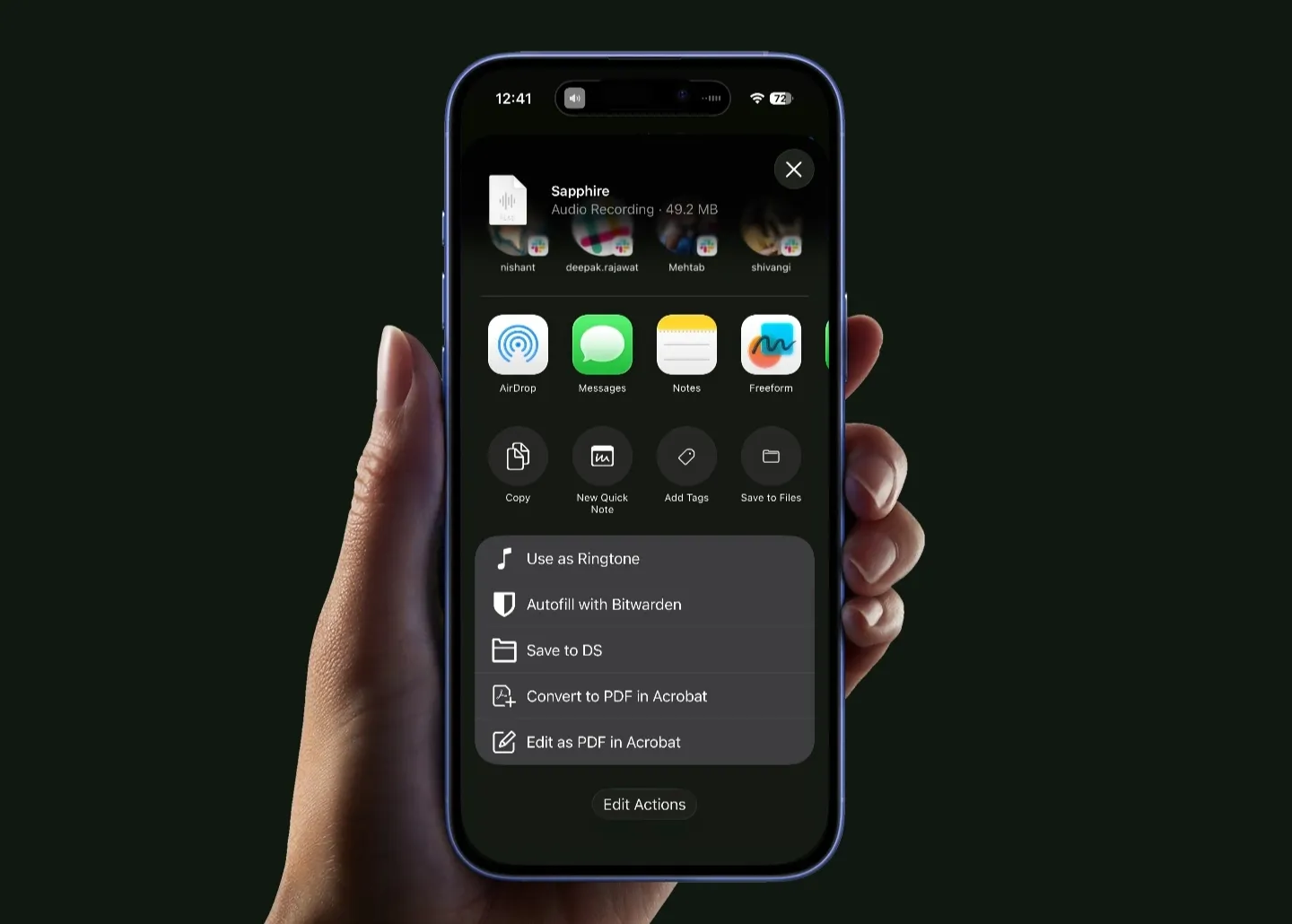
iOS 26 is packed with headline features like the new Liquid Glass design and some AI tools, but Apple has also quietly added a bunch of small but super useful changes that many users might have missed. One of those is something iPhone users have been asking for forever: setting any audio file as your custom ringtone directly, without needing an external app like GarageBand, a Mac, or complicated workarounds.

ALSO READ: iPadOS 26 vs. iPadOS 18: New Liquid Glass Design, Windowing System For Multitasking, And Other Additions

Here’s how you can set a custom ringtone on your iPhone

  1. Make sure your iPhone is updated to iOS 26.
  2. Save the audio file you want to use in Files, Voice Memos, or any compatible app.
  3. Trim the audio file to 30 seconds or less using any audio editor or the built-in Voice Memos editing tools.
  4. Open the trimmed audio file and tap the Share button.
  5. Scroll down in the share sheet and select Use as Ringtone.
  6. The custom ringtone will now appear in Settings > Sounds & Haptics > Ringtone.
  7. You can set it as your default ringtone or assign it to specific contacts.
iOS 26

ALSO READ: WWDC 2025: How to Install iOS 26 on Your iPhone?

That’s it. No Mac required, no GarageBand projects, no file conversions. Just a few taps, and your custom ringtone is set. If you ever want to delete it, simply swipe left on the ringtone inside the list and hit Delete.

ALSO READ: iOS 26 Wallpaper Now Available in 4K: Download Now

ALSO READ: iOS 26 is Official: Check Out 30 New Features

You can follow Smartprix on Twitter, Facebook, Instagram, and Google News. Visit smartprix.com for the latest tech and auto news, reviews, and guides.

Mehtab AnsariMehtab Ansari
Mehtab Ansari is the Assistant Editor – Features & Reviews at Smartprix, where he writes about smartphones, laptops, audio gear, and everything in between. A computer science student by degree but a tech nerd by heart, he’s been into consumer tech for years and started reviewing products professionally in February 2024. He’s especially into photography and audio, often spending more time testing a smartphone’s camera than he probably should. For him, tech isn’t just work, it’s what he’s always thinking about.

Expertise 

Smartphones, laptops, tablets, monitors, smartwatches, photography, and audio gear. I’ve reviewed over 60 products across these categories on Smartprix in the past year and a half.

Education - Bachelor of Computer Applications – Nizam College, Hyderabad (2022–2025) | Joined Smartprix -February 2024 | Published Reviews & Stories - 723

Related Articles

Imagevivo V80 Review: So Close to Being a Great Phone

The V-series is vivo’s camera line under the X-series. The V80 keeps that job and adds OriginOS 7, a bigger battery, and a 144 Hz panel. It is one of the first phones, and the first V-series phone in India, with OriginOS 7 out of the box. I used the V80 for about two weeks …

ImageApple Releases iOS 27: Everything New on iPhone, Supported Models and AI Features

Apple has released iOS 27, bringing one of the company’s largest iPhone software updates in years. The update expands the Liquid Glass design introduced with iOS 26 while adding a major overhaul of Siri, more AI tools, new photography features and performance improvements for older iPhones. Here’s how to install iOS 27 and what’s new. …

ImageApple Plans Two Separate Product Launches This October, Report Says

Apple just wrapped its September event, and honestly, it was a rollercoaster for the giant. While the iPhone 18 Pro (review) unveiling went quite well, reports about users facing Face ID-related issues on the latest iPhones started surfacing a few weeks later. Apple has already released iOS 27.0.1 to fix them, but buyers aren’t entirely …

ImageiOS 27 Hands-On (First Impressions After 36 Hours): This Is What iOS 26 Should Have Been

I’ve been using iOS 26 since the very first day on my iPhone 17. I went through every update, eventually landing on iOS 26.5.1, which was supposed to be the polished stable release. Then WWDC 2026 happened, Apple released the first iOS 27 developer beta, and I installed it almost immediately. The funny thing is …

ImageiOS 27 Supported Devices: Apple Confirms iPhone 11 and Newer Will Get the Update

Apple confirmed at WWDC 2026 that iOS 27 will be available on all iPhones currently running iOS 26. That means no devices are being dropped this year, making it one of the longest support windows Apple has ever offered for iPhone users. The update will be available on: This means the iPhone 11 series will …

Discuss

Be the first to leave a comment.

Related Products