TL; DR
- Nothing has begun teasing Nothing OS 5.0 features ahead of its full reveal on August 25.
- Key changes include a new airplane mode animation and the option to separate Notifications and Quick Settings.
- Both features have long histories dating back to older iOS versions and have already appeared on most major Android skins.
Nothing is teasing Nothing OS 5.0 ahead of its official presentation on August 25 at 11:00 BST. The update is based on Android 17 and continues the brand’s minimalist, glyph-focused design language while adding several practical changes.
Airplane Mode Animation
One of the more visible teasers shows a new airplane mode animation. When enabled, the interface plays a distinctive transition. Some users immediately began quoting Carl Pei and comparing it to the airplane mode animation Apple introduced all the way back in iOS 6. While the visual treatment is new for Nothing OS, the concept itself is more than a decade old.
Redesigned Status Bar
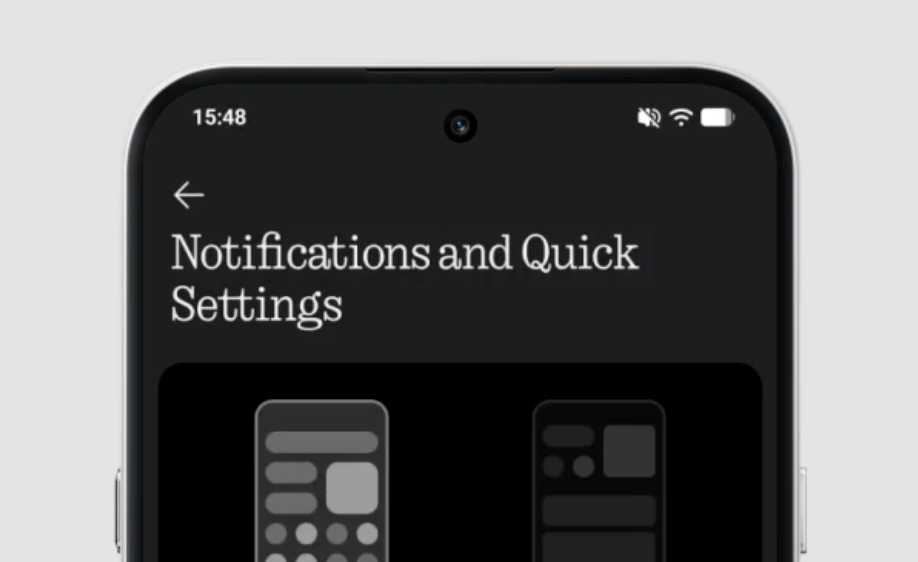
The status bar also appears to have received a redesign. There is a new battery icon, with Nothing seemingly changing it again after introducing a redesigned battery icon with Nothing OS 4. Some of the other status bar icons have also been tweaked. The screen recording shows a new font as well (Geist Mono), although it is unclear whether this is part of the OS or simply used for the design mockup. In another screenshot showing the notifications and Quick Settings, the default Roboto font is still visible.
Separate Notifications and Quick Settings
Speaking of which, Nothing OS 5.0 finally adds the option to separate the Notification Center and Quick Settings into two distinct panels. Users can swipe down from the left side of the status bar for notifications and from the right side for Quick Settings.
This is another long-standing feature. Apple introduced the split Control Center and Notification Center approach years ago. On Android it has already become standard on HyperOS, ColorOS, One UI, Hello UI, XOS, OriginOS and most other major skins.
Until now, Nothing (along with stock Pixel UI) was one of the few remaining holdouts that kept everything in a single combined shade. The new dual-panel setup gives faster access to toggles without scrolling past long notification lists and brings Nothing OS in line with the rest of the industry.
What Else to Expect
Beyond these changes, Nothing OS 5.0 is shaping up to be the most visually ambitious update the company has shipped since Phone 1’s launch. The recent Nothing Gallery beta, which is built around the OS 5.0 design language, already gives a preview: live blur behind the navigation bar, redesigned Explore and Albums pages with rounded, distinctly-bordered cards, and icon-rich context menus replacing OS 4.1’s plain text lists. A dedicated HDR display toggle has also shown up in that beta.
System-wide, expect a font overhaul built around Geist Mono, redesigned volume sliders, and expanded lock-screen clock customisation. Nothing has repeatedly lagged behind OxygenOS and One UI on animation smoothness, and after what was, by most accounts, a fairly stagnant OS 4.0 cycle, this update needs to visibly close that gap rather than just talk about it.
ALSO READ: Nothing Confirms Nothing OS 5.0 Launch Date: Check Full List Of Compatible Devices Here
Rollout and Eligibility
Around ten Nothing and CMF devices are expected to be in line for Nothing OS 5.0, with Phone 3 and the Phone 4a series likely first in for beta testing. As expected, Phone 1, Phone 2, and CMF Phone 1 won’t be making the cut, all three have already hit end-of-life status.
Nothing hasn’t published an official changelog yet, and everything above outside the confirmed morphing status bar and the August 25 date is still teaser-and-leak territory. We’ll know exactly what’s real once the reveal goes live on August 25 at 11:00 BST (3:30 PM IST).

You can follow Smartprix on Twitter, Facebook, Instagram, and Google News. Visit smartprix.com for the latest tech and auto news, reviews, and guides.