
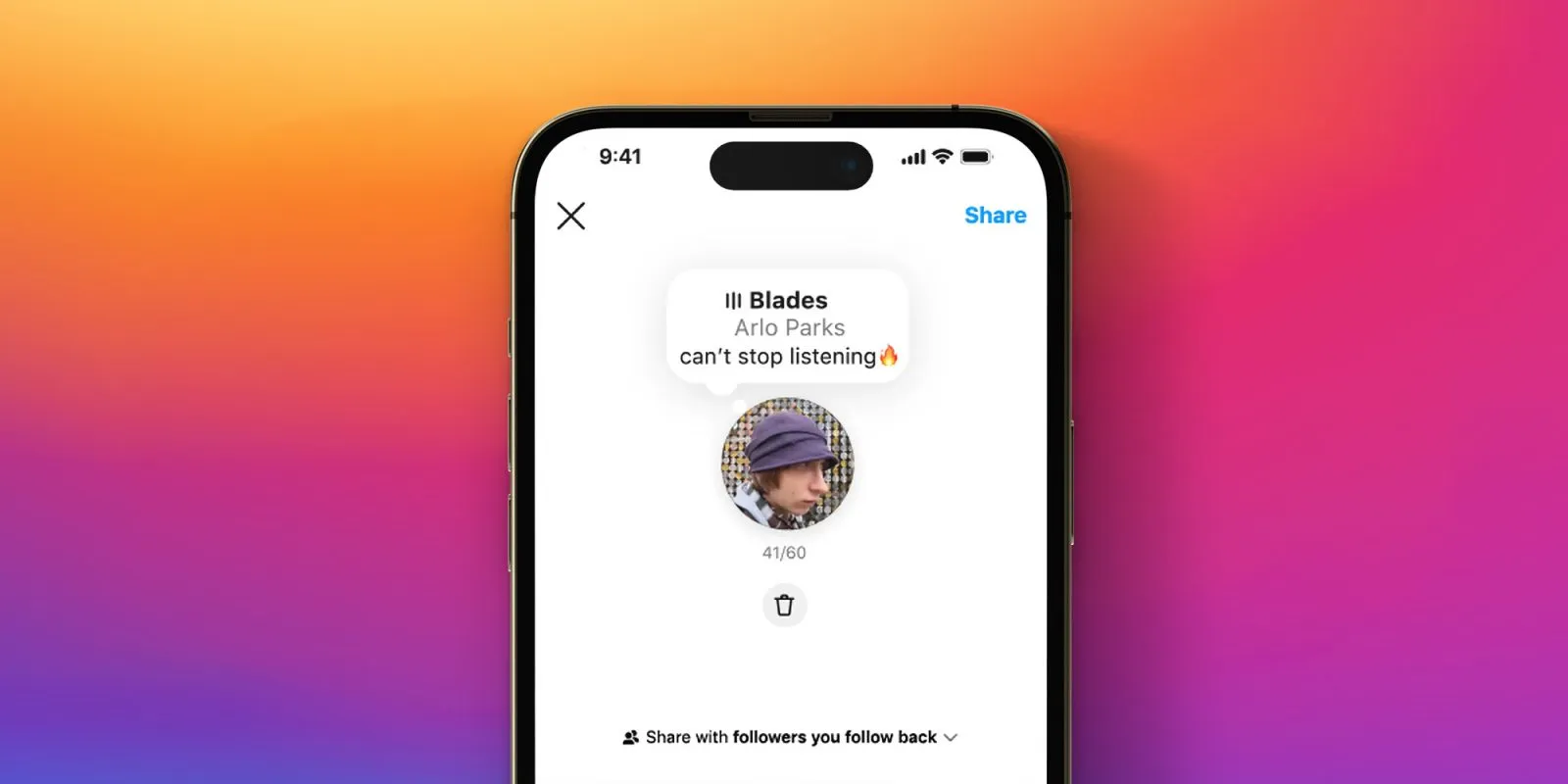
How to Add Music Clips to Your Instagram Notes

Main Image
  • Like
  • Comment
  • Share

The CEO of Meta, Mark Zuckerberg has announced a new interesting update for Instagram users. According to Zuckerberg, Instagram users can now add Music clips to their Instagram Notes. Up to 30 seconds of music can be added to notes along with a text message or an emoji. The Instagram Note with music will stay active for 24 hours.

What are Instagram Notes?

Instagram Notes is a simplified Instagram feature, visible in the chat (DM) section. It was first introduced in December 2022 and till now notes could include short text-based statuses and emojis. However, now IG will allow users to share popular songs and audio bits from the platform’s music library. The Notes allow you to post disappearing text and emojis and are limited to 60 characters only.

These Notes can be deleted or replaced anytime and the user can also select who can access these notes, including close friends and followers. The feature can be accessed on both Android and ios devices. Read on to know how music can be added to Instagram Notes.

ALSO READ: How to convert Jio Prepaid Number to Postpaid Number Without Visiting Physical Store

How to Add Music to IG Notes

Adding a 30-second music clip to your Instagram Notes is really very simple. Just follow these steps.

  • Open Instagram and go to the Chats Window.
  • Click on the ‘+’ icon in the top left corner that says “Your Notes”.
  • Select the “Add Music” option.
  • Choose the song you want to add.
  • Write the text and insert emojis if you want to.
  • Tap on “Share” to make your Instagram Note go live.

The song shared will not play on its own. Your friends will need to tap on your Notes update to listen to the snippet. A translation button is also expected to be added very soon to translate notes into different languages.

The feature is now available to everyone so go ahead and try out sharing notes with music. If you don’t find the option to add music to your IG Notes, then check the App Store or Google Play Store for Instagram Updates.

You can follow Smartprix on Twitter, Facebook, Instagram, and Google News. Visit smartprix.com for the most recent news, reviews, and tech guides.

Shivangi AgarwalShivangi Agarwal
Shivangi is a tech writer at Smartprix, where she covers consumer technology news with a focus on smartphones, wearables, laptops, and the evolving world of OTT streaming. Since joining the team in August 2021, she has written over 120 in-depth reviews, comparisons, and buying guides aimed at helping readers navigate the ever-changing tech landscape.

With a strong foundation in English literature and education, Shivangi brings clarity, insight, and a reader-first approach to every story. Her expertise lies in breaking down complex features into accessible, practical insights—whether she’s reviewing the latest smartphone or exploring trends in infotainment.

Shivangi holds a B.A. (Hons.) and M.A. in English, along with a B.Ed in English and Social Studies. She is based in Faridabad, India. You can follow her work on Smartprix or connect with her for tech-related queries.

Related Articles

Imagevivo X500 Review: A Camera Flagship That’s Easy to Recommend

A camera phone becomes particularly interesting when it can handle everything from everyday photography to distant wildlife shots, while keeping up with hours of video recording. The vivo X500 attempts exactly that, pairing a new Sony LYTIA 828 main sensor with a 64 MP ZEISS APO telephoto camera and support for a dedicated 200 mm …

ImageNotes by Instagram rolled out globally; Here’s how to create Notes on Instagram

Instagram, one of the most popular photos and videos sharing applications of all time, keeps experimenting with new features. Recently, the Meta-owned social media platform provided limited access to its Notes feature to some of the users on the platform. In a recent update, Instagram lead Adam Mosseri said that the feature is now available …

ImageHow to Add Music to your Instagram Feed Posts

Instagram has many useful features; one of the most popular options is to add music directly to stories, posts, and reels. Instagram offers a lengthy selection of tunes from its music library and the ability to import songs from other music streaming services, like Spotify. When Instagram rolled out this feature, the official statement from …

ImageInstagram Adds Four New Features for Stories and Apple Music

Instagram has rolled out four new features aimed at improving Stories and music sharing. The changes include direct Apple Music integration, the ability to edit Stories after publishing, a redesigned location sticker, and a simpler way to customize backgrounds when sharing photos that do not fit the vertical Story format. Instagram Lets Users Save Songs …

ImageInstagram’s Edits Finally Lands On iPad & Brings Custom LUT Import Along

If you’re someone who edits a multi-clip Reel on a smartphone, you and I share the misery: a cramped timeline, thumbs blocking the preview, and one accidental tap that ruins the entire edit. Instagram’s Edits app, though capable, has endured that limitation since launch.  However, an update on November 23, 2026, not only fixes the …

Discuss

Be the first to leave a comment.