



Canon PIXMA G2730 Multi Function Ink Tank Printer vs Canon PIXMA G2010 Multi Function Ink Tank Printer
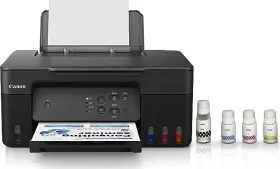
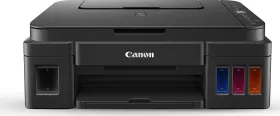
- Like
- Comment
- Share
General
| Country of Origin | China | |
| Brand | Canon | Canon |
| Model | G2730 | G2010 |
| Model Name | PIXMA | Pixma |
| Type | Multi Function Printer | |
| Printer Type | Inkjet | Inkjet |
| Scan Type | Flatbed | Flatbed |
| Suitable For | Home, Office | Home & Small Office |
| Display | LCD (3.04cm segment mono) |
Design and Body
| Dimensions | 416 x 177 x 337 mm | 445 x 135 x 330 mm |
| Weight | 6000 g | 6300 g |
| Active Noise | 47.5 dB |
Printer Features (Color)
| Resolution | 4800 x 1200 dpi | 4800 x 1200 dpi |
| Print Speed | 6 ppm | 5 ipm |
| Copy Speed | 23 cpm | 1.7 ipm |
Printer Features (Mono)
| Print Speed | 11 ppm | 8.8 ipm |
Scanner Features
| Optical Scanning Resolution | 600 x 1200 dpi | 600 x 1200 dpi |
| Scan Area | 216 x 297mm | |
| Scanning Speed (Color) | 3.5 ms/line | 3.5ms/line (300dpi) |
| Scanning Speed (Mono) | 1.5 ms/line | 1.5ms/line (300dpi) |
| Scan Method | CIS | CIS |
Features
| Functions | Print, Copy, Scan | Print, Copy, Scan |
| Duty Cycle | 3000 pages | |
| Print Speed (Photo) | 45 seconds | |
| Borderless Printing | Yes | Yes |
| Max Copies | 99 cpm | |
| Input Tray Capacity | 100 sheets |
Extra
| Sales Package | Printer, Power Cord, USB cable, Instruction Manual, 1 set of GI71S Cyan, Magenta, Yellow and Black ink bottles | Printer, Power Cord, USB cable, Instruction Manual |
| Operating Temperature | 5 - 35°C | 5 - 35°C |
| Compatible Cartridge (Color) | GI-71 (Dye-Based Ink / Cyan, Magenta, Yellow) | GI-790 Black, Cyan, Magenta, Yellow |
| Compatible Cartridge (Black) | GI-71 (Pigment Ink / Black), | GI-790 Black |
| Media Types Supported | Plain Paper, High Resolution Paper, Photo Paper, Glossy, Matte Photo Paper, Envelope, Photo Stickers | Plain Paper, High Resolution Paper, Photo Paper Plus Glossy II, Semi-Gloss, Glossy Photo Paper, Pro Luster, Matte Photo, Double-Sided Matte Photo Paper, Envelope |
| Media Size Supported | A4, A5, A6, B5, LTR, LGL, Executive, Oficio 2, B-Oficio, M-Oficio, Legal (India), Foolscap, F4, 10.16x 15.24cm (4 x 6in), 12.7x 17.78cm (5 x 7in), 17.78x 25.4cm (7 x 10in), 20.32x 25.4cm (8 x 10in), Envelopes (DL, COM10, C5, Monarch), Square (89 x 89 mm, 127 x 127 mm), Card Size (91 x 55 mm) | A4, B5, Letter, Legal, Executive, Foolscap, Indian Legal |
| OS | Windows 11 / 10 / 8.1 / 7 SP1, macOS 10.14.6 – 12 or later, Chrome OS | Windows 10, Windows 8.1, Windows 7 SP1 |
| USB Support | USB 2.0 | USB 2.0 |
| Wireless Support | No | No |
| Ethernet Support | No | No |
| Operating Humidity Range | 10 - 90% RH | 10 - 90% RH |
Power Features
| Power Requirements | AC 100 - 240 V, 50/60 Hz | AC 100 - 240V |
| Power Consumption | 15 W | 9 W |
| Power Consumption Manual Off | 0.1 W | 0.2 W |
| Power Consumption Stand by | 0.6 W | 0.6 W |
Warranty
| Warranty | 1 year | 1 year |
| Warranty Type | Manufacturer | Manufacturer |
| Warranty Service Type | Onsite |
Discuss
Related News
 Top 5 cost-effective black and white printers for office use to buy in 2026
Buying an office printer sounds simple until you start looking. If you work from home, you probably print a document now and then, and that’s it. Run a small business, and you’re suddenly dealing with invoice…
 Canon EOS R6V Review: The Gateway Into Going Pro
The Canon EOS R6V is Canon’s latest and most advanced camera in the EOS V-range of cameras that are focused on content creators. Now, the new Canon EOS R6 V sits between the Canon EOS R50 and the EOS R6 Mk II…
 Bambu Lab A2L 3D Printer Review: The A1 Finally Grows Up, and I Stopped Making Excuses
3D printing in India has moved beyond the hobbyist stage, and the Bambu Lab A2L proves it. Earlier budget printers made you handle manual bed leveling, PID tuning, and slicer settings before you got anything …
 9,000mAh, Cooling Fan and 200MP Camera: Is This India’s OnePlus 16R?
OnePlus launched the Ace 7 and Ace 7 Pro in China on October 29. Both phones pack 9000mAh batteries, 100W charging and dual-airflow cooling fans that cool the chipset and rear panel separately. This is the fi…
Related Printers
Related Searches
Related Comparisons

 Canon PIXMA G2010 Multi Function Ink Tank Printer vs Canon Pixma G3012 Multi Function Printer
 Canon PIXMA G2730 Multi Function Ink Tank Printer vs HP Smart Tank 520 Multi Function Inkjet Printer
 Canon PIXMA G2010 Multi Function Ink Tank Printer vs Canon PIXMA G3000 Multi Function Ink Tank Printer
 Canon PIXMA G2010 Multi Function Ink Tank Printer vs Epson EcoTank L3210 Multi Function Ink Tank Printer
 Canon PIXMA G2010 Multi Function Ink Tank Printer vs HP Smart Tank 580 Multi Function Inkjet PrinterCanon PIXMA G2730 Multi Function Ink Tank Printer vs Canon PIXMA G3000 Multi Function Ink Tank Printer