


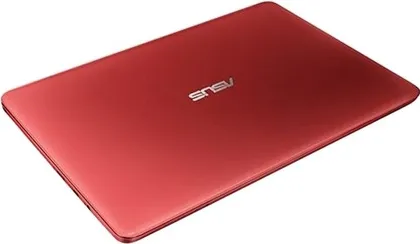
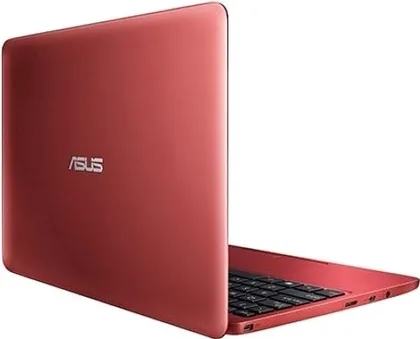
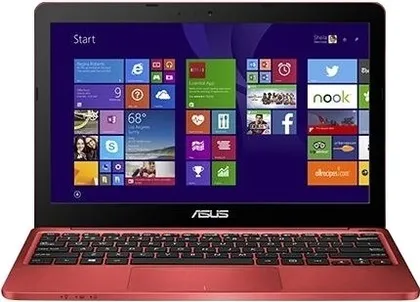


Asus EeeBook X205TA Notebook (4th Gen Atom Quad Core/ 2GB/ 32GB EMMC/ Win8.1)
Asus EeeBook X205TA Notebook (4th Gen Atom Quad Core/ 2GB/ 32GB EMMC/ Win8.1) is a Windows Laptop powered by 4th Gen Intel Atom Z3735F with 2 GB DDR3 RAM and 32 GB HDD. It has a 11.6 inches HD LED Backlit Ultra Slim Glare display. It uses Intel HD Graphics. Notable features include Ethernet, Card Reader, Headphone Jack, Webcam and HDMI.
- Compare
- Like
- Comment
- Share
Set an Alert to know when it comes back in stock.

Features
- 4th Gen Intel Atom Z3735F
- Quad Core
- 2 GB DDR3 RAM
- 32 GB Hard Disk
- Intel HD Graphics
- 11.6 inches, 1366 x 768 pixels
- Windows 8 OS
- 1 Year Warranty
Asus EeeBook X205TA Notebook (4th Gen Atom Quad Core/ 2GB/ 32G… Specs
- OS: Windows 8
- Utility: Everyday Use
- Thickness: 17.5 mmAverage
- 980 gLight
- 1 Year Warranty
- 11.6 inchesAverage
- 1366 x 768 pixelsAverage
- ~ 135 PPIAverage
- 16:9 Aspect Ratio
- 4th Gen Intel Atom Z3735F
- 4 x 1.33 GHz (Turbo Speed upto 1.83 GHz) Cores
- Quad Core
- 2 MB Cache
- Intel HD Graphics Graphics
- 2 GB DDR3 RAMSmall
- 32 GB HDDSmall
- Ethernet (LAN), HDMI, Multi Card Reader
- WiFi, Bluetooth v4.0
- 0.3 MP Camera
- Inbuilt Microphone
- 2 Cell Battery
Asus EeeBook X205TA Notebook (4th Gen Atom Quad Core/ 2GB/ 32G… Prices


User Reviews

A Sheer Powerhouse in small dimension
Finally I decided to review the product after using it thoroughly for 5 months. From the previous reviews the prospect looked good and purchased it. And it has never let me down. It can literally process anything you throw at it. Pros: 1> Light weight. I can carry it around it doesn't add to the extra weight. 2> Powerhouse. I run my business of it and it has become an asset for me. I run movies[HD], play games, process photographs except for the daily heavy Office use and Internet surfing without any hiccups. 3> THE MOST AMAZING part is that Microsoft has upgraded the OS to win 10 for free. The upgrade was a boon for the machine. Now it runs even faster with faster booting[around 5 secs]. CORTANA runs perfect on the machine and the issue with the trackpad has been resolved with the upgrade. Memory management improved considerably. 4> The look and feel of the device is great. The chick let key pad works fine. 5> the sound is loud and with the OS upgrade the quality has improved considerably. 6> Office 365 bundle works great! CONS: 1> It would have been really great for ASUS to equip it with larger memory space though if you use external HD you should be fine. 2> There have been complaints of the surface being finger print magnet. I strongly recommend to purchase the white model as it does not catch the prints that often. 3> the screen panel could have been more thinner. 4> Expect to see a touch screen version soon! This machine is simply amazing. Go for it. Worth every rupee spent.
Read More on Flipkart →A good product overall
I got this machine yesterday. Overall it seems to be good. There was a review written about the office 365, but it comes with a product key in the manual which needs to be activated. But I was having a problem with the internet security. My internet security was giving a notification that it is gonna expire in 3 days. Need to rectify this issue. I bought a blue colour. But if you are looking for blue color as shown in the image then you are wrong. This blue is quite dark, therefore not the blue shown in the image. Overall laptop is good. Buyers please do not expect to perform as other high performance laptop. This is good only for browsing,office and movies. But, this laptop looks super sexy.
Read More on Flipkart →Discuss
2 CommentsRelated News
 I Went Inside ASUS’ Design Studio at COMPUTEX 2026. Here’s Why Premium Laptops Are No Longer Just About Specs
At COMPUTEX 2026, every company pushed the idea that AI will shape the next generation of PCs. But when I visited the ASUS Design Center in Taipei, I saw something different. Inside, industrial designers talk…
 The Era of Cheap Laptops is Over. Here is ASUS’s Plan to Ease the Pain
Nobody likes that laptop prices are rising. ASUS isn’t pretending otherwise. Instead, the company is being unusually direct about what buyers face and has a plan to make things easier. “We do not expect price…
 Exclusive: ASUS is Bringing the World’s First Dual OLED Gaming Laptop to India
Get ready, Indian gamers and creators. According to trusted industry insider Yogesh Brar, ASUS is gearing up to bring an absolute beast of a machine to the Indian market. Billed as the world’s first dual OLED…
 Asus Puts A Massive 240Hz 4K Mini-LED Screen on the 2026 ROG Strix Scar 18 at Computex
Asus showed off the ROG Strix Scar 18 at Computex 2026, highlighting its top gaming laptop. It runs on up to an Intel Core Ultra 9 290HX Plus processor and an Nvidia GeForce RTX 5090 Laptop GPU, so you get pl…
 Nothing OS 5.0 Features Teased Ahead of Launch
Nothing is teasing Nothing OS 5.0 ahead of its official presentation on August 25 at 11:00 BST. The update is based on Android 17 and continues the brand’s minimalist, glyph-focused design language while addi…
Related Laptops
Related Searches
Compared With

 Acer Nitro V 15 ANV15-52 Gaming Laptop (13th Gen Core i5/ 16GB/ 512GB SSD/ Win11/ 8GB RTX5050) vs Acer ALG AL15G-53 Gaming Laptop (13th Gen Intel Core i7/ 16GB/ 512GB SSD/ Win11/ 6GB RTX 3050 Graphics)
 Asus TUF F16 (2026) FX688JHI-TU364WS Gaming Laptop (14th Gen Core i5/ 16GB/ 512GB SSD/ Win11/ 8GB RTX 5050 8GB Graphics) vs Asus TUF F16 (2026) FX608JMI-TU251WS Gaming Laptop (14th Gen Core i7/ 16GB/ 1TB SSD/ Win11/ 8GB RTX 5060 8GB Graphics)
 Dell XPS 13 2026 Laptop (Intel Core 5-320/ 8GB/ 512GB SSD/ Win11) vs Dell XPS 9345 AI Laptop (Snapdragon X Elite/ 16GB/ 512GB SSD/ Win11)
 Dell Inspiron 3520 15 Laptop (11th Gen Core i3/ 8GB/ 512GB SSD/ Win11) vs HP 15s-fq2717TU Laptop (11th Gen Core i3/ 8GB/ 512GB SSD/ Win11 Home)
 Asus Vivobook 16 2026 X1607CA-MB349WS Laptop (Intel Core Ultra 5 225H/ 16GB/ 512GB SSD/ Win11) vs Asus Vivobook 16 2025 X1607CA-MB142WS Laptop (Intel Core Ultra 5 225H/ 16GB/ 512GB SSD/ Win11)
 HP Pavilion 16-af0069TU Laptop (Intel Core Ultra 5 125U/ 16GB/ 1TB SSD/ Win11) vs HP Victus 16-r1705TX Gaming Laptop (14th Gen Core i5/ 16GB/ 512GB SSD/ Win11 Home/ 6GB RTX3050 Graph)
Asus EeeBook X205TA Notebook (4th Gen Atom Quad Core/ 2GB/ 32G… Full Specs
| Model | 90NL0734-M04080 |
| Utility | Everyday Use |
| OS | Windows 8.1 (32-bit) |
| Dimensions | 286 x 193 x 17.5 mm |
| Weight | 980 g |
| Warranty | 1 Year Warranty |
| Type | HD LED Backlit Ultra Slim Glare Display |
| Touch | No |
| Size | 11.6 inches |
| Resolution | 1366 x 768 pixels |
| PPI | ~ 135 PPI |
| Aspect Ratio | 16:9 |
| Anti Glare Screen | No |
| Ethernet | Yes |
| WiFi | IEEE 802.11a/g/n |
| Bluetooth | v4 |
| USB Ports | No USB Port |
| HDMI | 1 x HDMI Port |
| Card Reader | 2-in-1 Card Reader |
| Headphone Jack | Yes |
| Security Lock Port | Yes |
| Camera | VGA Webcam, 0.3 MP |
| Keyboard | Chiclet Keyboard |
| Touchpad | Yes |
| Inbuilt Microphone | Built-in Microphone |
| Speakers | Yes |
| Sound | Built-in Speaker |
| Optical Drive | No |
| Processor | 4th Gen Intel Atom Z3735F |
| CPU Score | 10 out of 100 |
| Speed | 4 x 1.33 GHz (Turbo Speed upto 1.83 GHz) Cores |
| Cores | Quad Core |
| Cache | 2 MB |
| Brand | Intel |
| Series | Atom |
| Model | Z3735F |
| Generation | 4th Gen |
| GPU | Intel HD Graphics |
| Brand | Intel |
| RAM | 2 GB DDR3 |
| RAM Slots | 1 |
| Hard Disk Capacity | 32 GB |
| Battery | 2 Cell Battery |
| Adapter Type | 33 W AC Adapter |
| Sales Package | Laptop, Battery, AC Adapter |
6 months review of ASUS X205TA + OS change
What is it 1. It is portable LAPTOP where does it lacks 1. Speakers are weak (earphones /external speakers is a necessity) 2. keyboard layout is suitable for small/thin hands(I am using external keyboard) 3. because its sleek I feel its fragile too (not very heavy duty like full size laptop) 4. Office 365 is for one year only 5. No LAN Port(get a USB LAN port) what are the some best things about this laptop 1. Incredible battery backup(it has the latest ATOM Z series processor known for least power consumption) 2. It is fanless/ no heating 3. Very portable 4. runs latest and full version Of Windows 10 x86 5. Price : I got it for 13.5 k from flipkart what can it do 1. Coding ( c++, java ,HTML {yes it can do it} 2. Gaming (medium)(app store games run good)(dont expect it to run counter strike)(tekken 3, ballance, prime suspects can be played) 3. multimedia: Softwares Like: chrome, idm, vlc, MS Office PRO 2013 works fine(I am using Onenote exhaustively) 4. Windows apps can be installed like on windows Phone 5. Data sync : phone tablet laptop PC to Skydrive, one drive (Apple concept) 6. It runs full version of windows hence can runs full sized desktop applications 7. yes watching movie is also fun on it(ASUS Splendid technology) (remember: it gives 1.88 Ghz speed with turbo boost) what does it look like 1. 11.6 inch display gives it a looks like a tablet docked on a keyboard stand 2. very light, weighs less than a kg 3. small, sleek, portable, powerful, handy, useful How is Windows 10 on this laptop: 1. Initially looks like an extension of Win 8 2. It works perfectly fine on this laptop 3. Windows 10 drivers are available on Asus website 4. An option to revert back to old Windows 8.1 within 30 days period is there with Win 10 5. Upgrade to Window 10 can be done both ways Offline/Online. what ports does it have: 1. two usb ports(additional USB HUB may be required) 2. one micro SD card slot(I am using 16 GB card) 3. one HDMI port (it is micro HDMI) 4. single audio/microphone jack(no separate jack for mic) 5. custom charger port(it only works with this notebook) 6. No LAN Port(get a USB LAN port) (it also has an 'OK' webcam ) What are my specs 1. Windows 10 pro x86 2. Bios version 212 3. MS office 2013 Pro 4. Blue colored laptop (fingerprint magnet) Final Verdict: I am Computer-science student. I also own a core i5 laptop which i now use only for gaming It completes my all requirements (except gaming) My rating= 9.5/10 ============FOR ADVANCE USERS============ Can I change OS: >Yes and No What you need to know before OS change: 1. It is x64 based architecture (h/w), but for some cheap reason it only supports x86 OS 2. It has UEFI Boot system "NOT" MBR boot system new systems have UEFI(It gives fast boot and support to large HDD in terabytes) 3. It would only accept FAT32 formatted flash drives 4. Update BIOS to latest version 212/208 5. Asus provides supports (drivers) only to windows 8.1 x86/Windows 10 x86. (use driver booster to install drives for other OS) 6. To install OS from flash drive disable secure boot in BIOS setting 7. To boot from flash drive press escape while booting and select flash drive containing that OS 8. It would only accept Windows 8 x86/windows 10 x86 9. Win 7 x64 would install but would never boot. I have tried both version of Win 7 x86/x64 10.Linux can be installed (I myself have not tried it) # email me if you have any queries
Read More on Flipkart →