
TL;DR
- Smartprix just launched a real-time price comparison tool for quick commerce.
- You can compare prices for groceries, electronics, and mobile phones across Blinkit, Zepto, Swiggy Instamart, Flipkart Minutes, BB Now, and Amazon Fresh.
- The tool shows a cart-level table with the total cost per store, including all fees, and flags out-of-stock items.
- It’s free, live on the Smartprix website and app, and doesn’t require a login.
Quick commerce is fast. Ten-minute delivery is now standard on major apps. But price transparency is still missing. The same pack of paneer or phone charger can cost differently on each app, and prices change by the hour. Until now, you had to open four apps and rebuild your cart each time to see who was cheaper. Smartprix, already known for comparing phone and laptop prices, has now built a tool for quick commerce.
Why Do We Need Quick Commerce Price Comparison?
Quick commerce apps use dynamic pricing, so the same item can cost more or less depending on the app, demand, delivery slot, or promotions. Most people don’t compare prices at midnight when they want ice cream. Platforms use this with hidden delivery fees, markups, and checkout screens that make the real total hard to see. Without a tool to check prices instantly, shoppers just pay whatever the app shows them.
What Is Smartprix Quick Commerce Comparison?
Smartprix Quick Commerce Comparison is a free tool that shows the real-time total cost of your grocery, electronics, or mobile phone cart across several quick commerce apps at once. Instead of a one-off price check, it updates prices several times an hour and includes platform fees, delivery charges, and discounts, so you see the final cost, not just the sticker price. You’ll find it on the Smartprix website and app, using the same search interface as their phone and laptop comparisons.
How to Use Smartprix Quick Commerce Comparison
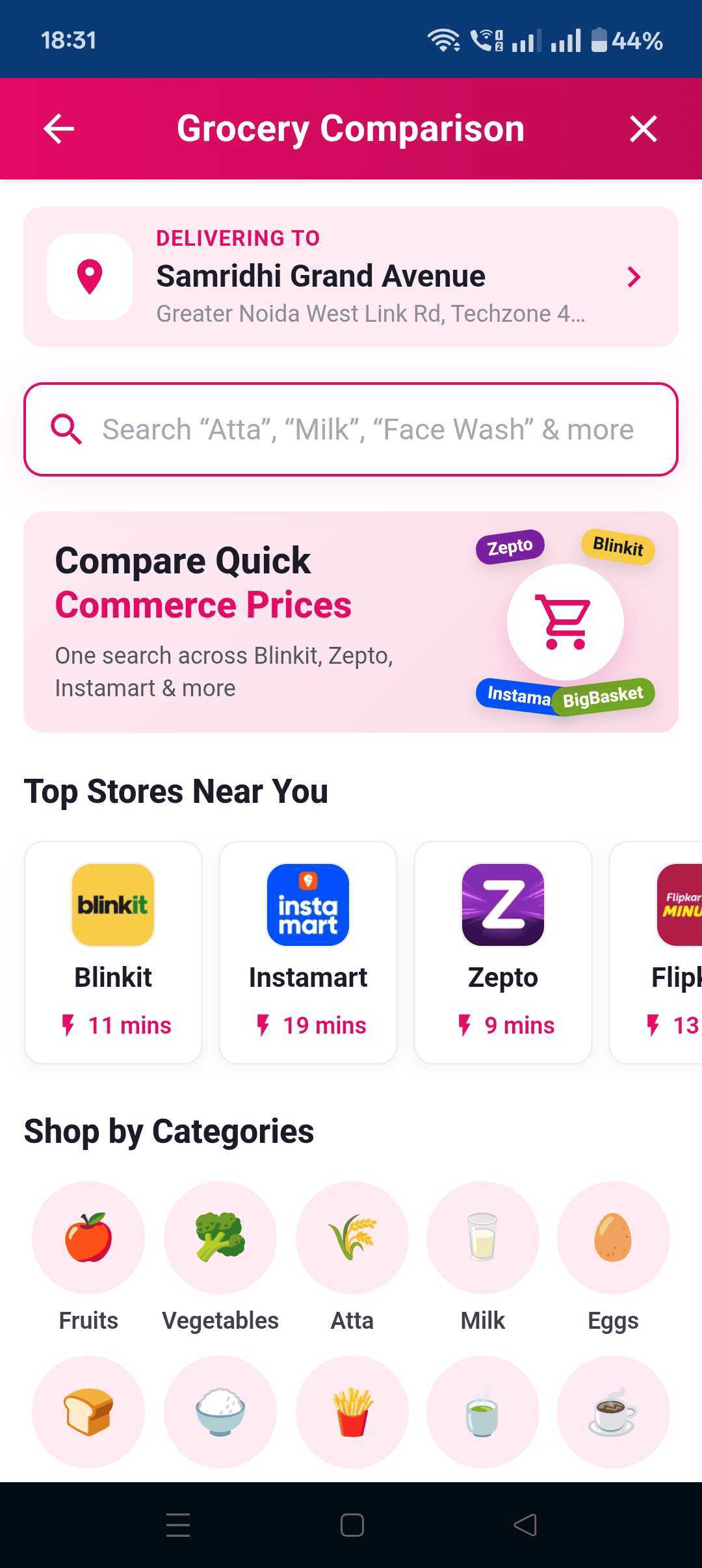
Step 1: Go to Smartprix Quick Commerce Comparison tool and use the search bar to look up a specific product, or browse by category (such as flour or rice) within the dedicated grocery section.

Add multiple items to your cart as you would in any shopping app.

Once your cart has items, the tool generates a comparison table with one column per store and a lead column showing the lowest possible price across all stores. Comparing six stores, for instance, produces a seven-column layout.
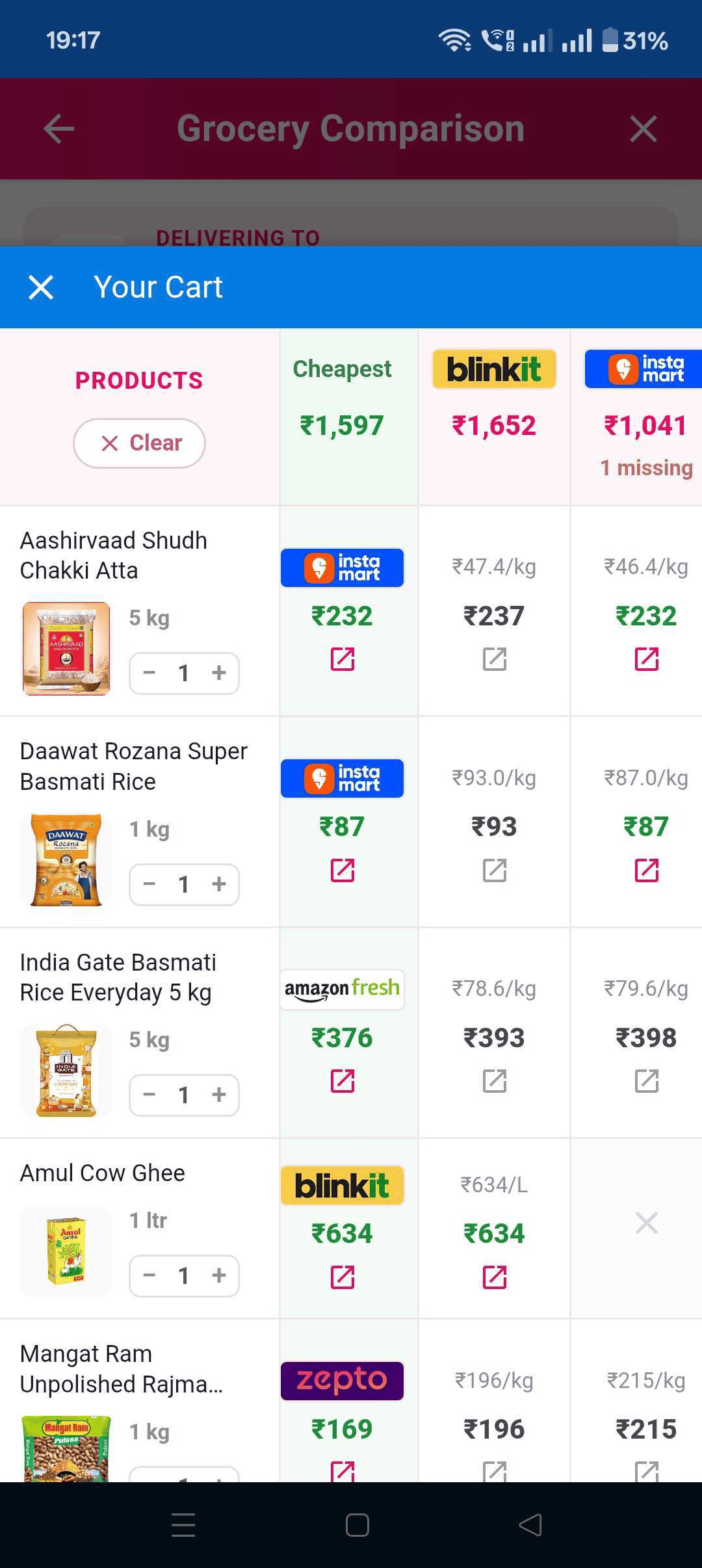
The table also flags which items in your cart are missing or out of stock at any given store, so you know in advance whether the cheapest total is actually achievable there.
DMart appears as a comparison option only where it’s available for your specific pincode, so results vary slightly by location.
The tool is built for mobile-first. You get dedicated views for the home page, search results, store comparisons, and your cart.
Key Benefits of the Smartprix Quick Commerce Comparison Tool
1. See the true final price, not the sticker price
Fees, delivery charges, and discounts are folded into the total shown per store.
2. Search and Compare Instantly
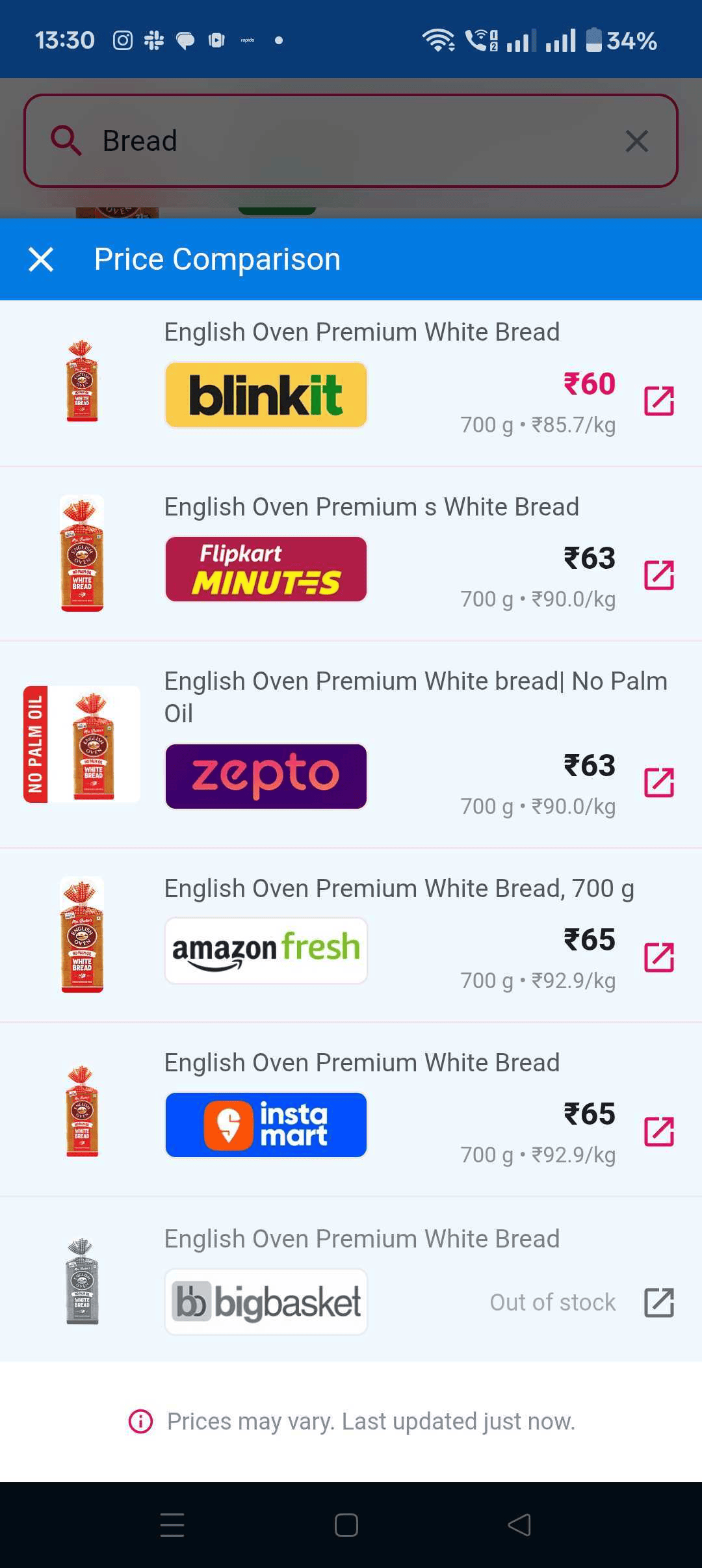
Easily compare prices for specific products using our search bar. The search results display an instant price comparison of the product by fetching data from each platform, allowing you to identify the cheapest option at a glance.
3. Compare an entire cart, not one item at a time
The multi-column table shows what your whole basket would cost on each platform at once, instead of forcing manual, item-by-item checking.
4. Avoid ordering from a store that can’t fulfill your cart
Missing-item flags prevent the frustration of choosing the cheapest store only to find an item is out of stock there.
5. Stay current with dynamic pricing
Because prices refresh multiple times an hour, the comparison reflects what you’d actually pay now, not a stale average.
6. One search habit for groceries and gadgets
The same search-first interface already used for phone comparisons now works for daily essentials, too.
Categories You Can Compare
Smartprix’s tool spans three broad categories:
- Groceries: staples like atta and rice, plus dairy, packaged foods, beverages, and personal care items.
- Electronics: chargers, earphones, and other small electronics sold through quick commerce.
- Mobile phones: including comparisons against standard e-commerce pricing on platforms like Amazon and Flipkart, so you can see whether paying more for 10-minute delivery is worth it.
Store coverage includes Amazon Fresh, Flipkart Minutes, Zepto, Blinkit, BB Now, and Swiggy Instamart in pincodes where it operates.

FAQ
What is Smartprix Quick Commerce Comparison?
It’s a free tool that compares real-time prices for groceries, electronics, and mobile phones across major quick commerce platforms, showing the total cart cost per store, including fees and delivery charges.
Which platforms does it compare?
Amazon Fresh, Flipkart Minutes, Zepto, Blinkit, BB Now, and Swiggy Instamart, with DMart included where available for a given pincode.
How do I use the tool?
Search for a product or browse by category, add items to your cart, and the tool generates a comparison table showing the lowest total cost and a cost breakdown by store, including any missing or out-of-stock items.
Are the prices shown in real time?
Yes, prices update multiple times an hour to reflect each platform’s dynamic pricing.
Is there a cost to use it?
No, it’s free and doesn’t require a login.
Does it work in every city?
Coverage depends on where each quick commerce platform operates and if it’s available for the user’s pincode.
You can follow Smartprix on Twitter, Facebook, Instagram, and Google News. Visit smartprix.com for the latest tech and auto news, reviews, and guides.