Image
EXPAND

How to remove ‘Device is HD Capable’ Notification from Status Bar

Main Image
  • Like
  • Comment
  • Share

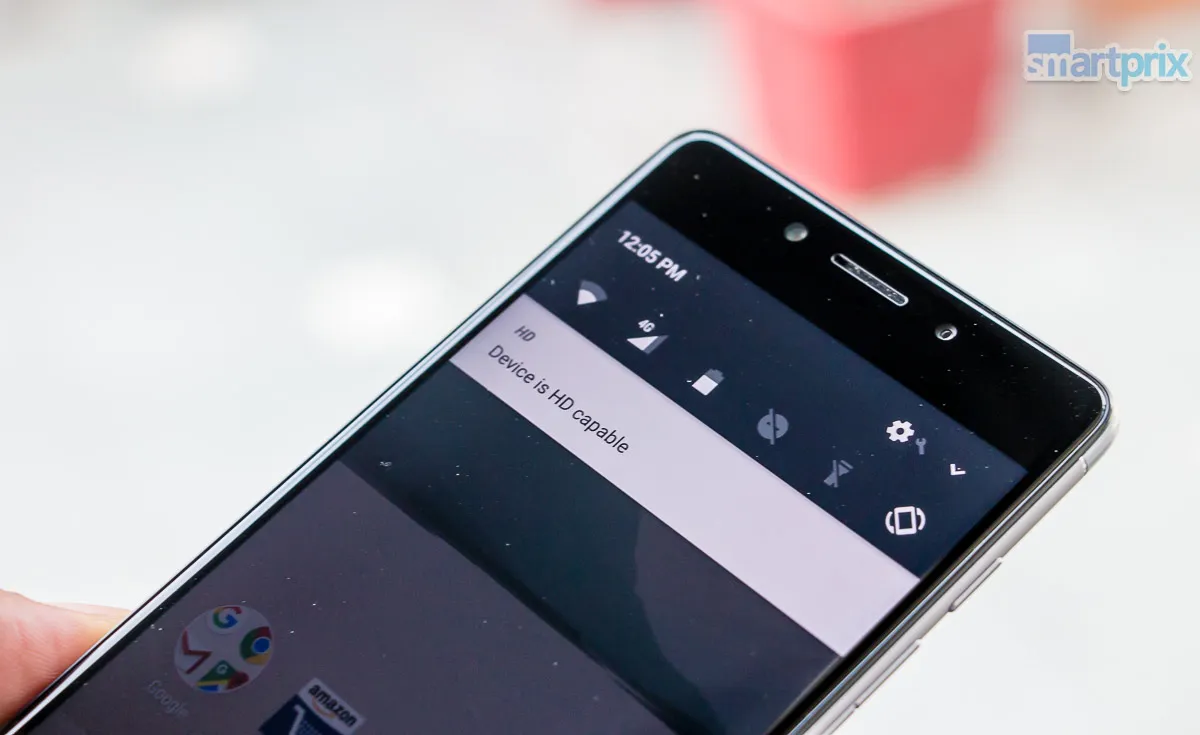
Certain stock Android phones show persistent ‘Device is HD Capable’ Notification in the status bar when you are using a 4G VoLTE enabled SIM card. This particular notification is extremely stubborn and there seems to be no way you could disable it. An ‘HD’ notification also appears in the status bar.

We recently ran in to the same on our 10.or smartphones (both E and G) and unfortunately, there is no way to permanently disable ‘Device is HD Capable’ notification without Root, but you can very well eliminate the HD icon from the status bar and lock screen, and also ensure that it will be displayed as the last notification, which means you won’t miss out on important ones due to this persistent notification being displayed up top. Here is how you can do it.

Also Read: How To Run the Same App in Split Screens On Android Nougat

Step 1: drop down the notification shade and long press the settings wheel on top to turn on System UI tuner.

Step 2: Now go to settings>>> System UI Tuner

Step 3: Select ‘Others’ and then select and turn on ‘Power Notification controls’. This will allow you to define the priority for each app’s notification.

Step 4: Now pull down the notification shade again and long press on the ‘Device is HD Capable’ notification

Step 5: Set its priority to 1 (because it just won’t go below that) and tap on ‘Done’.

After you are done, the ‘HD’ logo in the status bar will vanish. And the persistent notification will be displayed below all other notifications.

If you don’t need VoLTE, you can also disable Enhanced 4G LTE Mode from network settings to remove the notification.

Also, you could delete the storage and force stop the service to temporarily remove the notification without disabling 4G VoLTE service, but after a while, the notification will show up again.

How to completely Remove ‘Device is HD Capable’ Notification

To completely remove the notification, download Notification Off app from Play store. After granting root access to the app, just find org.codeaurora.ims package and uncheck it. Save changes and you are done.

Remove Device is HD Capable Notifications

This notification isn’t a problem on all VoLTE phones running stock Android but it does pop up every now and then in custom ROMs and phones from lesser known brands.

How To Voice Read Text Using S Pen on Samsung Galaxy Note 8

Deepak SinghDeepak Singh
Deepak Singh is a technology journalist and editor with over 13 years of experience covering consumer electronics. A computer engineering graduate, he has developed deep expertise in chipsets, displays, and hardware performance.

Over the past decade, Deepak has reviewed more than 700 products, including smartphones, laptops, TVs, and audio gear. He currently leads the editorial team at Smartprix, focusing on accurate, useful, and hands-on tech reporting.

When he’s not testing new devices, Deepak enjoys reading and spending time with his family.

Related Articles

ImageSamsung Is Reshuffling Its Entire Foldable Lineup Because Apple’s Foldable iPhone Is Coming

Samsung is making one of the most important structural changes to its foldable lineup in years, and believe me, the timing is not a coincidence. The Cupertino giant Apple is widely expected to launch a foldable iPhone later in 2026; whether it be called the iPhone Fold or the iPhone Ultra is a completely different …

Image22 Samsung One UI Tips, Tricks, and Hidden Features

Samsung’s OneUI is undoubtedly one of the best Android skins as of today and it has been further refined with its third iteration. The software has a clean design, has been optimized for comfortable one-hand use, has loads of slick animations, and quite a few new useful features. In fact, many OEMs are now taking …

ImageApple to change iPhone 14 Pro always-on display similar to Android Style

Apple iPhone 14 Pro and iPhone 14 Pro Max users will soon have more functional options for managing their device’s always-on display. According to reports, the Cupertino-giant is working on a new software update that will allow users to remove their wallpaper and notifications. It will, however, only be made available to beta and developer …

ImageForget The Chromebook: Google’s New Googlebook Is Built Entirely Around Gemini Intelligence

About fifteen years ago, Google launched the Chromebook, a new category of devices built for cloud-based workflows that required relatively lighter hardware but helped users get a capable machine at a very reasonable price. The browser-first device found its way into schools, offices, and homes around the world.  Also Read: From Grocery Lists to Custom …

Image2026 Mercedes-Maybach S-Class Facelift Debuts Globally: V8, V12, & Bespoke Luxury Redefined

Mercedes-Benz has pulled the wraps off the most comprehensively updated Maybach S-Class (facelift) in the nameplate’s 105-year history. The 2026 edition arrives with sweeping design changes, a cutting-edge tech overhaul, and two very capable engine options. It wouldn’t be a stretch to say that the 2026 S-Class raises the bar for ultra-luxury motoring. So, without …

Discuss

3 Comments
User
Kizzie Devenny
Anonymous
5 years ago

HI Good

Reply
User
Hashi
Anonymous
5 years ago

Wish there was a donate button for this information. This worked. ! Ok i can do one favour for you. Ill turn off my adblock ad click one of your ad 🙂 . Nice job

Reply
User
meet
Anonymous
7 years ago

lol it took me 7 seven sec to remove it! without anything

Reply