How to get Microsoft News Bar on your Windows 10 desktop

Main Image
  • Like
  • Comment
  • Share

We all crave for information because it makes us fluent and aware of life and the world in general. It is the content of our communication and driver of socialization. But, with the hyper-tasking and a busy-as-bee life, we look for brief and brisk access to a timely dose of “What’s happenin’ around?” The newly launched Microsoft News Bar is your quick fix.

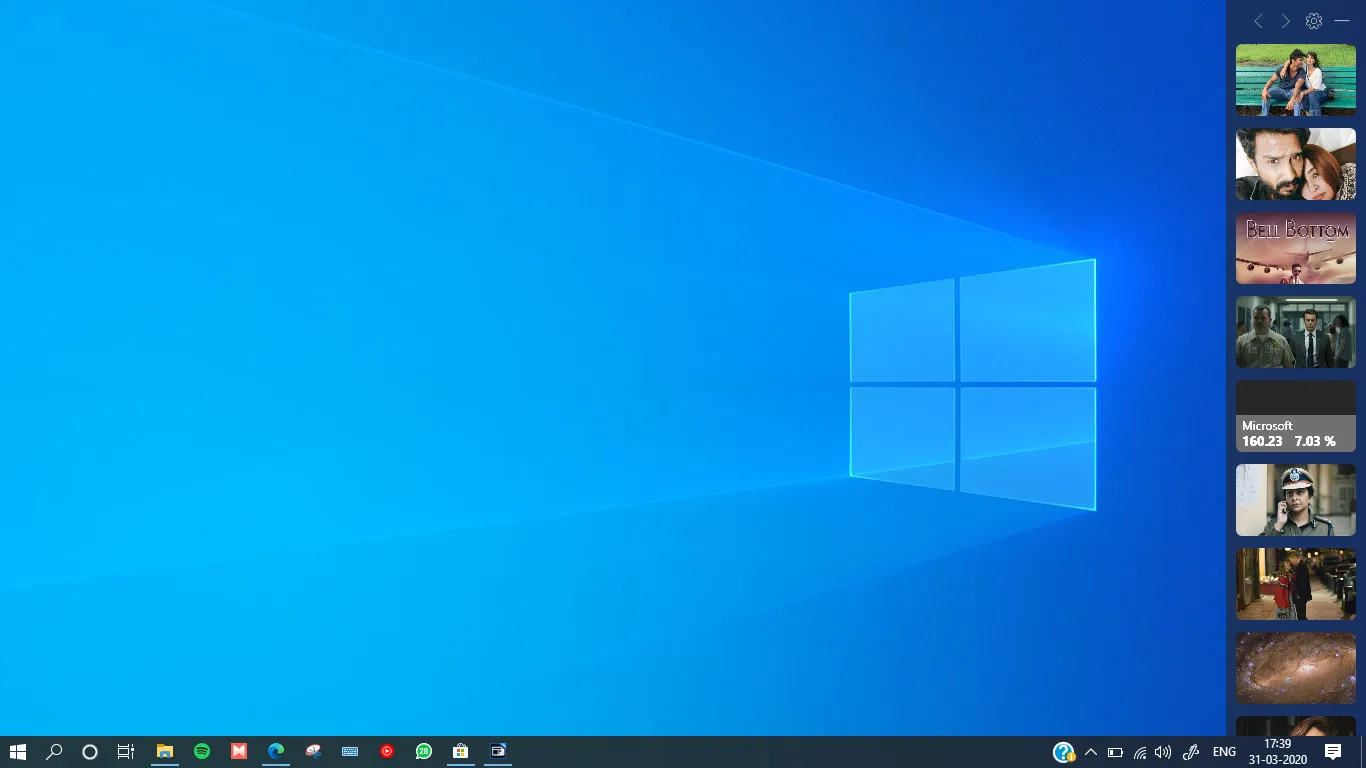
Microsoft News Bar is a new app, that lets you keep track of the latest news and stocks right from your desktop. It looks like a widget that consumes a stripe on your Windows 10 desktop. It can be placed on the left, right, top or bottom position.

So, without further ado, let’s download, install and set it up.

How to Install and Setup Microsoft News Bar on your Windows 10 Desktop

How to Get News Bar on The Windows 10 Desktop

The app is currently in beta and if you try to download it from the Microsoft Store, it will probably get an error that says the app is currently not available. Follow these steps to download Microsoft News Bar on a Windows 10 PC:

1. First of all, visit this link to the Microsoft.com, wherein you’ll see the app.

How to Get News Bar on The Windows 10 Desktop

2. Now, click on the 3-dot menu right next to the blue button. Then, tap on the Add to the Cart and followed by Checkout on the next page. Don’t worry, it’s free and nothing will be deducted.

ALSO READ: How to install any website as a Progressive Web App

3. Next up visit this link to install the app.

How to Get News Bar on The Windows 10 Desktop

4. Once you install, launch the News Bar. You will see both the widget as well as the settings window.

5. You can customize the appearance, location and a few more things from these settings. If you choose Text visualization, the Bar will have a wide and detailed view.

ALSO READ: How to do an Incognito Search directly from Google Bar on your phone home screen

“Microsoft’s Windows News Bar works just like the Windows Taskbar. It’s there when you need it, where you need it and how you need it. Customize its appearance in settings to find the experience that’s just right for you. If you want to focus, don’t worry, you can minimize the News Bar at any time and then bring it back when you’re ready for it again.”, states Microsoft.


Vasan G.S.Vasan G.S.
An inquisitive mind who spends a big chunk of the day keenly tracking every emerging detail and is responsible for quickly passing on important developments to Smartprix followers. He loves to stay in his bubble scripting his destiny involving amazing technology and people with good character, passion, and brilliance.

Related Articles

ImageEngland vs Argentina Live Stream: How to Watch the 2026 Fifa World Cup Semifinal Online for Free

England and Argentina face off in the second semifinal of the 2026 FIFA World Cup at Mercedes-Benz Stadium in Atlanta. This rivalry goes back decades, including the famous 1986 match with Maradona’s “Hand of God” goal. Both teams want a spot in the final, and history adds extra weight to this meeting. England is aiming …

ImageWindows 11 Keyboard Shortcuts: The Essential Guide to Boosting Your Productivity

In the digital age, time is of the essence, and efficiency in using your computer can significantly impact your productivity. Windows 11, the latest desktop operating system from Microsoft, comes with a host of keyboard shortcuts that can streamline your daily tasks. These shortcuts are designed to make your work life easier, helping you navigate …

ImageWindows 11: Features, Changes, Release Date, Download Link, Eligibility

At its “What’s next for the Windows” event, Microsoft finally announced the next version of Windows — Windows 11. Although this had leaked online already, there’s plenty new and perhaps undiscovered that was divulged by Panos Panay and the team. Windows 11 is much cleaner, secure, more accessible, and promises to be better at performance …

ImageWindows 10 Support Ends, But Extended Security Updates (ESU) Could Let You Use Your PC For Longer

After years of nurturing the beloved Windows 10 operating system, Microsoft is finally pulling the plug on it. Starting October 14, 2025, the company won’t support the OS, meaning it will no longer receive security updates, technical assistance, or feature updates. Also Read: Apple’s SVP Teases M5 MacBook As “Coming Soon” What Happens After Support …

ImageiQOO Neo 10 Is Getting a New Coat of Paint on April 30

iQOO is refreshing its Neo 10 lineup in India with new color options on April 30, 2026. While the internal hardware remains the same, the launch teased as an Amazon Special brings more understated black and silver finishes to a device previously known for its flashier Inferno Red and Titanium Chrome color options. The move …

Discuss

6 Comments
briancrane7679@gmail.com
@briancrane_dujolowe
2 years ago

My friend is windows 10

Reply