


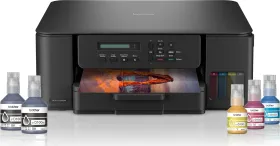
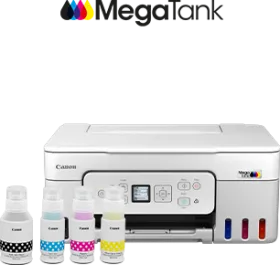
Brother DCP-T535DW Multi Function Ink Tank Printer vs Canon PIXMA G3780 Multi Function Ink Tank Printer
- Like
- Comment
- Share
General
| Brand | Brother | Canon |
| Model | DCP-T535DW | G3780 |
| Model Name | PIXMA | |
| Type | Inkjet | |
| Printer Type | Ink Tank | Inkjet |
| Scan Type | Flatbed | Flatbed |
| Suitable For | Home, Office | Home, Office |
| Display | 1 Line LCD | 3.429 cm (1.35 inch) Square LCD (Mono) |
Design and Body
| Dimensions | 390 x 148.5 x 343 mm | 416 x 177 x 363 mm |
| Weight | 7200 g | 6500 g |
| Active Noise | 53.5 dB | 47.5 dB |
Printer Features (Color)
| Resolution | 1200 x 6000 dpi | 4800 x 1200 dpi |
| First Print Time | 9.5 seconds | |
| Print Speed | 9 ppm | 6 ppm |
| Bit Depth | 24 bits | |
| Copy Resolution | 1200 x 1800 dpi | 3.2 ipm |
| Copy Speed | 4 cpm | 23 cpm |
Printer Features (Mono)
| First Print Time | 6 seconds | |
| Print Speed | 16 ppm | 11 ppm |
| Bit Depth | 8 bits | |
| Copy Speed | 11.5 cpm |
Scanner Features
| Optical Scanning Resolution | 1200 x 2400 dpi | 600 x 1200 dpi |
| Interpolated Scanning Resolution | 19200 x 19200 dpi | |
| Scan Area | 213.9 x 295 mm | |
| Scanning Speed (Color) | 3.35 - 4.3 sec | 3.5 ms/line |
| Scanning Speed (Mono) | 1.5 ms/line | |
| Scan Method | CIS |
Features
| Functions | Print, Copy, Scan | Print, Copy, Scan |
| Duty Cycle | 3000 pages | |
| Print Speed (Photo) | 45 seconds | |
| Auto Document Feeder | Manual | |
| Borderless Printing | Yes | Yes |
| Copier Resize | 25% to 400% | 25 - 400% |
| Max Copies | 99 cpm | |
| Max Multicopy | Up to 99 pages | |
| Output Tray Capacity | 50 sheets | |
| Input Tray Capacity | 150 sheets | 100 sheets |
| Input Tray Type | Manual Feed Slot / Multi-Purpose Tray |
Extra
| Sales Package | Printer, Power Cable, Installation CD, 1 Set of Ink Bottles (Black, Cyan, Magenta, Yellow) +1 Black Ink Bottle | Printer, Power Cord, USB cable, Instruction Manual, 1 set of GI71S Cyan, Magenta, Yellow and Black ink bottles |
| Operating Temperature | 10°C to 35°C | 15 - 30°C |
| Compatible Cartridge (Color) | Ink Bottle -BT5000CMY Approximate Yield 5000 | GI-71 (Dye-Based Ink / Cyan, Magenta, Yellow) |
| Compatible Cartridge (Black) | Ink Bottle -BTD60BK Approximate Yield 7500 | GI-71 (Pigment Ink / Black), |
| Media Types Supported | Plain, Inkjet, Glossy(cast/resin), Recycled | Plain Paper, High Resolution Paper, Photo Paper, Glossy, Matte Photo Paper, Envelope, Photo Stickers |
| Media Size Supported | A4, Letter, Legal, Mexican Legal, India Legal, Folio, Executive, B5, A5, B6, A6, C5 Envelope, Com-10, DL Envelope, Monarch, Photo(10x15cm/4x6"), Photo-L(9x13cm/3.5x5"), Photo-2L(13x18cm/5x7"), Index card(13x20cm/5x8") | A4, A5, A6, B5, LTR, LGL, Executive, Oficio 2, B-Oficio, M-Oficio, Legal (India), Foolscap, F4, 10.16x 15.24cm (4 x 6in), 12.7x 17.78cm (5 x 7in), 17.78x 25.4cm (7 x 10in), 20.32x 25.4cm (8 x 10in), Envelopes (DL, COM10, C5, Monarch), Square (89 x 89 mm, 127 x 127 mm), Card Size (91 x 55 mm) |
| OS | Windows, Mac & Linux | Windows 11 / 10 / 8.1 / 7 SP1, macOS 10.14.6 – 12 or later, Chrome OS |
| USB Support | USB 2.0 | USB 2.0 |
| Wireless Support | Yes | No |
| Ethernet Support | No | No |
| Operating Humidity Range | 10 - 80% RH | |
| Internal Memory | 128 MB |
Power Features
| Power Requirements | AC 220 - 240V 50/60Hz | AC 100 - 240 V, 50/60 Hz |
| Power Consumption | 18 W | |
| Power Consumption Manual Off | 0.15 W | 0.1 W |
| Power Consumption Stand by | 2.5 W | 0.8 W |
Warranty
| Warranty | 1 year | 1 year |
| Warranty Type | Manufacturer | Manufacturer |
Discuss
Related News
 Canon EOS R6V Review: The Gateway Into Going Pro
The Canon EOS R6V is Canon’s latest and most advanced camera in the EOS V-range of cameras that are focused on content creators. Now, the new Canon EOS R6 V sits between the Canon EOS R50 and the EOS R6 Mk II…
 Canon India to More Than Double Printing Retail Network: 10,000+ Retailers, 700 Cities by 2027
Canon India will expand its consumer printing retail network to more than 10,000 active retailers across 700 cities by the end of 2027, more than doubling its current reach, the company announced Wednesday. T…
 The Tech Inside: BMW X3 30i M Sport Pro – Equal Parts Functional, Equal Parts Fun!
There is the saying, “Cars nowadays are more like gadgets on wheels,” which makes it all the more important to understand how good, bad, functional, ergonomic, and useful the tech inside cars is. This is wher…
 I Visited a vivo Service Center Expecting a Repair, Not a Reason to Trust the Brand More
I took my vivo V60e in recently because the speaker had started crackling during calls, and I walked in with fairly low expectations. My last repair experience at a different brand’s service center left me wi…
Related Printers
Related Searches
Related Comparisons

 Brother DCP-T535DW Multi Function Ink Tank Printer vs Epson EcoTank L3366 Multi Function Ink Tank Printer
 Canon PIXMA G3780 Multi Function Ink Tank Printer vs Canon PIXMA G4780 Multi Function Ink Tank Printer
 Brother DCP-T535DW Multi Function Ink Tank Printer vs Brother DCP-T436W Multi Function Ink Tank PrinterCanon PIXMA G3780 Multi Function Ink Tank Printer vs Brother DCP-T436W Multi Function Ink Tank Printer
 Canon PIXMA G3780 Multi Function Ink Tank Printer vs Canon Pixma G3010 Multi Function Ink Tank Printer
 Brother DCP-T535DW Multi Function Ink Tank Printer vs Canon PIXMA G3770 Multi Function Ink Tank Printer