Although routers may not be the most thrilling PC accessories, they play a crucial role in connecting devices to the outside world. Therefore, selecting the right router for your needs is crucial to ensure optimal performance and avoid any performance issues.
Synology, a company known for producing the best NAS enclosures, also produces routers. The latest addition to their lineup is the Synology RT6600ax, a Wi-Fi 6 router that supports the latest 5.9GHz band, providing additional bandwidth for all your wireless devices.
In this review, we’ll explore the features and specifications of the Synology RT6600ax, as well as conduct a few tests to determine whether this router is one of the best options for your needs.

Synology RT6600ax Specs
| Specifications | Synology RT6600ax |
| Processor | Quad-core 1.8GHz |
| RAM | 1GB DDR3 |
| Antenna | 4×4 MIMO Omni-directional high-gain dipole (5GHz) 2×2 MIMO Omni-directional high-gain dipole (2.4GHz / 5GHz) |
| LAN ports | 3x 1Gb (Dual WAN), 1x 2.5Gb |
| WAN ports | 1x 1Gb, 1x 2.5Gb (Dual WAN) |
| USB ports | 1x USB-A 3.2 Gen 1 (5V, 0.9A) |
| Wi-Fi standard | IEEE 802.11a/b/g/n/ac/ax: 5GHz-1: 4800Mbps, 5GHz-2: 1200Mbps, 2.4GHz: 600Mbps, 4×4 160MHz, simultaneous tri-band Wi-Fi |
| Encryption | WPA/WPA2-Personal, WPA/WPA2-Enterprise, WPA2/WPA3-Personal, WPA3-Personal/Enterprise, Wi-Fi Enhanced Open (OWE) |
| Dimensions | 175mm x 320mm x 200mm |
| Weight | 1.6kg |
| Warranty | 2 years |
Synology RT6600ax router review: Design
Design may not be the primary reason why people buy routers, but manufacturers often incorporate some design elements nonetheless. Synology’s RT6600ax is a prime example of this. Although it is a simple black plastic slab, it features a sleek finish with plenty of vents and no distracting RGB lighting.
The front of the router has seven status LED lights for activity and diagnostics, with subtle Synology branding. On the right side, you’ll find WPS and Wi-Fi mode toggle buttons. Meanwhile, the back of the router boasts three 1Gb LAN ports, a single 2.5Gb WAN/LAN port, a single 1Gb WAN port, a single USB-A 3.2 port, DC input, and reset and power buttons.
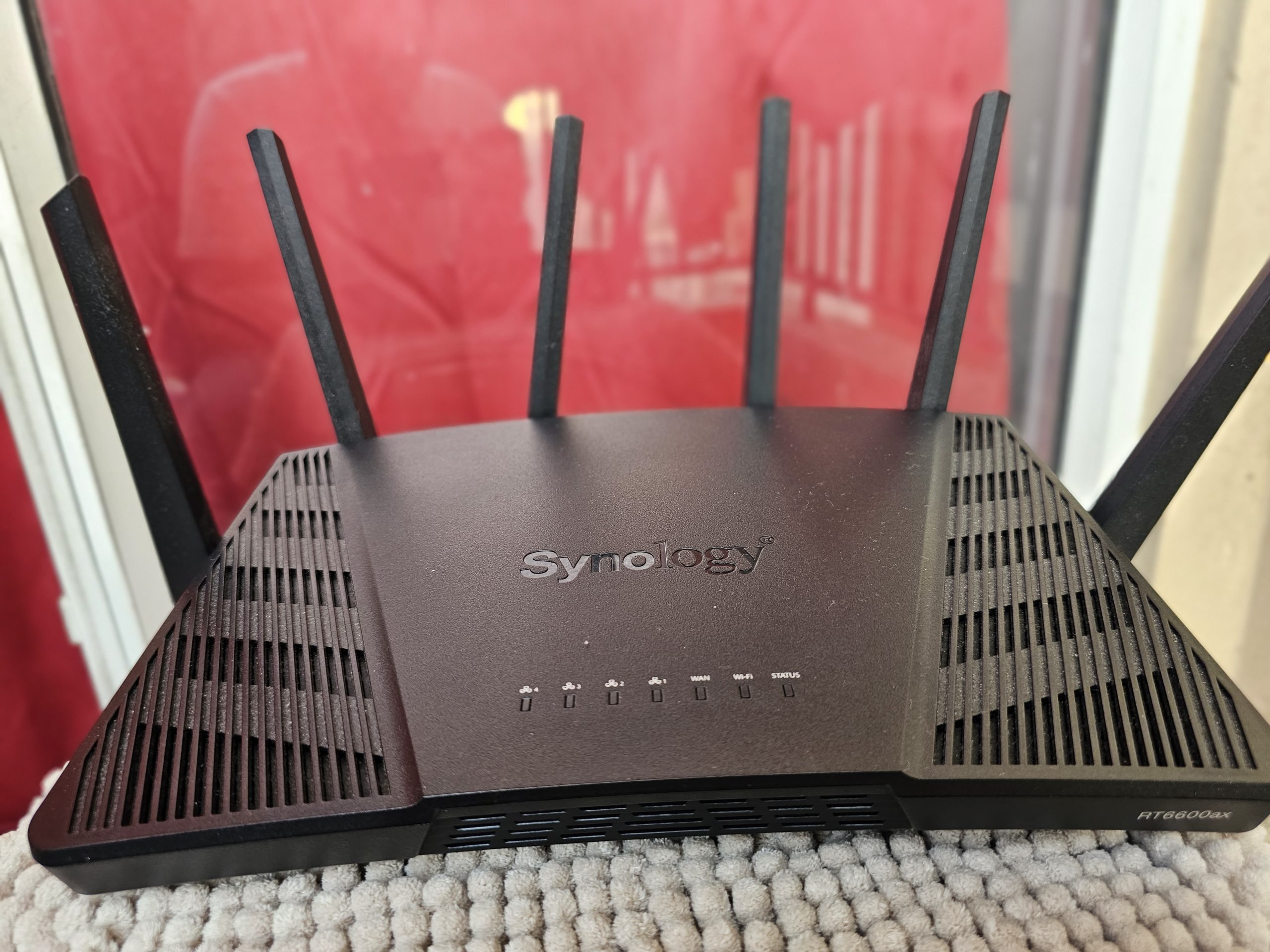


With six adjustable yet non-removable antennas, the Synology RT6600ax provides maximum signal strength and coverage throughout your home or office. As a tri-band AX6600 router, this device can achieve data transfer speeds of up to 4,800Mbps and 600Mpbs on 5GHz and 2.4GHz bands, respectively. Additionally, there’s a second 5GHz channel with a capacity of 1,200Mbps.
The RT6600ax is equipped with various features, including Wi-Fi 6 functionalities such as Orthogonal Frequency Division Multiple Access (OFDMA), 160MHz channel bandwidth, MU-MIMO simultaneous data streaming, WPA3 encryption, and beamforming for improved performance. Furthermore, the router supports 5.9GHz channels.
But the Synology RT6600ax doesn’t stop there – it also comes with the company’s highly acclaimed SRM (Synology Router Manager) operating system. Version 1.3 is available for this model, providing users with even more features and options.
Synology RT6600ax router review: Initial Setup
Setting up the Synology RT6600ax for the first time is a breeze. You can choose to install the router via the SRM web interface on a PC or through the DS Router mobile app (available for iOS and Android). Both methods yield the same results, and you can select whichever one is more convenient for you.


Similar to the DSM OS used in Synology NAS enclosures, SRM boasts a desktop OS-like interface that will feel familiar to anyone who uses Windows, macOS, or Linux. It’s an excellent tool that makes managing the RT6600ax painless, from managing network connections to configuring your own VPN.
You can create profiles for different individuals, which allows for web filtering and parental control configuration. The Network Protection feature is also noteworthy, as it not only shows how long a client has been connected but also helps block access to known malicious websites and protects against malware attacks.
Synology RT6600ax Review: performance
To get the best performance out of your router, it is recommended to use RJ45 ports that support 1Gbps or 2.5Gbps. The Synology RT6600ax has four LAN ports, with one capable of handling up to 2.5Gbps, making it perfect for heavy local usage, such as with a Synology NAS enclosure. I tested both connections and achieved the maximum allowed by either standard.
Powering everything inside the router is a quad-core processor running at 1.8GHz with 1GB of DDR3 RAM to play with. There’s also a considerable amount of flash memory for application storage. When testing wireless use, I used an app on my daily driver Samsung Galaxy S23 Ultra to measure bandwidth at various distances both indoors and outside. The results were consistently strong, with a reading of 851Mbps downloads and 835Mbps upload speed in the living room and 285Mbps download and 231 upload speeds outside the home in the lift lobby.
The Synology RT6600ax is a top performer in the 5GHz band, delivering consistently high speeds across multiple devices. What’s more impressive is that these results were achieved without testing the 5.9GHz frequency as it is still not available in India.
Not only did it excel in speed, but it also offered excellent range and proved to be stable and reliable during long-term usage. Even though the firmware was unstable during most of the testing period, there were no downtime or glitches in the four months it was used. In summary, the RT6600ax is one of the fastest Wi-Fi 6 routers available in the market today.
Verdict: Should you buy the Synology RT6600ax?
If you’re in the market for a high-performance Wi-Fi 6 router, the Synology RT6600ax is an excellent choice. It offers impressive coverage and speed, making it a great upgrade option from older Wi-Fi ac routers.The router is highly configurable and extensible, so you can start with one unit and add mesh points later on if needed. In addition, it features a variety of security features and easy-to-use parental controls, making it a great choice for families.
One of the standout features of the RT6600ax is its ability to function as a NAS server, allowing you to stream content from an external hard drive to devices on your network. This, combined with its fast Wi-Fi connectivity, makes it one of the best Wi-Fi 6 routers available today.
Pros
- Delivers excellent coverage
- Reliable Wi-fi 6 performance
- Easy to setup
- Extensive reconfigurability
- Robust parental controls
Cons
- No 10GbE LAN ports
- No Link Aggregation