


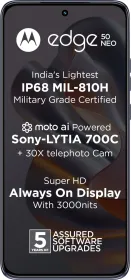
The Motorola Edge 50 Neo, launched in India last month, has made waves primarily due to its impressive pricing. For under ₹24,000, you’re getting features like an IP68 rating, a telephoto lens, an LTPO display, and even wireless charging—all of which are quite rare in this price range.
Further, the Edge 50 Neo is compact, which appeals to users like myself who prefer smaller, more manageable phones. Motorola has primarily been focusing on larger phones with curved displays this year, so it’s refreshing to see a flat display option.
The phone’s lightweight build is another appealing factor. But how does the Edge 50 Neo perform in daily usage? Are the cameras up to par? And what about battery life, especially considering its compact size?
In this review of the Motorola Edge 50 Neo, we’ll explore everything from camera performance to battery life, display quality, and its overall pros and cons. Let’s dive into it.
Motorola Edge 50 Neo Price & Availability
The Motorola Edge 50 Neo is available on Flipkart for ₹23,999 for the sole 8 GB RAM + 256 GB storage variant. It’s available in four different colors—Nautical Blue, Lattè, Grisaille, and Poinciana.
Pros
- IP68 water and dust resistance
- Compact and lightweight design
- LTPO OLED display with 120 Hz refresh rate
- Impressive camera hardware for the price
- Fast PD charging (68W)
- Good battery life (around 7 hours screen-on time)
- 5 years of OS updates
Cons
- Camera app can be slow
- Average low-light performance in ultra-wide & telephoto
- Oversaturation in photos
Motorola Edge 50 Neo Review: Specifications

Here are the specifications of the Motorola Edge 50 Neo:
- Display: 6.4” LTPO pOLED, 120 Hz, 3000 Nits peak, 1256 x 2760 pixels, 474 PPI, Corning Gorilla Glass 3
- SoC: MediaTek Dimensity 7300 chip (4x 2.5 GHz, 4x 2.0 GHz, Mali-G615 MC2)
- RAM: 8 GB LPDDR4X RAM
- Storage: 256 GB UFS 2.2
- Cameras:
- Main: 50 MP Sony LYT700C, 1/1.56”, f/1.8, OIS
- Ultra-wide: 13 MP GalaxyCore G313A2, 1/3”, f/2.2
- Telephoto: 10 MP Samsung S5K3K1 1/3.94”, f/2.0, 3x optical, OIS
- Front: 32 MP Samsung S5KJD1 1/3.1”, f/2.4
- Speakers: Stereo
- Battery and charging: 4,310 mAh, 68W wired PD, 15W wireless, reverse wired & wireless
- IP rating: IP68
- NFC: Yes
- Biometrics: Under display optical fingerprint scanner, 2D face unlock
- Weight: 171g
- Build: Vegan leather back, plastic frame
Motorola Edge 50 Neo Review: Unboxing

Unboxing the Motorola Edge 50 Neo is a delightful experience. As soon as you open the seal, you are presented with a beautiful fragrance. Also, the box is made of recycled material and is plastic-free.
Inside, you’ll find the Motorola Edge 50 Neo itself, a hard case (color-matched), a 68W USB-C PD charger, a USB-C to USB-C cable, and the SIM ejector tool. Basically, it has everything you need to get started.
Motorola Edge 50 Neo Review: Design & Build
The Motorola Edge 50 Neo is a compact device, featuring a 6.4” display and weighing only 171 grams, making it quite lightweight. It comes with Corning Gorilla Glass 3 protection, while the frame and back are plastic.
However, the unit I have has a silicon polymer or vegan leather back, which doesn’t feel particularly premium. The phone also includes a good-quality hard case, matching the phone’s color.
On the bottom of the device, there’s a USB Type-C 2.0 port, a primary speaker, a dual nano-SIM card tray, and the primary microphone. The right side houses the volume rockers and the power button, along with the secondary microphone. These buttons are quite small, and they can be difficult to press.


The top of the phone features a third microphone, and there’s no headphone jack. The camera module follows Motorola’s typical 2024 design language. The display is flat, so that eliminates accidental touches, while also making it comfortable to hold.
The phone is also IP68 certified for water and dust resistance, which is rare in this segment. It supports eSIM and comes in four color options—Nautical Blue, Lattè, Grisaille, and Poinciana. The one that I have is called the Nautical Blue.
Motorola Edge 50 Neo Review: Display

The Motorola Edge 50 Neo comes with a 6.4” LTPO pOLED that supports a 120 Hz refresh rate. It also has HDR10+ support and a peak brightness of 3000 Nits. The resolution of the display is 1220p or 1256 x 2760 pixels. This results in a pixel density of 474 PPI, making everything look sharp and crisp.
By default, the display is set to Vibrant tuning, which tends to make the colors look cooler and more saturated. However, switching to the Natural color setting gives me a more accurate and pleasant color balance. You can adjust this under the Display settings.
This being an LTPO display means it can dynamically adjust the refresh rate, lowering it when necessary to save battery life. In my usage, the display switched between 1 Hz, 10 Hz, 60 Hz, 90 Hz, and 120 Hz, depending upon what I was doing on my screen.
There’s also support for an Always-On Display (thanks to LTPO), which can be activated by enabling the Sleep display mode. As for eye strain, I haven’t experienced any discomfort, so PWM dimming doesn’t seem to be an issue here.
Motorola Edge 50 Neo Review: Speakers and Haptics
The speakers on the Motorola Edge 50 Neo are also decent. They provide clear sound with a bit of stereo separation, although there’s some imbalance between the top earpiece and the bottom speaker. The bass is present but not particularly strong, yet the overall sound quality is good for a device of this size.

The haptics on the Motorola Edge 50 Neo are decent, though not exceptional. Thankfully, they aren’t the cheap vibration motors found on some budget devices. For typing and basic interactions, the haptics are okay, but they don’t provide the best feedback you can find in this price range.

Motorola Edge 50 Neo Review: Software
The Motorola Edge 50 Neo comes with Hello UI, a software stream based on Android 14, which includes a bunch of AI-powered features and personalization options. Hello UI has seen significant improvements recently in terms of both smoothness and customization.

One of the features is the new Always-On Display (AOD) and customization options for fonts, themes, and wallpapers. Magic Canvas allows you to generate custom wallpapers by typing in a prompt, while Style Sync lets you match your phone’s wallpaper with your outfit by generating style suggestions based on a photo of your clothes.

There’s also the Smart Connect feature, enabling seamless file sharing, clipboard syncing, and even using your phone as a webcam when connected to a PC. However, despite all of this, Hello UI does come with some bloatware, and the Weather app displays ads, which is disappointing.

In terms of functionality, Hello UI includes standard Android features such as floating windows, split-screen multitasking, and app locking. The overall software experience has been smooth, with no significant bugs or performance issues noted.
Check out our dedicated review of Hello UI to know more: Motorola’s Hello UI 1.0 Review: Features, Pros, Cons
That said, Motorola’s history with software updates hasn’t been strong, with security patches often not including any bug fixes. Nonetheless, the company has committed to 5 years of OS and security updates for the Edge 50 Neo, which is probably the best in this price segment.
Overall, the software experience is solid, though Motorola could still improve in terms of reducing bloatware and providing more consistent updates.
Motorola Edge 50 Neo Review: Biometrics

Regarding biometrics, the in-display fingerprint scanner is placed quite low but it’s accurate and quite fast as well. Face unlock works well but is only 2D, so it shouldn’t be relied on for top-level security.
Motorola Edge 50 Neo Review: Performance
When it comes to performance, the Motorola Edge 50 Neo is powered by the MediaTek Dimensity 7300 SoC. This chipset features 4x 2.5 GHz cores and 4x 2.0 GHz cores, paired with a Mali-G615 MC2 GPU. The device comes with 8 GB LPDDR4X RAM and 256 GB UFS 2.2 storage, and this is the sole variant available in India.

Synthetic Benchmarks
Benchmark results showed a Geekbench 6 CPU single-core score of 995 and a multi-core score of 2908. For the GPU, Geekbench 6 OpenCL scored 2604, while Vulkan scored 2529.
In Antutu v10, the phone scored 652688, and in the storage test, it scored 51528. The results showed a sequential read speed of 1015.3 MBps, a sequential write speed of 784 MBps, and random read and write speeds of 502 MBps and 338 MBps, respectively.


In the 3D Mark Wild Life Extreme test, the device scored 860, with an average FPS of 5.15. The Wild Life Stress test returned a best loop score of 3141, with a lowest loop score of 3188 and stability at 99.3%, with no significant thermal issues.
Even in the Wild Life Extreme Stress test, the best loop score was 858, while the stability was at 99.3%. I also ran a CPU throttling test at 50 threads for 30 minutes, and it only throttled to 91% of its full performance, which is commendable. The average GIPS score was 321,631.


Gaming
Gaming performance was decent. In Asphalt 9, the Default setting yielded an average FPS of 58.8, Performance settings got 58.9 FPS, and High-quality settings resulted in 59.4 FPS. Gameplay was enjoyable and the graphics were decent.


In Call of Duty Mobile, the device maintained an average FPS of 59.3 in both Very High + Max and High + Max settings. The game ran smoothly throughout.


For BGMI, the Smooth + Extreme settings delivered an average FPS of 58.6, while HDR + Ultra settings showed a drop to 38.8 FPS.
In Genshin Impact, Medium settings with 60 FPS yielded an average FPS of 43.7. While playable, the game experienced occasional performance dips during intense moments.

Overall, gaming performance is solid, with better results in optimized settings. Heavier games like Genshin Impact struggle at higher settings, but the device performs well for casual gaming.
The Dimensity 7300 is more of an efficient CPU than a performance powerhouse. It’s sufficient for regular tasks and multitasking but not the best-performing chip in this price range.
Motorola Edge 50 Neo Review: Cameras

The Motorola Edge 50 Neo comes with the best camera hardware in its segment. You’ve got a large main sensor, a good ultra-wide, and even a 3x telephoto lens, which is a rarity in this segment. Here are the full camera specs.
- Main: 50 MP Sony LYT-700C, 1/1.56”, f/1.8, OIS
- Ultra-wide: 13 MP GalaxyCore G313A2, 1/3”, f/2.2
- Telephoto: 10 MP Samsung S5K3K1 1/3.94”, f/2.0, 3x optical, OIS
- Front: 32 MP Samsung S5KJD1 1/3.1”, f/2.4
- Video: 4K30 across all lenses.

Main Camera
The Motorola Edge 50 Neo comes equipped with a 50 MP Sony Lytia 700C sensor. This large 1/1.56”, f/1.8 sensor performs well in most lighting conditions, giving you vibrant, saturated photos by default.


What’s puzzling to me is that even the Natural mode in the camera app takes very vibrant photos. Motorola needs to work on this. Low-light images have good detail too but lens flare and ghosting can be an issue.
HDR performance is generally good, providing a balanced contrast between highlights and shadows. However, there can be slight delays when using the camera app.


Ultra-wide
The 13 MP ultra-wide lens, with a 1/3” sensor and f/2.2 aperture, captures decent ultra-wide shots. The details are consistent with the main camera, though the HDR performance is average.


This one has autofocus, so naturally, there’s a macro mode to take advantage of it. Now, the macro mode isn’t anything to write home about but it can do the job. It often results in over-sharpened images, which may not appeal to everyone.


Telephoto
The 10 MP 3x optical telephoto lens features a 1/3.94” sensor and f/2.0 aperture. While the image quality is good for this price range, Motorola can definitely work on the oversaturated and oversharpened look in some scenarios.


One thing to note here is that the device doesn’t always use the telephoto lens when you tap on the 3x zoom button. If it detects that the light is low, it instead uses the main sensor to crop in digitally. So, if you want to use the 3x lens, you’ll have to go to Pro mode.
In low light, the photos maintain decent detail as long as conditions aren’t too dark. While it can struggle slightly with bright light sources, causing some lens flare, this is typical for devices in this price range. All things considered, it’s a good telephoto lens for the price.


Portraits
You can take portraits using the Edge 50 Neo at multiple digital focal lengths: 24mm, 35mm, 50mm, and 85mm. The 85mm focal length uses the 3x lens and it can deliver some good-looking portraits.


However, the camera occasionally produces reddish skin tones, particularly in specific lighting conditions. While the edge detection is decent, there is room for improvement. This is something that could potentially be refined in a future update.


Front Camera
The 32 MP front camera with a 1/3.1” sensor and f/2.4 aperture offers mostly neutral skin tones and good daylight performance. Low-light performance is decent, though the bokeh effect in portrait mode can appear artificial.


Videos
You can record 4K30 videos from all lenses, but you cannot switch between lenses during recording, which is a limitation. In daylight, videos boast great dynamic range, colors, and stabilization across all lenses.
However, low-light performance is a mixed bag, with the main lens handling it well, while the ultra-wide and telephoto struggle with exposure control in some scenarios.
Motorola Edge 50 Neo Review: Battery Life and Charging

The Motorola Edge 50 Neo packs a 4,310 mAh battery, which might look a bit small for a 2024 smartphone, but it holds its own. And with 68W PD fast charging, you can go from 10 to 100% in just about 35-40 minutes. Make sure to turn on Boost Charging in the settings, though.
When it comes to battery life, I was consistently getting around 7 hours of screen-on time with moderate use. That included gaming, binge-watching YouTube, scrolling through social media like Twitter and Instagram, and browsing. This was with the always-on display feature turned on.
Sure, your mileage may vary, but this shows that the LTPO, efficient chip, and the small display really help extend battery life. You can easily get through a full day or even a day and a half without reaching for the charger.
Review Verdict: Should You Buy the Motorola Edge 50 Neo?
Smartprix Rating: 7.5/10

Design and Build: 8/10
Display & Speakers: 8.5/10
Software: 8.5/10
Haptics: 7.5/10
Biometrics: 6.5/10
Performance: 7/10
Cameras: 7/10
Battery Life & Charging: 9/10
The Motorola Edge 50 Neo offers a fantastic package with a stunning display, impressive battery life, solid performance, and decent cameras. It ticks a lot of boxes for what you’d want in a phone. However, it’s not without its hiccups. The camera app can lag at times, which can be a bit frustrating.
That said, if you’re looking for a phone under ₹24,000, the Motorola Edge 50 Neo stands out as one of the best options available. It features an IP68 rating for water and dust resistance, a 3x telephoto lens, and more. Overall, if these features matter to you and you can overlook some minor issues, it’s worth considering.
First reviewed in October 2024.









Nice detailed review 👍