


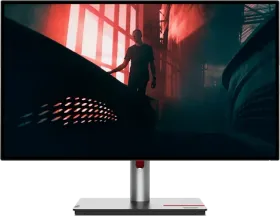
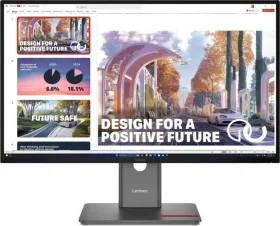
Lenovo ThinkVision P27h-30 27 inch Quad HD Monitor vs Lenovo ThinkVision P27QD-40 27 inch QHD Monitor
Here you can compare Lenovo ThinkVision P27h-30 27 inch Qua… and Lenovo ThinkVision P27QD-40 27 inch QH…. Comparing Lenovo ThinkVision P27h-30 27 inch Qua… vs Lenovo ThinkVision P27QD-40 27 inch QH… on Smartprix enables you to check their respective specs scores and unique features. It would potentially help you understand how Lenovo ThinkVision P27h-30 27 inch Qua… stands against Lenovo ThinkVision P27QD-40 27 inch QH… and which one should you buy The current lowest price found for Lenovo ThinkVision P27h-30 27 inch Qua… is ₹29,999 and for Lenovo ThinkVision P27QD-40 27 inch QH… is ₹33,749. The details of both of these products were last updated on Nov 16, 2026.
| Specification | Lenovo ThinkVision P27h-30 27 inch Qua… | Lenovo ThinkVision P27QD-40 27 inch QH… |
|---|---|---|
| Display | 27 inches | 27 inches |
| Price | ₹29,999 | ₹33,749 |
- Like
- Comment
- Share
Overview
| Thickness | 46 mm Slimmer | |
| Weight | 4.6 kg Lighter |
General
| Country of Origin | China | |
| Series | ThinkVision | |
| Model | P27h-30 | P27QD-40 |
| Dimensions | 613.4 x 357 x 46 mm | |
| Depth with Stand | 204.5 mm | 195 mm |
| Height with Stand | 380.3 mm | 539.1 mm |
| Weight | 4.6 kg | |
| Weight with Stand | 7 kg | 6.8 kg |
| Panel Type | IPS | IPS |
| Form Factor | Flat | Flat |
| Warranty | 3 years Warranty | 3 years Warranty |
Display
| Size | 27 inches | 27 inches |
| PPI | ~ 109 PPI | ~ 109 PPI |
| Aspect Ratio | 16:9 | 16:9 |
| Anti Glare Screen | Yes | Yes |
| Features | HDR10, Natural Low Blue Light | Natural Low Blue Light |
| Display Type | LED | |
| Resolution | 2560 x 1440 pixels (QHD) | 2560 x 1440 pixels (QHD) |
| Max Refresh Rate | 60 Hz | 120 Hz |
| Contrast Ratio | 1000:1 (Typ), 3M:1 (Dynamic) | 1500:1 |
| Response Time | 4 ms | 4 ms |
| Brightness | 350 cd/m² | 350 nits |
| Backlight | W-LED | WLED |
| Number of Colors | 1.07 B | |
| Color Gamut | 95% DCI-P3 | 98% DCI-P3, 99% sRGB, 99% BT.709 |
| Horizontal Viewing Angle | 178 ° | 178 ° |
| Vertical Viewing Angle | 178 ° | 178 ° |
Connectivity
| USB Ports | 2 x USB Type-C, 4 x USB Type-A, 1 x USB 3.0 | 2 x USB Type-C, 4 x USB Type-A |
| USB Port Details | 1 x USB 3.2 Gen 1 Type-C (Upstream, 100W Power Delivery, DisplayPort), 1 x USB 3.2 Gen 1 Type-C (15W Power Delivery, Downstream), 4 x USB 3.2 Gen 1 Type-A (Downstream), 1 x USB 3.2 Gen 1 Type-B (Upstream) | 4 x USB 3.2 Gen 1 Type-A (Downstream, 1 x BC1.2), 1 x USB 3.2 Gen 1 Type-B (Upstream), 1 x USB 3.2 Gen 1 Type-C (Downstream, 15W PD), 1 x USB 3.2 Gen 2 Type-C (Upstream, 140WPD, DisplayPort) |
| Headphone Jack | Yes | |
| Display Port | 2 x Display Port v1.4 | 2 x Display Port v1.4 |
| HDMI | 1 x HDMI v2.0 Port | 1 x HDMI v2.1 Port |
| Ethernet | Yes | Yes |
Extra
| Sales Package | Monitor with Stand, Quick Setup Guide, 1 x Power Cable (1.8m), 1 x USB Type-B to Type-A (1.8m), Factory Calibration Report, 1 x USB Type-C Gen 2 Cable | Monitor with stand, 1x DP 1.4 cable (1.8m), 1x USB-C to USB-C Gen 2 cable (1.5m), 1x USB-B to USB-A Gen 1 cable (1.8m), 1x Power cable (1.5m), 1x Quick setup guide, Factory calibration report |
| Other Features | Lenovo Display Control Center, Factory Calibration, Height Adjustable, Swivel & Pivot Support | Height Adjustable Stand, Swivel & Pivot, KVM Switch, LDFM (Lenovo Display Fleet Manager), Multi-sync, Picture In Picture (PIP) / Picture By Picture (PBP) Support |
| Stand Tilt | -5°~23.5° | Yes |
| Wall Mounting | 100 x 100 mm | 100 x 100 mm |
| HDCP Support | Yes | Yes |
Discuss
Related News
 Motorola Unveils Signature 27 Phone, Moto Watch 2 Fit And Moto Buds 2 Ultra: Prices And Specs
Motorola has forayed into the flagship segment with a bang. On November 5, 2026, the company launched Signature 27, its top-tier flagship with the Snapdragon 8 Elite Extreme Gen 6 chip, and that’s only for yo…
 Motorola’s Signature 27 Lands In November: It’s the First Non-Pixel Phone GrapheneOS Officially Supports
Motorola has locked in the first week of November for one of its most compelling smartphones in a while: the Signature 27. First shown at Qualcomm’s Snapdragon Summit in September 2026, it revolves around per…
 Snapdragon X2 Plus Meets Its Match: 15 Days. One Lenovo Laptop. Zero Apologies
My cousin and I almost never agree on tech. He thinks I’m stuck in the past. I think he chases every new chip He claimed his Lenovo Yoga Slim 7x with the Snapdragon X2 Plus could handle anything I threw at it…
 Airtel PUK Code Explained (2025): Unlock Your Airtel SIM in Minutes
Locked out of your Airtel SIM? Don’t panic! If you’ve entered the wrong PIN too many times, you’ll need a Personal Unlocking Key (PUK) code to regain access. This guide provides clear, step-by-step instructio…
Related Monitors
Related Searches
Related Comparisons

 Samsung ViewFinity S7 S70H 32 inch Ultra HD 4K Monitor (LS32H700EAWXXL) vs Dell UltraSharp U3225QE 32 inch Ultra HD 4K Monitor

 Acer Nitro XV272U X1 27 inch Quad HD Monitor vs Zebronics ZEB-N27C 27 inch Quad HD Gaming Monitor

 MSI MAG 32CQ6F 32 inch Quad HD Gaming Monitor vs Acer Nitro XZ320QX 31.5 inch Full HD Gaming Monitor

 Acer EK240Y P0 24 inch Full HD Monitor vs MSI PRO MP2412 23.8 inch Full HD Monitor

 Lenovo LOQ 27Q-10 27 inch QHD Gaming Monitor vs ViewSonic VX2758A-2K-PRO-3 27 inch Quad HD Gaming Monitor
 Lenovo LOQ 27Q-10 27 inch QHD Gaming Monitor vs Dell SE2726D 27 inch QHD IPS Monitor