


Dell Latitude 5420 Laptop vs Acer Aspire Lite AL15-52 Laptop
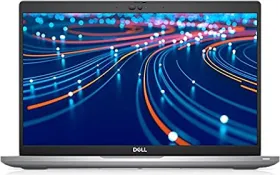
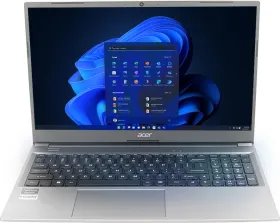
Here you can compare Dell Latitude 5420 Laptop (11th Gen Co… and Acer Aspire Lite AL15-52 Laptop (12th …. Comparing Dell Latitude 5420 Laptop (11th Gen Co… vs Acer Aspire Lite AL15-52 Laptop (12th … on Smartprix enables you to check their respective specs scores and unique features. It would potentially help you understand how Dell Latitude 5420 Laptop (11th Gen Co… stands against Acer Aspire Lite AL15-52 Laptop (12th … and which one should you buy The current lowest price found for Dell Latitude 5420 Laptop (11th Gen Co… is ₹45,000 and for Acer Aspire Lite AL15-52 Laptop (12th … is ₹48,990. The details of both of these products were last updated on Jun 19, 2026.
| Specification | Dell Latitude 5420 Laptop (11th Gen Co… | Acer Aspire Lite AL15-52 Laptop (12th … |
|---|---|---|
| Display | 14 inches | 15.6 inches |
| CPU | 11th Gen Intel Core i5 1135G7 | 12th Gen Intel Core i7 1255U |
| GPU | Intel Iris Xe Graphics | Intel Graphics |
| RAM | 8 GB DDR4 | 16 GB DDR4 |
| HDD | ||
| Price | ₹45,000 | ₹48,990 |
- Like
- Comment
- Share
Overview
| Specs Score | 46 / 100 | 52 / 100 Better Specs |
| CPU Clock Speed | 2.4 GHz Faster Clock Speed | 1.7 GHz |
| CPU Cores | Quad Core | 10 Cores More CPU Cores |
| Display Size | 14 in | 15.6 in Bigger Display |
| RAM | 8 GB | 16 GB More RAM |
| Storage | 256 GB SSD | 512 GB SSD More Storage |
| SSD | 256 GB | 512 GB More SSD |
| Weight | 1.37 kg Lighter | 1.59 kg |
| Unique Features | No No | Ethernet Port Lock Port |
General
| Series | Latitude | Aspire Lite |
| Model | Latitude 5420 | AL15-52 |
| Utility | Performance | |
| Device Type | Ultrabook | |
| OS | Windows 10 Pro (64-bit) | Windows 11 Home (64-bit) |
| Dimensions | 321 x 212 x 19.3 mm | |
| Weight | 1.37 kg | 1.59 kg |
| Warranty | 1 year Warranty | 1 year Warranty |
Display
| Type | IPS | LED-backlit TFT LCD |
| Touch | No | No |
| Size | 14 inches | 15.6 inches |
| Resolution | 1920 x 1080 pixels | 1920 x 1080 pixels |
| PPI | ~ 157 PPI | ~ 141 PPI |
| Refresh Rate | 60 Hz | |
| Aspect Ratio | 16:9 | 16:9 |
| Anti Glare Screen | Yes | Yes |
Connectivity
| Ethernet | No | Yes |
| WiFi | Wi-Fi 6 AX201 2x2 802.11ax | Yes |
| Bluetooth | v5.1 | Yes |
| USB Ports | 2 x USB Type-C, 2 x USB 3.0 | 1 x USB Type-C, 2 x USB 3.0, 1 x USB 2.0 |
| HDMI | 1 x HDMI 2.0 Port | 1 x HDMI Port |
| Card Reader | Yes | |
| Micro SD Card Reader | Yes | |
| Microphone In | Yes | Yes |
| Headphone Jack | Yes | Yes |
| Security Lock Port | Yes |
Input
| Camera | Yes | Yes |
| Keyboard | 100-/101-/104-key FineTip keyboard with independent numeric keypad | |
| Touchpad | Yes | Yes |
| Inbuilt Microphone | Noise Reducing Array Microphones | Built-in Dual Microphone |
| Speakers | High Quality Speakers | Built-in Dual Speakers |
| Sound | Two built-in stereo speakers | |
| Optical Drive | No | No |
Processor
| Processor | 11th Gen Intel Core i5 1135G7 | 12th Gen Intel Core i7 1255U |
| Speed | 4 x 2.4 GHz (Turbo Speed upto 4.2 GHz) Cores | 2 x 1.7 GHz (Turbo Speed upto 4.7 GHz) Performance Cores 8 x 1.2 GHz (Turbo Speed upto 3.5 GHz) Efficient Cores |
| Cores | Quad Core, 8 Threads | 10 Cores (2P + 8E), 12 Threads |
| Cache | 8 MB | 12 MB |
| Brand | Intel | Intel |
| Series | Core i5 | Core i7 |
| Model | 1135G7 | 1255U |
| Generation | 11th Gen | 12th Gen |
| Process Node | 10 nm |
Graphics
| GPU | Intel Iris Xe Graphics | Intel Graphics |
| Brand | Intel | Intel |
Memory
| RAM | 8 GB DDR4 | 16 GB DDR4 |
| RAM Bus Speed | 3200 MHz | |
| Maximum RAM Supported | Upto 64 GB | Upto 32 GB |
| Solid State Drive | 256 GB SSD | 512 GB SSD |
| SSD Interface | NVMe |
Battery
| Battery | 36 Wh, 3 Cell Battery | |
| Adapter Type | 45W | |
| Battery Backup | Upto 11 hours |
Extra
| Sales Package | Laptop & Adaptor | Laptop, Power Adaptor, User Guide, Warranty Documents |
Discuss
Related News
 Dell Launches 14S, 16S AI Laptops And Alienware 16 Gaming Rig: Here’s Everything You Need To Know
Dell has introduced two new laptops built around on-device AI, and a new gaming laptop designed to pull Alienware down from its traditionally steep price ladder. Whether you’re a professional who needs a slim…
 XPS 13 (2026) vs. MacBook Neo: Can Dell Challenge Apple’s Affordable Laptop Dominance?
For years, budget laptops have been dominated by Windows devices, with capable machines from major OEMs available for ₹50,000–₹60,000. MacBooks, by contrast, typically started around ₹80,000, even for discoun…
 The New Dell XPS 13 Starts At $699, And It Includes Everything That Apple’s MacBook Neo Omits
Dell has been making Windows ultrabooks since before the term was coined, and at Computex 2026, the company launched what is arguably its most important XPS in over a decade. Spoiler alert: it’s because of Ap…
 macOS 27 Golden Gate Hands-On: My First 48 Hours on a MacBook Air M4
I installed the macOS 27 developer beta on my MacBook Air M4 (16GB/256GB) almost as soon as it dropped after WWDC. It’s been roughly 48 hours now, and I’ve been using it as my main machine for work, browsing,…
Related Laptops
Related Searches
Related Comparisons

 Asus TUF Gaming F15 FX566LU-HN223TS Laptop (10th Gen Core i7/ 16GB/ 512GB SSD/ Win10/ 6GB Graph) vs Asus TUF Gaming F15 FX577ZC-HN193W Gaming Laptop (12th Gen Core i7/ 16GB/512GB SSD/ Win11 / 4GB Graph)
 Acer Aspire Lite AL15-52 Laptop (12th Gen Core i7/ 16GB/ 512GB SSD/ Win11) vs Infinix Zerobook 13 ZL513 Laptop (13th Gen Core i7/ 16GB/ 512GB SSD/ Win 11 Home)
 HP OmniBook 7 14-fs0789TU Laptop (Intel Core 5 210H/ 16GB/ 512GB SSD/ Win11) vs HP 15-fd0682TU Laptop (Intel Core 5 120U/ 16GB/ 512GB SSD/ Win11 Home)
 Asus Expertbook P1 14 P1403CVA-S60938WS Laptop (13th Gen Core i3/ 16GB/ 512GB/ Win11) vs MSI Modern 15 B12MO-1051IN Laptop (12th Gen Core i5/ 8GB/ 512GB SSD/ Win11 Home)
 Acer Aspire Lite AL15-52 Laptop (12th Gen Core i7/ 16GB/ 512GB SSD/ Win11) vs Acer Aspire 7 A715-76G NH.QMFSI.004 Gaming Laptop (12th Gen Core i5/ 16GB/ 512GB SSD/ Win11 Home/ 4GB Graph)
 Dell Latitude 5420 Laptop (11th Gen Core i5/ 8GB/ 256GB SSD/ Win10 Pro) vs HP Pavilion Plus 14-ey0789AU Laptop (AMD Ryzen 7 7840H/ 16GB/ 1TB SSD/ Win 11)