Users Reporting Deliberate Delay in YouTube Video Playback, Here’s Why

Main Image
  • Like
  • Comment
  • Share

A few days ago, users on Hacker News and Reddit started complaining about video delays on YouTube on Mozilla’s Firefox for those who use ad blockers to get rid of inundated ads on the platform. YouTue has been vocal about the recent development stating that this isn’t a browser-side issue but rather YouTube’s attempt to thwart ad blocker users as ads are ‘lifeline for content creators’.

People started to see a five-second delay in watching YouTube videos on Firefox. However, it was later discovered that the delay has been introduced across Google Chrome and Microsoft Edge as well for users attempting to skip ads using ad blockers such as AdBlock or uBlock Origin. Christopher Lawton, YouTube Communications Manager, said in an email that disabling ad blockers from the browser will resolve the issue quickly, however, it might need the browser to be refreshed.

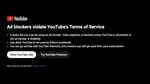
YouTube has been attempting to thwart adblockers from its system using various methods including prompting users to either subscribe to YouTube Premium at $13,99/mo or watch ads. For anyone willing to skip ads using countless ad blockers available, YouTube started testing out a prompt warning users to deactivate their ad blockers or they will be disabled from watching YouTube videos temporarily.

Although anti-ad blocking measures are limited to a subset of users at the moment, they will be rolled out across the platform to thwart ad blockers. Additionally, Lawton says that users will keep seeing these issues (delays in video playback or prompts warning to disable ad blocker) as YouTube’s ad blocker detection methods get better.

Google is undergoing drastic changes in terms and one of the major blows will be to popular ad-blocking extensions such as uBlock Origin.

You can follow Smartprix on Twitter, Facebook, Instagram, and Google News. Visit smartprix.com for the most recent news, reviews, and tech guides.


Related Articles

ImageGlobal PC Shipments Just Snapped A Nine-Quarter Winning Streak

Nine consecutive quarters of growth (over two years) are a commendable run for any hardware category. Global PC shipments had been on that streak since the AI-driven upgrade cycle started pushing people and businesses in 2024, but it ended in Q2 2026 with a familiar culprit. Also Read: Netflix Is Testing Free Trials Again After …

ImageGoogle To Stop Chrome Ad Blockers With Manifest V3 Extensions

Last month, Google acted on YouTube ad blockers, encouraging users to watch ads or pay for a Premium subscription. Now, uBlock Origin, one of the most popular Chrome ad blockers, will stop working soon. In a recent developer post, Google announced that it is resuming plans to change how extensions function on the web browser, …

ImageYouTube Is Limiting Views For People Using Ad Blockers

Earlier this month, YouTube began an experiment wherein it paused playback for viewers using an ad blocker and showed them a pop-up. It suggests users watch the video with ads or upgrade to YouTube Premium for a seamless watching experience. However, it wasn’t as effective, as reports claim that users could simply close the pop-up …

ImageOnePlus halts OxygenOS 16 Rollout After Users Report Random Reboot Issues

OnePlus has temporarily stopped rolling out OxygenOS 16 following reports of unexpected reboots and boot loops from users. Both the 16.0.7.XXX and 16.0.5.XXX builds have been pulled, as OnePlus engineers investigate the root cause and work toward a stable fix. While OnePlus says only a small percentage of devices are affected, the company will keep …

ImageYouTube finally lets users turn off Shorts with new feed limit setting

YouTube has added a new setting that gives users a built-in way to stop Shorts from taking over their feed. After years of complaints about Shorts appearing across the homepage and recommendations, users can now set the Shorts Feed limit to zero minutes. The option is available in the YouTube app under Settings, then General, …

Discuss

Be the first to leave a comment.