Quick Verdict
The Sony LinkBuds Clip is a polished introduction to the clip-on earbud format, built around a simple idea: let you listen without cutting yourself off from the world around you. The open design works surprisingly well for awareness, the soundstage is spacious, call quality is excellent in quieter settings, and the distinctive design has drawn me plenty of compliments.
The trade-offs are equally clear. Bass can’t match sealed earbuds, comfort and fit depend heavily on your ear shape, Sony has left out a few features found on its own LinkBuds alternatives, and the lack of wireless charging feels hard to overlook at Rs. 18,990.
Buy it if:
- You specifically want to stay aware of traffic and your surroundings
- Sealed earbuds have never felt comfortable in your ears
- You want open-ear earbuds without sacrificing a premium design
- You’re already invested in Sony’s audio ecosystem
Skip it if:
- You already own Sony’s other open-ear LinkBuds
- You want deep bass or immersive isolation
- Wireless charging is important to you at this price
It’s difficult to understand clip-style earbuds until you actually try them on. It’s not a trend that might pass away with time, but rather a shift in consumer behavior from immersive, isolated earbuds to ones that help you stay aware of your immediate surroundings. The fact that global shipments of open-ear earbuds have jumped massively by mid-2026 speaks for itself. Clip-style earbuds are just a sub-category within that broader segment, and the Sony LinkBuds Clip fit right in.
In the United States, the category is flooded with options. Bose has its Ultra Open Earbuds, Shokz has multiple generations of the OpenDots line, Anker’s Soundcore has the AeroClip, JLab has a $40 option for the truly frugal, and Huawei has been iterating on the FreeClip since it first showed up there. In India, however, the market is still picking up.

That makes this review more important than your average earbuds write-up. For a lot of Indian buyers, this will be their first (and possibly only) exposure to what this category can do.
HOW I TESTED
| Reviewed By: Shikhar Mehrotra (Consumer Tech, Auto, and AI Expert with 6+ years of experience) Test Unit: Sony provided the review unit of the LinkBuds Clip, with no involvement in the editorial process. Duration and Environment: I used the earbuds for over three weeks across home, office, and outdoor commuting environments in Northern India. It was the Lavender finish. Tests: Daily use including music playback, podcasts, video calls, and voice calls across quiet and noisy environments. I tested with and without the bundled Fitting Cushions, ran full battery drain tests under continuous playback, timed the quick-charge claim, and evaluated fit consistency across multiple wearing sessions. Competitors: Huawei FreeClip, Huawei FreeClip 2 |
Sony LinkBuds Clip: Price & Availability
The Sony LinkBuds Clip is available in India at a price of ₹18,990, in a single configuration.
Launched on July 13, 2026, it’s available via Amazon, Flipkart, Myntra, select Croma and Reliance Digital stores, Sony Centers, and Sony’s own online store (ShopAtSC). Color options include Green, Greige, Black, and Lavender.
Pros
- Stylish design that draws compliments
- Fitting cushions genuinely help when needed
- Soundstage feels wide and spacious
- call quality is impressively clear in quiet settings
- Vocals and mids sound bright and detailed
- Works well for staying aware in traffic
- Good battery life with a useful quick-charge feature
Cons
- Comfort varies noticeably by ear shape
- Limited bass, largely because of the open-ear design
- No wireless charging at this price
- Missing features found on Sony’s other buds
Sony LinkBuds Clip: Tech Specs
| Specification | Details |
| Driver | 10mm dynamic driver (per earbud) |
| Design | Open-ear, clip-on form factor with a flat, stiff bridge connector |
| Weight | Approximately 6.4 grams per earbud |
| Connectivity | Bluetooth 5.3 |
| Codec Support | SBC, AAC (no LDAC, no aptX) |
| Multipoint Connection | Yes, supports simultaneous pairing to two devices |
| Microphones | Dual microphone array + bone conduction sensor for voice pickup |
| Noise Handling | No active noise cancellation |
| Controls | Touch/tap gestures only, on the bridge connector — no physical buttons |
| Wear Detection | Not supported |
| Water Resistance | IPX4 on the earbuds; charging case has no water resistance rating |
| Battery Life (Claimed) | Up to 9 hours continuous playback (earbuds), up to 37 hours total with case |
| Quick Charge (Claimed) | 3 minutes of charging for approximately 1 hour of playback |
| Charging | USB-C wired only; no wireless charging support |
| App | Sony Sound Connect (Android and iOS) |
| App Features | 10-band custom EQ, 3 Listening Modes (Standard, Voice Boost, Sound Leakage Reduction), Bluetooth priority toggle, standard DSEE upscaling, adaptive volume, Quick Access shortcuts |
| In the Box | LinkBuds Clip earbuds, charging case, USB-C cable, Fitting Cushions |
| Colors (India) | Green, Greige, Black, Lavender |
| Price (India) | ₹18,990 |
| Launch Date (India) | July 13, 2026 |
Sony LinkBuds Clip Review: Design & Comfort
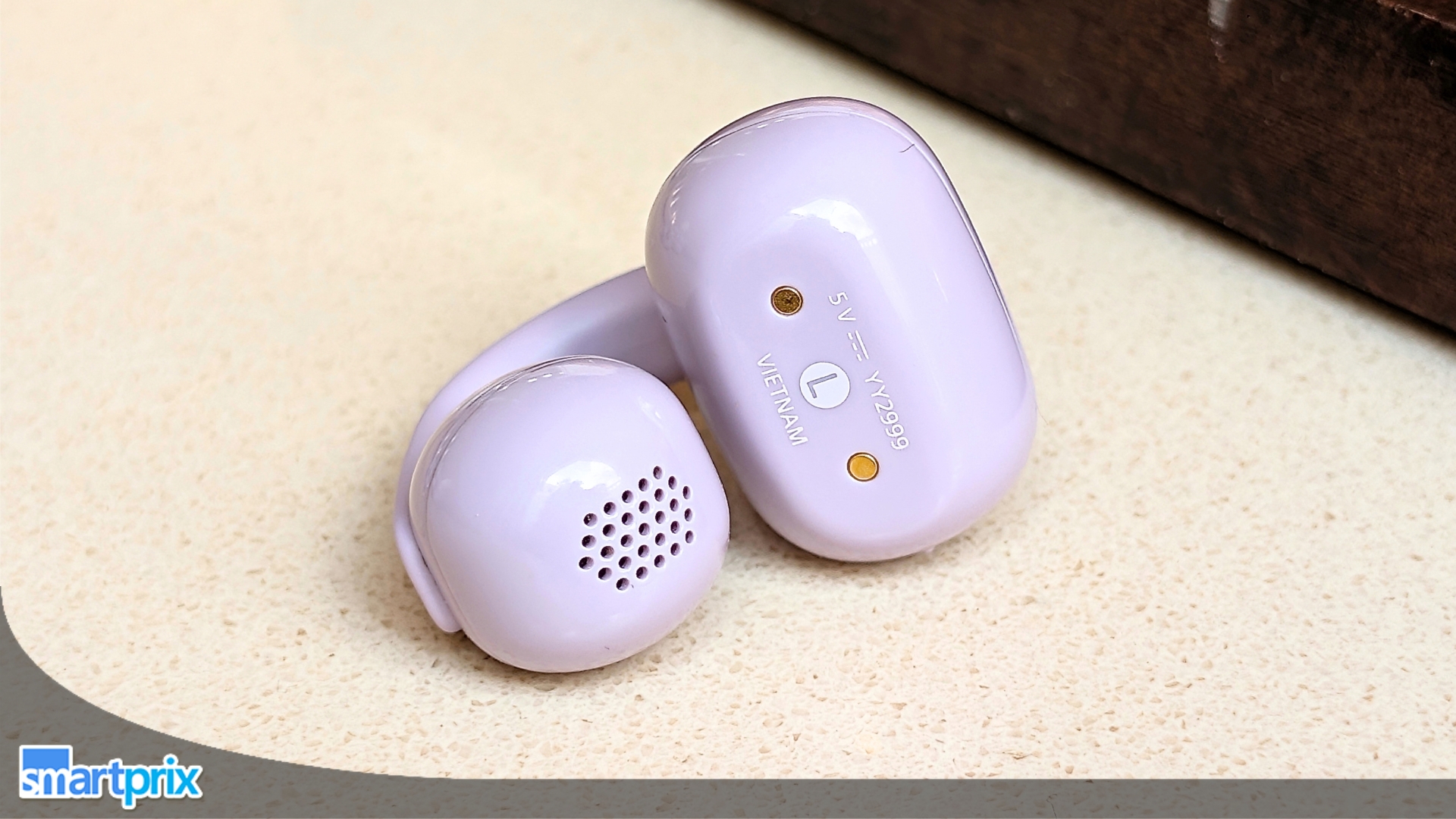
I’ll get the compliment out of the way first. The LinkBuds Clip look great in the Lavender color I received from Sony. The charging case has a glossy finish that’s attracted a few minor scratches over three weeks of use, but it’s nothing my AirPods Pro 3’s case doesn’t have, even though that one is white. If you don’t like the Lavender finish, you can also get them in Black, Greige, and Green, the latter being my second favorite.

The case looks cute, but hides its orientation
The case is a small, rounded “squircle” design. Giving credit where due, Sony has cleverly hidden the hinge here, so all four sides look nearly identical. Cute, yes. Practical, not quite. More often than not, I open the case upside down. Apparently, even a charging case can keep you guessing. Anyway, it has a USB-C charging port and a pairing/reset button on the back, plus an LED indicator tucked away on the front.
Sony used a flat, ribbon-like, stiff bridge to connect the two halves: the front unit, which houses the audio driver and speaker mesh, and the rear unit, which houses the battery, supporting hardware, charging pins, and microphone. While the bridge itself has a textured finish, the front and rear units have a shiny surface.

A stiffer clip makes them feel more secure
Compared to the wirier, springier designs most competitors use, I prefer this harder, stiffer approach. It helps balance the clip-on earbuds better and gives them a cleaner, more geometric look. I’ve worn them while riding a scooter, walking through a railway station, and sitting at a café, and they never came loose during normal use. You’ll need some time to get used to putting them on and taking them off. There’s a learning curve here, and it bugged me more than I expected.
I’ll admit the device might look odd at first, but I’ve heard enough compliments about them looking like a piece of jewelry and complementing my outfit that I’ve made my peace with it. One time, though, my friend came up to me and said they looked quite odd, but that had more to do with being unfamiliar with the category and its design than the device itself.

Comfort depends more on your ears than usual
Inside the box, you get a pair of “Fitting Cushions,” which are essentially small rubber sleeves that slide onto the bridge to anchor the earbuds more securely, aimed primarily at people with smaller ears. I have relatively average-sized ears, and I found the earbuds perfectly wearable without the cushions. If you have relatively larger ears, the grip could come in handy; otherwise, you don’t really need it.
Similarly, overall comfort and ease of wear are subjective. My sister could wear them comfortably for around 40 minutes, while my friend wore them all day without any pinching or pain. Personally, I found the device quite comfortable for an hour or an hour and a half before I started adjusting the grip. You might not completely forget you’re wearing them, but based on the mixed reactions, ear shape seems to play a bigger role here than usual.

Because there’s no seal or stem to hang onto your ear, I couldn’t clip the earbuds into the best-sounding position on my first try. Getting a perfectly consistent fit between sessions and matching the left earbud to the right takes some effort. Again, this isn’t a defect, rather an inherent trait of the design.
I feel that’s deliberate, though. Given that the device prioritizes awareness and presence over everything else, it isn’t trying to disappear into your ears the way conventional TWS earbuds do. You’ll always be somewhat aware of having something clipped to your ear, but that’s also the trade-off for keeping your ears open to the world around you. The design isn’t just an aesthetic choice; it serves a purpose.

The earbuds have no physical buttons. Everything is tap-based through the bridge, and it’s reasonably accurate, though the app only lets you pick from preset tap combinations. Volume is locked to continuous tapping and can’t be reassigned. I also missed wear detection while using them.
The earbuds carry an IPX4 rating, so sweat and light rain are fine. The case has no such protection, so keep it away from puddles and other bright ideas.
Sony LinkBuds Clip Review: Sound Quality
his is yet another area where the LinkBuds Clip’s premium pricing clashes with what you might expect at this price, especially when you factor in its open-ear, awareness-first design.

Bass is the unavoidable trade-off
Without a seal, the sound has to move through a much larger volume of open air. Also, the driver isn’t in contact with your canal.
In technical terms, the 10 mm dynamic drivers struggle with anything below roughly 60–80 Hz. That is why the LinkBuds Clip trail regular TWS earbuds on bass (something true of the entire open-ear category). Mid-bass still has useful punch and body on contemporary tracks, enough to give pop and lighter hip-hop some weight.
If you’re the kind of listener who needs to feel a bassline in your chest, clip-style earbuds aren’t for you, period.

Sony gets the balance right
What Sony has done, though, is something I truly respect. Instead of overcompensating with a hard bass boost at low volumes that then usually tapers off as you turn things up (a trick to avoid distortion), they’ve kept the frequency response consistent. This delivers consistent audio quality across the volume range.
It’s amid that consistency that the upper register genuinely impresses me.
The open design has its strengths
I’ve used the device across a wide range of environments, and the sound quality remained consistent throughout. The mids and lower treble are bright, detailed, and lively, noticeably more forward than Sony’s usual warmer signature. Vocals are clear, instrument separation is good, and acoustic tracks, podcasts, and dialogue-heavy content sound genuinely pleasant.

The open design also benefits from Sony’s DSEE processing, which does a solid job of restoring some high-frequency detail and air to compressed streams (Spotify, YouTube, etc.).
The earbuds might tip into sounding a touch honky or shouty in the “Voice Boost” mode, something that I noticed while watching stand-up comedy specials and shows on YouTube. The part where the audience hoots or shouts, which basically lies in the higher end, gets too loud even though the main voice doesn’t, with noticeable distortion, forcing me to reduce the volume immediately.
In Standard mode, the presentation stays more balanced and less fatiguing over longer sessions.

Soundstage is surprisingly spacious; leakage isn’t
The open-ear design also gives the presentation a surprisingly spacious quality. To my ears, music sounds more like it’s coming from around me than from inside my ears. In simpler words, music sounds like it’s being played around you rather than inside your ears.
It doesn’t help with sound leakage, though. Using them above 60–70% volume will almost definitely get a look from the person sitting right next to you. To curb this, Sony has included a dedicated “Leakage Reduction” mode, which suppresses the high end a bit and, as a side effect, makes the overall sound somewhat muffled and duller.
I’m not a loud listener myself, so I’ve never really felt the need to use the mode. The companion Sound Connect app also gives you a full 10-band EQ plus several presets (Heavy, Clear, Hard, Soft, etc.), so you can dial in more mid-bass or tame the treble if the default tuning doesn’t quite suit you.

Awareness remains the point
There’s no active or passive noise cancellation, as that would defeat the entire purpose. One could argue that transparency mode on sealed earbuds has improved to the point where the digital passthrough feels almost natural. And while I agree, some users still feel mild discomfort, headaches, or nausea from that sealed, vacuum-like feeling in their ears, and the LinkBuds Clip could be the right choice.
Overall, the LinkBuds Clip’s sound quality suits listeners who prioritize clarity, natural spaciousness, and all-day awareness over impact. If your playlists lean toward vocals, acoustic music, podcasts, or dialogue-heavy content, and you value a consistent, fatigue-free presentation that never isolates you from your surroundings, these earbuds will feel like a refined match.

Sony LinkBuds Clip Review: Software & Features
I’ve used the Sony Sound Connect app before, but it was for the Sony ULT Field 5 speaker that I reviewed last year (great sound quality, premium build, ideal for medium- to large-size rooms or small outdoor gatherings). Interestingly, its feature list depends on the device you’ve paired it with, and with the LinkBuds Clip, that list is noticeably thinner than what I recall.


Most of the audio controls live in one place
The home page shows you the battery percentage of the earbuds and the charging case at the top, with the codec the device is currently using right below it. Then you have the “All device settings” menu. It includes the “Sound Quality / Volume” option, which is more like an everything-in-one-place menu for all audio-related settings.
That’s where Adaptive Volume Control and the 360 Reality Audio Setup live, in case you’re wondering. The DSEE feature, though included, only toggles between “Auto” and off. The 360 Reality Audio effect was noticeable for me when using compatible content. It added a richness, sense of space, and a three-dimensional feel to the sound. However, Sony’s app asks you to download a third-party app to complete the setup, which is weird in my opinion.


Multipoint works exactly how I want it to
Then there’s the “Connection” menu, which houses the multi-device connection feature. As someone who constantly uses more than one device at a time, I genuinely appreciate how the feature lets me switch from my smartphone to my laptop as soon as I hit play on either one. You can change the codec under the “Bluetooth Connection Quality” option.
Then there’s the Controls section, which basically lets you customize what tapping on the earbuds does. Since there’s no capacitive surface on the earbuds, they rely solely on tap-based controls. To cycle between the listening modes, you tap twice on the left earbud. To play/pause media, you double-tap on the right one. To decrease or increase the volume, tap four times on the left and right earbuds, respectively.


Background Music is a surprisingly clever addition
For all the times when you want to play something in the background that doesn’t really intrude on your focus but rather keeps you going, the Background Music mode essentially converts what you’re playing (any audio track or YouTube video) into a mellowed-down, softer version of the same, which mimics the sound coming from ceiling-mounted speakers in an open space. Sony has also included a distance setting, and my favorite is Cafe.
The app’s biggest problem is staying connected
For some odd reason, the app kept disconnecting every time I minimized it. Opening it to tweak the equalizer or listening mode mid-session often required me to reconnect the earbuds. It takes a few seconds, but the app should ideally stay paired as long as I am using them.
Bluetooth is version 5.3, and codec support is limited to SBC and AAC. No LDAC, no aptX. Interestingly, Sony’s own LinkBuds Fit and LinkBuds Open both offer LDAC, so the Clip is, feature for feature, a step down within Sony’s own open-ear family, aside from the shape itself.
Sony LinkBuds Clip Review: Call Quality
This is where I came away impressed, with one honest caveat. Sony’s combined a dual-microphone array with a bone conduction sensor that reads vocal vibration directly through your jaw, isolating your voice before machine-learning-based noise reduction kicks in.
On calls in quiet rooms, my voice came through natural, well-toned, with no artificial clipping from the noise algorithm, genuinely one of the better mic experiences I’ve had on any earbud at this price. Because your ear canal isn’t sealed, you can hear your own voice clearly while talking, so you never accidentally shout into a call.
Take these into a genuinely loud environment, though, and voice clarity does dip noticeably. The noise suppression algorithm tends to filter out my voice a bit, which could be improved with a software update.

Sony LinkBuds Clip Review: Battery Life & Charging
In my own testing, the device lasted closer to 7 hours of continuous playback (between sessions), which is a tad short of the 9-hour claim but good enough to cover an entire workday. Sony rates the earbuds at up to 9 hours with AAC (and 8 hours with SBC), though real-world results commonly land in the 6.5–7.5 hour range once volume, DSEE, and EQ are factored in.
As I mentioned earlier, the volume level is usually between 50 and 60%, with occasional bumps to 80% when I’m working out or need to shrug off a bad day at work.
I usually never keep my earbuds outside the charging case, but if you do, this one has enough juice to last a few hours of idle time. Sony lists a maximum standby time of about 15 hours, so leaving them out overnight is generally fine, though you’ll still want to dock them regularly.

The charging case provides enough power for another 28 hours, for a total of up to 37 hours when completely charged (both the case and the earbuds). A quick 3-minute top-up also delivers roughly an hour of playback, which is handy in a pinch.
With average usage of around two to three hours every day, I only ended up charging the case once a week or so. That’s one less device to charge every day, if you ask me. Just note that the case charges via USB-C only. There’s no wireless charging support, which feels like a major miss at this price point.
Sony LinkBuds Clip Review: Price & Competition
At ₹18,990, the LinkBuds Clip is one of the pricier clip-style options in India. The Huawei FreeClip 2 is the clearest cross-shop and edges ahead on conveniences like automatic left-right detection. Sony’s premium is easiest to justify if you value its ecosystem, design language, and call quality. Pure value seekers will find the case harder to justify.
| Model | Price (₹) | Key Notes |
| Sony LinkBuds Clip | 18,990 | Premium pricing, strong call quality & design |
| Huawei FreeClip 2 | 17,999 | Closest rival; auto L/R detection |
| Huawei FreeClip | 16,999 | Slightly cheaper alternative |
Review Verdict: Should You Buy the Sony LinkBuds Clip?

Smartprix ⭐ Rating: 8/10
The LinkBuds Clip makes the most sense when you stop treating it like conventional TWS earbuds. Its biggest strength is the freedom to listen, take calls, or watch videos while staying aware of your surroundings. After more than two weeks of use, I found that approach genuinely useful rather than gimmicky.
Sony gets the essentials right, with a secure clip, spacious sound, clear vocals, and strong call quality in quieter surroundings. But at ₹18,990, the compromises matter: bass is limited by the open design, fit depends heavily on your ears, some features are missing compared to Sony’s other open-ear models, and there’s no wireless charging.
Ultimately, the LinkBuds Clip is worth considering if staying aware is how you want to listen. If you’re looking for maximum features or value at this price, its compromises are harder to overlook.
First reviewed in September 2026